
LF : Does anyone know the name of this shader?
-
-
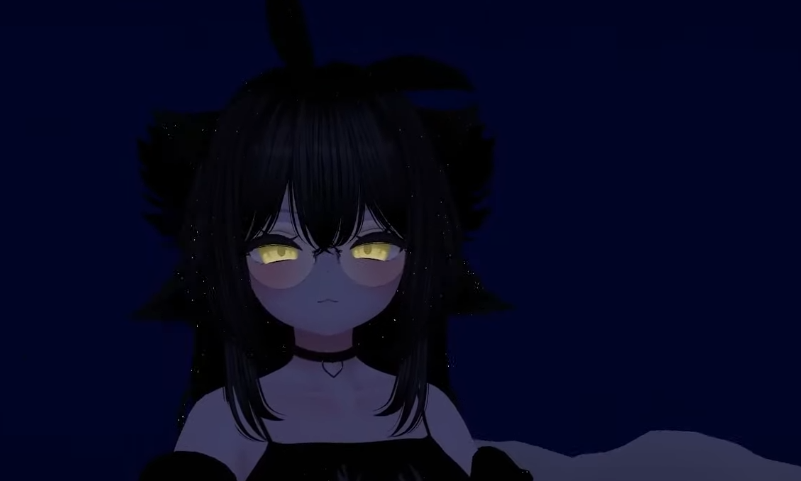
Define the shader a bit more. Like, the hair having shiny dots on it?
That is poiyomi's "Glitter / Sparkle"-shader logic.
The eyes? Bright yellow-ish texture with a simple emission layer on it.
Glasses? Any shader which can do opacity/seethrough functions to meshes.If it's about the hair, it is very easy to recreate and even fit it to your own purpose and likings (the amount of dots, blinking, fading, synchronous/asynchronous fade effects, sizes, brightness and so on).
If your avi has already poiyomi on it, will be easier to progress (as you won't have to redo the hair textures, alphas and so on), so you can skip the next part.
Start your project file,
in the meantime, download the poiyomi shader (toon shader version, which is free) here https://poiyomi.booth.pm/items/4841309 ,
create a new material (rightclick somewhere in your project's "Project" window and go "Create > Material"),
change the "NameHere (Material) // Shader [Standard]" to .poiyomi > Poiyomi 8.2 (for example) > Poiyomi Toon.(Skip)
From there, you are free to adjust anything you want.
Go [Special FX] > [Glitter / Sparkle], give it a good smack (turn it on) and now you can go wild.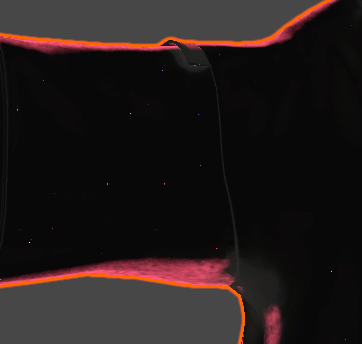
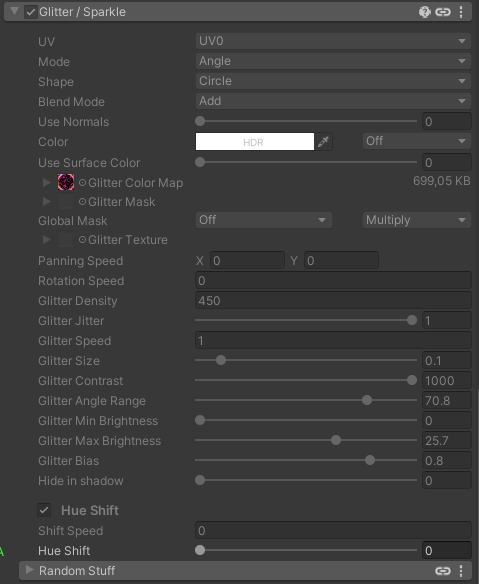
You can go with a subtle setting like I did (except the texture map on Glitter Color Map). -
Hello! It looks like you're interested in this conversation, but you don't have an account yet.
Getting fed up of having to scroll through the same posts each visit? When you register for an account, you'll always come back to exactly where you were before, and choose to be notified of new replies (either via email, or push notification). You'll also be able to save bookmarks and upvote posts to show your appreciation to other community members.
With your input, this post could be even better 💗
Register Login