Skip to content
  • Categories
  • Recent
  • Tags
  • Popular
Skins
  • Light
  • Brite
  • Cerulean
  • Cosmo
  • Flatly
  • Journal
  • Litera
  • Lumen
  • Lux
  • Materia
  • Minty
  • Morph
  • Pulse
  • Sandstone
  • Simplex
  • Sketchy
  • Spacelab
  • United
  • Yeti
  • Zephyr
  • Dark
  • Cyborg
  • Darkly
  • Quartz
  • Slate
  • Solar
  • Superhero
  • Vapor

  • Default (Zephyr)
  • No Skin
Collapse
RipperStore Logo
  1. Home
  2. Assets
  3. Found Avatars and Assets
  4. ✔ (FOUND by avicollector) Project Prince by Ruski

✔ (FOUND by avicollector) Project Prince by Ruski

Scheduled Pinned Locked Moved Found Avatars and Assets
maleeboy
9 Posts 6 Posters 3.9k Views 18 Watching
  • Oldest to Newest
  • Newest to Oldest
  • Most Votes
Reply
  • Reply as topic
Log in to reply
This topic has been deleted. Only users with topic management privileges can see it.
  • avicollectorA
    avicollectorA
    avicollector
    wrote on last edited by avicollector
    #1

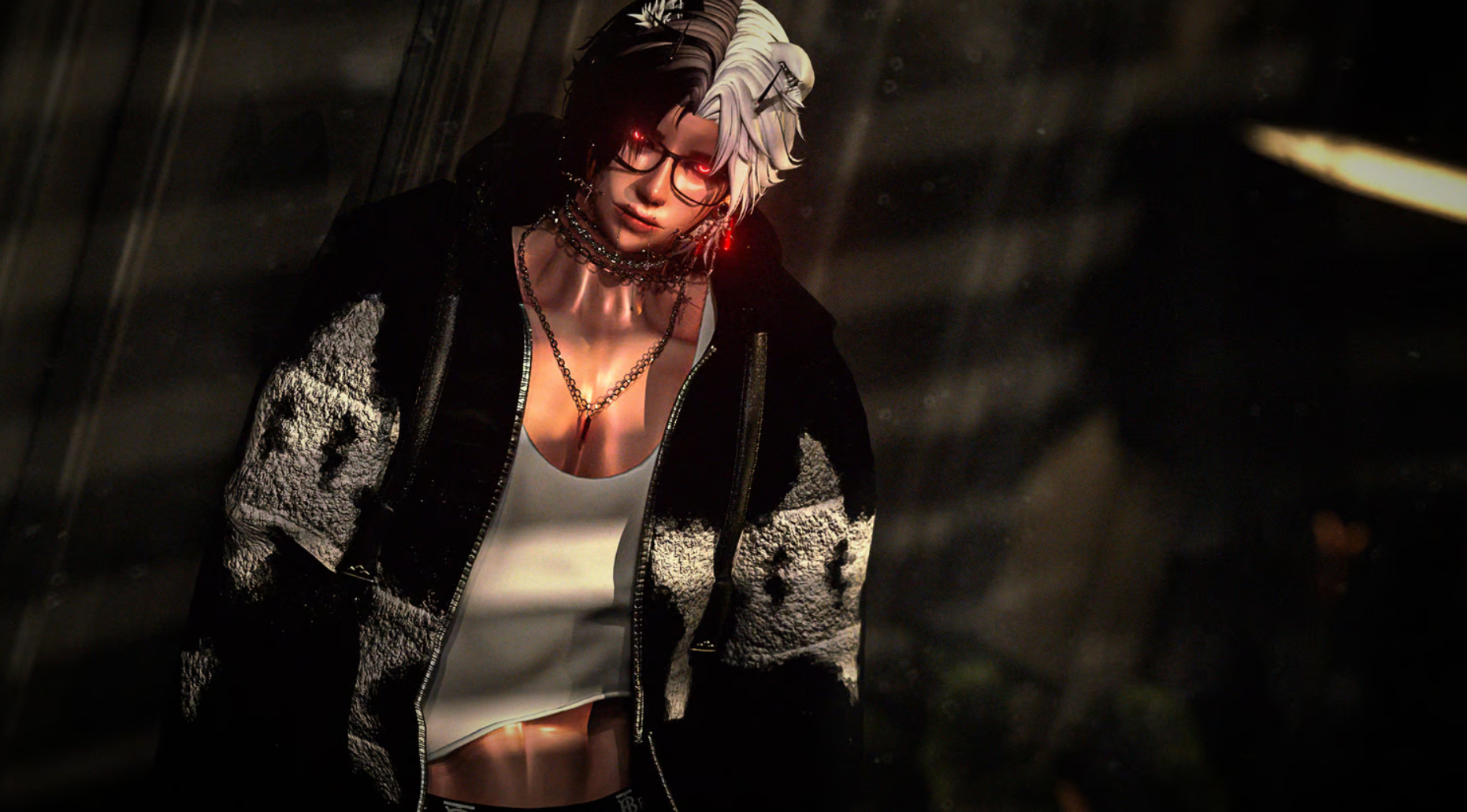
    Screenshot 2024-10-10 122503.png

    https://payhip.com/b/RwThL

    ⊱ ────── {⋆♥⋆} ────── ⊰
    Please do NOT leave unnecessary comments about the appearance of the models I choose to post.
    ⊱ ────── {⋆♥⋆} ────── ⊰

    1 Reply Last reply
    0
    • Its_VinceI
      Its_VinceI
      Its_Vince
      wrote on last edited by
      #2

      bumpyyyyy

      1 Reply Last reply
      0
      • BenDoverDomB
        BenDoverDomB
        BenDoverDom
        wrote on last edited by
        #3

        BIG BUMP

        1 Reply Last reply
        0
        • avicollectorA
          avicollectorA
          avicollector
          wrote on last edited by
          #4

          FOUND !! ❤

          [register or login to view this hidden content]

          ⊱ ────── {⋆♥⋆} ────── ⊰
          Please do NOT leave unnecessary comments about the appearance of the models I choose to post.
          ⊱ ────── {⋆♥⋆} ────── ⊰

          G 1 Reply Last reply
          ✨
          0
          • avicollectorA avicollector moved this topic from Gumroad/Payhip Avatars on
          • avicollectorA avicollector

            FOUND !! ❤

            [register or login to view this hidden content]

            G
            G
            Gnome
            wrote on last edited by
            #5

            @avicollector The hair toggles are messed up ,anyway to fix?

            avicollectorA 1 Reply Last reply
            0
            • G Gnome

              @avicollector The hair toggles are messed up ,anyway to fix?

              avicollectorA
              avicollectorA
              avicollector
              wrote on last edited by
              #6

              @Religionn I'll have to check, I'm not too sure !!

              ⊱ ────── {⋆♥⋆} ────── ⊰
              Please do NOT leave unnecessary comments about the appearance of the models I choose to post.
              ⊱ ────── {⋆♥⋆} ────── ⊰

              ZEROVIRTUEZ 1 Reply Last reply
              👍
              0
              • avicollectorA avicollector

                @Religionn I'll have to check, I'm not too sure !!

                ZEROVIRTUEZ
                ZEROVIRTUEZ
                ZEROVIRTUE
                wrote on last edited by
                #7

                @avicollector did you figure it out?

                ImpossibilityI 1 Reply Last reply
                0
                • ZEROVIRTUEZ ZEROVIRTUE

                  @avicollector did you figure it out?

                  ImpossibilityI
                  ImpossibilityI
                  Impossibility
                  Banned
                  wrote on last edited by Impossibility
                  #8

                  @ZEROVIRTUE I fixed the issue. I'll break it down in steps.

                  #1 - Go into the Djinn Folder > Toggles > Toggles (Again)

                  Within that folder, you will see 2 Parameters. What you want to do is replace the parameters on the Avatar with "Parameters 1" - That's how I managed to fix the hair issue. It was using the wrong Parameters.

                  My troubleshoot with stuff is usually always checking parameters, and like realigning the parameters just incase.

                  EDIT/UPDATE:

                  Okay, so it turns out its actually a very simple issue. For some reason, the hood on the hoodie is automatically toggled on despite there not being a hoodie active. So, if you go into Clothes > Tops > Page 2 > Hood Move, click Hood Move, and it'll show the hair again. You dont need to touch parameters or anything.

                  ZEROVIRTUEZ 1 Reply Last reply
                  0
                  • ImpossibilityI Impossibility

                    @ZEROVIRTUE I fixed the issue. I'll break it down in steps.

                    #1 - Go into the Djinn Folder > Toggles > Toggles (Again)

                    Within that folder, you will see 2 Parameters. What you want to do is replace the parameters on the Avatar with "Parameters 1" - That's how I managed to fix the hair issue. It was using the wrong Parameters.

                    My troubleshoot with stuff is usually always checking parameters, and like realigning the parameters just incase.

                    EDIT/UPDATE:

                    Okay, so it turns out its actually a very simple issue. For some reason, the hood on the hoodie is automatically toggled on despite there not being a hoodie active. So, if you go into Clothes > Tops > Page 2 > Hood Move, click Hood Move, and it'll show the hair again. You dont need to touch parameters or anything.

                    ZEROVIRTUEZ
                    ZEROVIRTUEZ
                    ZEROVIRTUE
                    wrote on last edited by
                    #9

                    @Impossibility thank youuuu

                    1 Reply Last reply
                    0

                    Hello! It looks like you're interested in this conversation, but you don't have an account yet.

                    Getting fed up of having to scroll through the same posts each visit? When you register for an account, you'll always come back to exactly where you were before, and choose to be notified of new replies (either via email, or push notification). You'll also be able to save bookmarks and upvote posts to show your appreciation to other community members.

                    With your input, this post could be even better 💗

                    Register Login
                    Reply
                    • Reply as topic
                    Log in to reply
                    • Oldest to Newest
                    • Newest to Oldest
                    • Most Votes


                    • Login

                    • Login or register to search.
                    • First post
                      Last post
                    0
                    • Categories
                    • Recent
                    • Tags
                    • Popular