Skip to content
  • Categories
  • Recent
  • Tags
  • Popular
Skins
  • Light
  • Brite
  • Cerulean
  • Cosmo
  • Flatly
  • Journal
  • Litera
  • Lumen
  • Lux
  • Materia
  • Minty
  • Morph
  • Pulse
  • Sandstone
  • Simplex
  • Sketchy
  • Spacelab
  • United
  • Yeti
  • Zephyr
  • Dark
  • Cyborg
  • Darkly
  • Quartz
  • Slate
  • Solar
  • Superhero
  • Vapor

  • Default (Zephyr)
  • No Skin
Collapse
RipperStore Logo
  1. Home
  2. Assets
  3. Found Avatars and Assets
  4. LF Nibbles by confusey (FOUND, Standard Version No FT)

LF Nibbles by confusey (FOUND, Standard Version No FT)

Scheduled Pinned Locked Moved Found Avatars and Assets
avatar
73 Posts 31 Posters 16.5k Views 43 Watching
  • Oldest to Newest
  • Newest to Oldest
  • Most Votes
Reply
  • Reply as topic
Log in to reply
This topic has been deleted. Only users with topic management privileges can see it.
  • J jyfvhjvhv

    @lazypastels how to upload please

    lazypastelsL
    lazypastelsL
    lazypastels
    wrote on last edited by
    #39

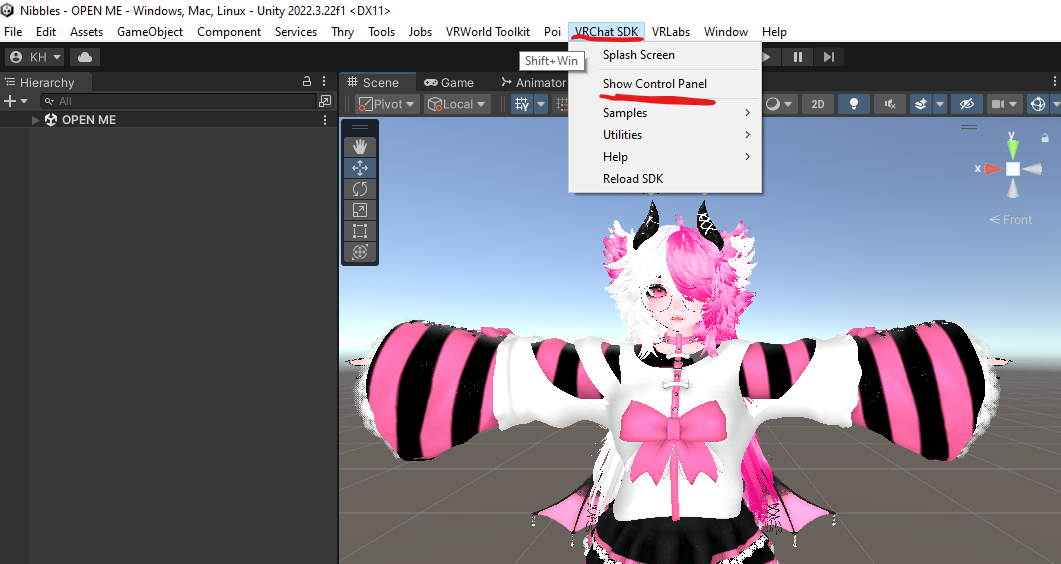
    @jyfvhjvhv Oh, sorry, I only saw your question now. I don't know how much you know, but I assume you have the basics down, if not, you can look it up or DM me for further help, once you're in Unity and you have imported the package (and replaced the missing mesh on the dragon tail if you want it) all you need to do is open the VRChat SDK, found here:
    Screenshot 2024-10-10 153326.png

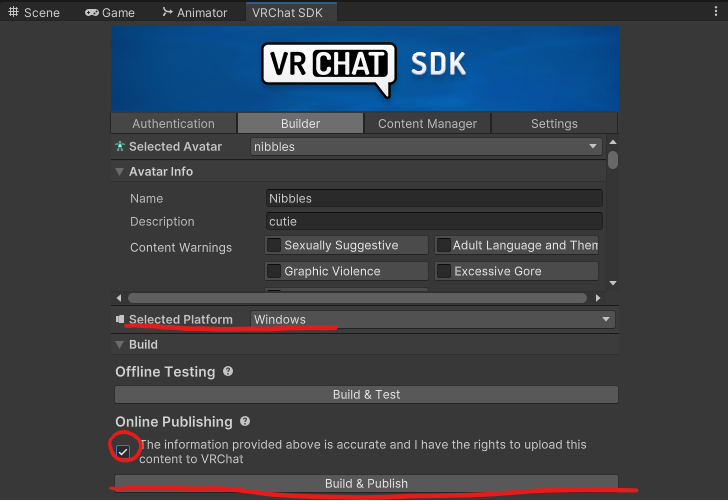
    Then in the VRChat SDK Control Panel you log in with your VRChat account. (It's important that you are at least a New User for you to be able to upload an avatar. Then you go into the Builder Tab of the SDK and you give the avatar a name, add a picture, select your platform and then click Build and Publish, like so:
    Screenshot 2024-10-10 153455.png

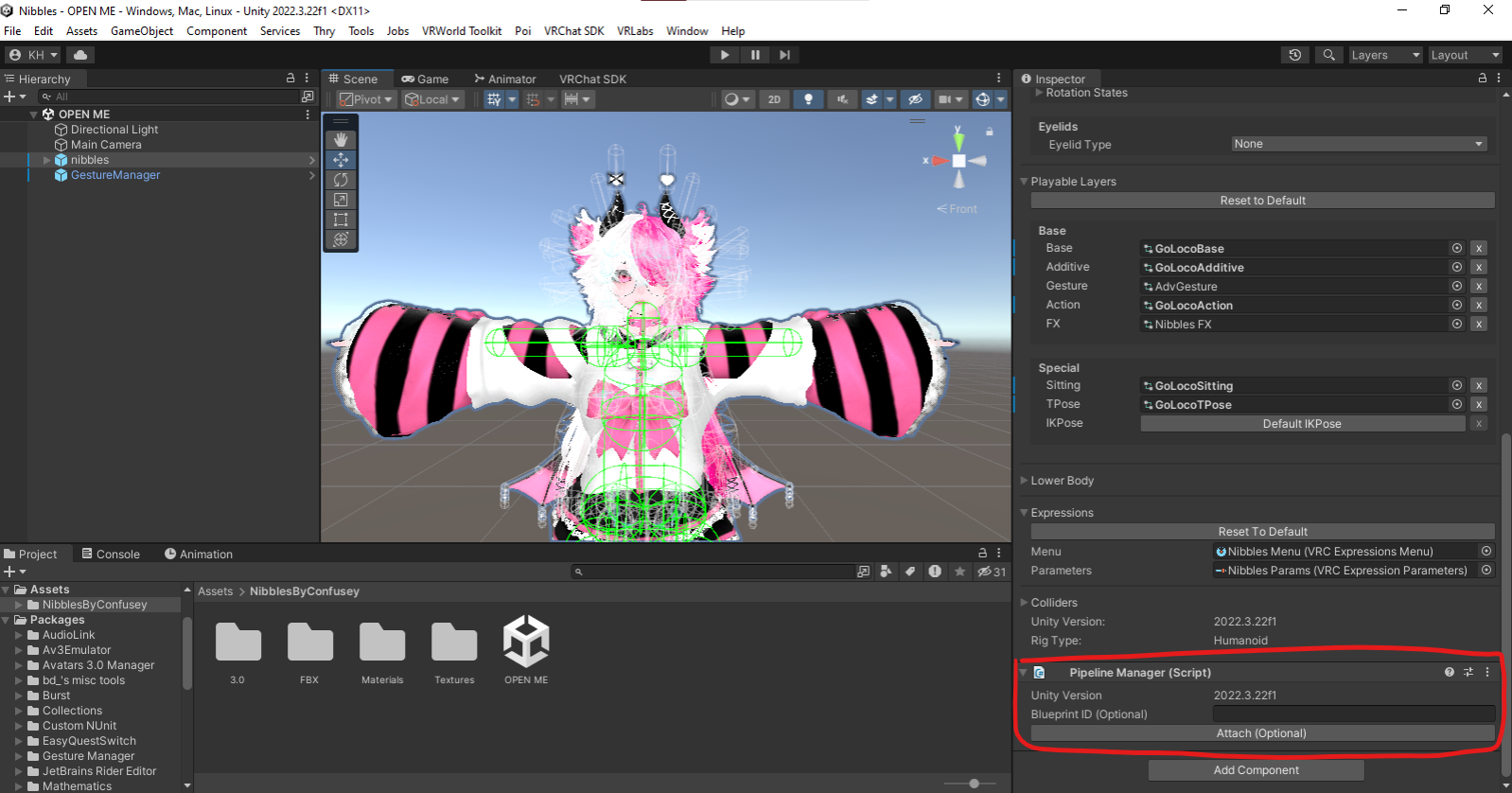
    If you want it to be cross platform compatible you'll need to upload both the quest and PC versions under the same Blueprint ID you can find when you click on the avatar itself, at the very bottom under the avatar descriptor, once you've uploaded one version, just copy the ID there, make a new project, attach that Blueprint ID to the avatar and select Android under the Selected Platform Option in the Builder.
    Screenshot 2024-10-10 154604.png

    Sadly with the quest version I've found it's slightly too big to upload so you'll need to either lower the resolution of some of the textures, or delete objects you do not want on the avatar (Be careful though, deleting clothes can sometimes leave your avatar naked if you end up toggling them on in the PC version)

    This ended up being longer than intended, I hope I could help though! I just wanted to explain everything as thoroughly as possible cause I don't know how experienced you are ^^;

    head emty

    J SeraphicRosesS 2 Replies Last reply
    0
    • lazypastelsL lazypastels

      @jyfvhjvhv Oh, sorry, I only saw your question now. I don't know how much you know, but I assume you have the basics down, if not, you can look it up or DM me for further help, once you're in Unity and you have imported the package (and replaced the missing mesh on the dragon tail if you want it) all you need to do is open the VRChat SDK, found here:

      Screenshot 2024-10-10 153326.png

      Then in the VRChat SDK Control Panel you log in with your VRChat account. (It's important that you are at least a New User for you to be able to upload an avatar. Then you go into the Builder Tab of the SDK and you give the avatar a name, add a picture, select your platform and then click Build and Publish, like so:

      Screenshot 2024-10-10 153455.png

      If you want it to be cross platform compatible you'll need to upload both the quest and PC versions under the same Blueprint ID you can find when you click on the avatar itself, at the very bottom under the avatar descriptor, once you've uploaded one version, just copy the ID there, make a new project, attach that Blueprint ID to the avatar and select Android under the Selected Platform Option in the Builder.

      Screenshot 2024-10-10 154604.png

      Sadly with the quest version I've found it's slightly too big to upload so you'll need to either lower the resolution of some of the textures, or delete objects you do not want on the avatar (Be careful though, deleting clothes can sometimes leave your avatar naked if you end up toggling them on in the PC version)

      This ended up being longer than intended, I hope I could help though! I just wanted to explain everything as thoroughly as possible cause I don't know how experienced you are ^^;

      J
      J
      jyfvhjvhv
      wrote on last edited by
      #40

      @lazypastels thank you so much

      1 Reply Last reply
      0
      • lazypastelsL lazypastels

        @jyfvhjvhv Oh, sorry, I only saw your question now. I don't know how much you know, but I assume you have the basics down, if not, you can look it up or DM me for further help, once you're in Unity and you have imported the package (and replaced the missing mesh on the dragon tail if you want it) all you need to do is open the VRChat SDK, found here:

        Screenshot 2024-10-10 153326.png

        Then in the VRChat SDK Control Panel you log in with your VRChat account. (It's important that you are at least a New User for you to be able to upload an avatar. Then you go into the Builder Tab of the SDK and you give the avatar a name, add a picture, select your platform and then click Build and Publish, like so:

        Screenshot 2024-10-10 153455.png

        If you want it to be cross platform compatible you'll need to upload both the quest and PC versions under the same Blueprint ID you can find when you click on the avatar itself, at the very bottom under the avatar descriptor, once you've uploaded one version, just copy the ID there, make a new project, attach that Blueprint ID to the avatar and select Android under the Selected Platform Option in the Builder.

        Screenshot 2024-10-10 154604.png

        Sadly with the quest version I've found it's slightly too big to upload so you'll need to either lower the resolution of some of the textures, or delete objects you do not want on the avatar (Be careful though, deleting clothes can sometimes leave your avatar naked if you end up toggling them on in the PC version)

        This ended up being longer than intended, I hope I could help though! I just wanted to explain everything as thoroughly as possible cause I don't know how experienced you are ^^;

        SeraphicRosesS
        SeraphicRosesS
        SeraphicRoses
        wrote on last edited by SeraphicRoses
        #41

        @lazypastels Dunno if you knew but I found a nice trick on reddit awhile back that can heavily decrease the size of quest models just gotta go to models, select all and turn the normals from import to none in the inspector 😄

        If any of my download links don't work PM me with the forum link! ❤︎₊ ⊹
        Rizz'm with the Tism

        lazypastelsL MarbledMooM 2 Replies Last reply
        1
        • ?
          ?
          A Former User
          wrote on last edited by
          #42

          bump for FT ver

          1 Reply Last reply
          0
          • SeraphicRosesS SeraphicRoses

            @lazypastels Dunno if you knew but I found a nice trick on reddit awhile back that can heavily decrease the size of quest models just gotta go to models, select all and turn the normals from import to none in the inspector 😄

            lazypastelsL
            lazypastelsL
            lazypastels
            wrote on last edited by
            #43

            @SeraphicRoses Ooh, I didn't know! I'm gonna try that next time, thank you :3

            head emty

            1 Reply Last reply
            1
            • SeraphicRosesS SeraphicRoses

              @JustVappy what avatar I can post it if you can't

              ?
              ?
              A Former User
              wrote on last edited by
              #44

              @SeraphicRoses It’s the marble fox dlc for Peekabowo’s Ollie vulpina

              1 Reply Last reply
              0
              • ?
                ?
                A Former User
                wrote on last edited by
                #45

                bump for FT ver

                1 Reply Last reply
                0
                • SeraphicRosesS SeraphicRoses

                  @lazypastels Dunno if you knew but I found a nice trick on reddit awhile back that can heavily decrease the size of quest models just gotta go to models, select all and turn the normals from import to none in the inspector 😄

                  MarbledMooM
                  MarbledMooM
                  MarbledMoo
                  wrote on last edited by
                  #46

                  @SeraphicRoses Could you possibly send a tutorial on how to do that? I'm trying to do that and realizing idk what it means

                  SeraphicRosesS 1 Reply Last reply
                  0
                  • MarbledMooM MarbledMoo

                    @SeraphicRoses Could you possibly send a tutorial on how to do that? I'm trying to do that and realizing idk what it means

                    SeraphicRosesS
                    SeraphicRosesS
                    SeraphicRoses
                    wrote on last edited by SeraphicRoses
                    #47

                    @MarbledMoo [register or login to view this hidden content]
                    couldnt upload a video here and didnt feel like editting a bunch of images, if you didnt know if you click on one thing and then hold left shift and click the last you select everything from the first you selected btw

                    also might look off cuz I did that on a pc avi instead of a quest one lol

                    If any of my download links don't work PM me with the forum link! ❤︎₊ ⊹
                    Rizz'm with the Tism

                    1 Reply Last reply
                    0
                    • ?
                      ?
                      A Former User
                      wrote on last edited by
                      #48

                      bump for FT version

                      1 Reply Last reply
                      0
                      • exE
                        exE
                        ex
                        wrote on last edited by
                        #49

                        bmp 4 ft

                        shhh

                        plz bmp!

                        1 Reply Last reply
                        0
                        • exE
                          exE
                          ex
                          wrote on last edited by
                          #50

                          bmp

                          shhh

                          plz bmp!

                          1 Reply Last reply
                          0
                          • CamomilleuhC
                            CamomilleuhC
                            Camomilleuh
                            wrote on last edited by
                            #51

                            https://payhip.com/b/7H0Gd

                            would be awesome if without gonso or if someone can tell me how to remove it
                            (and i couldn't find a valid link here

                            1 Reply Last reply
                            0
                            • CamomilleuhC
                              CamomilleuhC
                              Camomilleuh
                              wrote on last edited by
                              #52

                              Found

                              1 Reply Last reply
                              0
                              • sarahS
                                sarahS
                                sarah
                                wrote on last edited by
                                #53

                                bump for ft ver !

                                1 Reply Last reply
                                0
                                • thatcatoverthereT
                                  thatcatoverthereT
                                  thatcatoverthere
                                  wrote on last edited by
                                  #54

                                  Bump for reupload please

                                  1 Reply Last reply
                                  0
                                  • therabbitholeT
                                    therabbitholeT
                                    therabbithole
                                    wrote on last edited by
                                    #55

                                    bump for upload ❤

                                    1 Reply Last reply
                                    0
                                    • ?
                                      ?
                                      A Former User
                                      wrote on last edited by
                                      #56

                                      [register or login to view this hidden content]

                                      1 Reply Last reply
                                      💗
                                      3
                                      • ?
                                        ?
                                        A Former User
                                        wrote on last edited by
                                        #57

                                        bump for ft ver! tysm for reup

                                        1 Reply Last reply
                                        0
                                        • therabbitholeT
                                          therabbitholeT
                                          therabbithole
                                          wrote on last edited by
                                          #58

                                          thank you for the reupload!! ❤

                                          1 Reply Last reply
                                          0

                                          Hello! It looks like you're interested in this conversation, but you don't have an account yet.

                                          Getting fed up of having to scroll through the same posts each visit? When you register for an account, you'll always come back to exactly where you were before, and choose to be notified of new replies (either via email, or push notification). You'll also be able to save bookmarks and upvote posts to show your appreciation to other community members.

                                          With your input, this post could be even better 💗

                                          Register Login
                                          Reply
                                          • Reply as topic
                                          Log in to reply
                                          • Oldest to Newest
                                          • Newest to Oldest
                                          • Most Votes


                                          • Login

                                          • Login or register to search.
                                          • First post
                                            Last post
                                          0
                                          • Categories
                                          • Recent
                                          • Tags
                                          • Popular