
GodMagician Delete Outfit
-
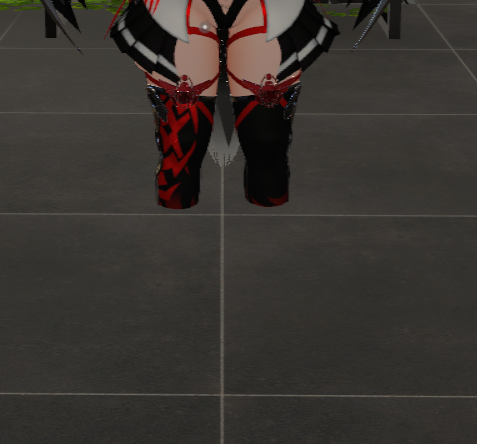
I can't remove the clothes from my GodMagician. I'd like to delete them from the avatar, but they keep getting removed in-game, and I don't understand why. I tried using 'dissolve' and checked the blendshape, but even though it works fine in Unity and my avatar is complete, the same thing happens in-game.
-
I'm just looking for a way to get the base of the GodMagician...
Maybe keep other accessories too, like piercings or the bandage on the nose, but I really want to be able to remove all the other things without any issues. When I try to remove them, parts of the body are missing or elements are directly removed from the menu...
Help me pls.. -
-
I'm just looking for a way to get the base of the GodMagician...
Maybe keep other accessories too, like piercings or the bandage on the nose, but I really want to be able to remove all the other things without any issues. When I try to remove them, parts of the body are missing or elements are directly removed from the menu...
Help me pls..@babyMeiMei @Atropos not sure if you had figured it out but i think its all to do with blendshapes, i think all the clothes were added into blender creating the blendshapes so its like IMPOSSIBLE to figure out how to remove it, i recommend adding all ur accessories and clothes & wtv just when uploading it you will need to toggle alot off to finally get all of the junk off
-
did anyone ever figure out just how to have the pure base with none of the outfits?
-
did anyone ever figure out just how to have the pure base with none of the outfits?
@horsedraught Godfall makes extensive use of
UV Tile Dissolvewhen overlaying clothes onto the body; allowing Poiyomi to discard vertices and "hide" the selected part entirelyunlock the Body material (
Body_GodfallCustom Magiby default) and underSpecial FX > Dissolve > UV Tile Dissolve, you can control the parts that are hidden (0is shown,1is hidden)simply set all of these to
0to show all parts of the bodyalso remember these are animated and most of these dissolves are automated through toggles and animations in the FX layer - you will have to remove these from the FX layer to prevent them from being overridden when the avatar loads
// avid reverse engineer, long-time software developer
// "...culture shouldn't exist only for those who can afford it."
// - Hakita -
@horsedraught Godfall makes extensive use of
UV Tile Dissolvewhen overlaying clothes onto the body; allowing Poiyomi to discard vertices and "hide" the selected part entirelyunlock the Body material (
Body_GodfallCustom Magiby default) and underSpecial FX > Dissolve > UV Tile Dissolve, you can control the parts that are hidden (0is shown,1is hidden)simply set all of these to
0to show all parts of the bodyalso remember these are animated and most of these dissolves are automated through toggles and animations in the FX layer - you will have to remove these from the FX layer to prevent them from being overridden when the avatar loads
@taikeru most excellent, thank you for your insight.



Hello! It looks like you're interested in this conversation, but you don't have an account yet.
Getting fed up of having to scroll through the same posts each visit? When you register for an account, you'll always come back to exactly where you were before, and choose to be notified of new replies (either via email, or push notification). You'll also be able to save bookmarks and upvote posts to show your appreciation to other community members.
With your input, this post could be even better 💗
Register Login