Skip to content
  • Categories
  • Recent
  • Tags
  • Popular
Skins
  • Light
  • Brite
  • Cerulean
  • Cosmo
  • Flatly
  • Journal
  • Litera
  • Lumen
  • Lux
  • Materia
  • Minty
  • Morph
  • Pulse
  • Sandstone
  • Simplex
  • Sketchy
  • Spacelab
  • United
  • Yeti
  • Zephyr
  • Dark
  • Cyborg
  • Darkly
  • Quartz
  • Slate
  • Solar
  • Superhero
  • Vapor

  • Default (Zephyr)
  • No Skin
Collapse
RipperStore Logo
  1. Home
  2. Assets
  3. Found Avatars and Assets
  4. ✔ (FOUND by luxs) Bertha by Silvia

✔ (FOUND by luxs) Bertha by Silvia

Scheduled Pinned Locked Moved Found Avatars and Assets
femaleegirl
14 Posts 12 Posters 5.5k Views 16 Watching
  • Oldest to Newest
  • Newest to Oldest
  • Most Votes
Reply
  • Reply as topic
Log in to reply
This topic has been deleted. Only users with topic management privileges can see it.
  • N
    N
    Nexus.Vr
    wrote on last edited by Nexus.Vr
    #4

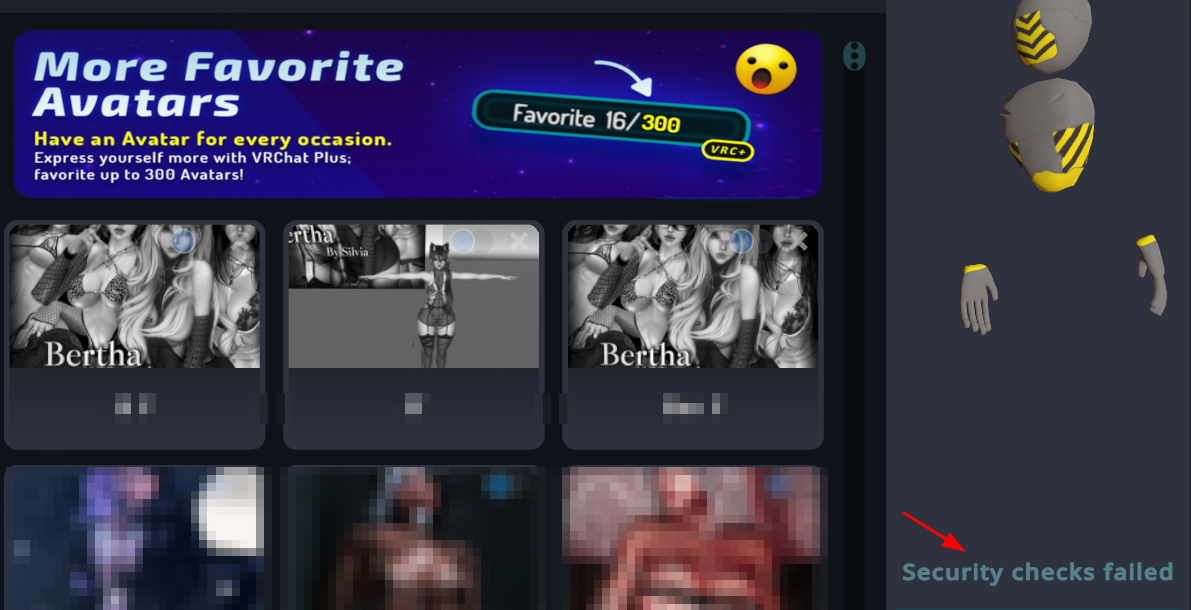
    How do I Import and Upload it correctly? Its only tellign em missing script.

    avicollectorA 1 Reply Last reply
    0
    • P
      P
      psychosxx
      wrote on last edited by
      #5

      how am i suppose to upload? there is only an assets folder?

      O 1 Reply Last reply
      0
      • P psychosxx

        how am i suppose to upload? there is only an assets folder?

        O
        O
        OnlyOneBuzz
        Banned
        wrote on last edited by
        #6

        @psychosxx extract the file then open existing project

        1 Reply Last reply
        0
        • P
          P
          psychosxx
          wrote on last edited by
          #7

          i did both of those but it was saying unknown

          1 Reply Last reply
          0
          • System moved this topic from Gumroad/Payhip Avatars on
          • luxsL luxs

            🔗 Download Link (pixeldrain.com)

            meowmeowvM
            meowmeowvM
            meowmeowv
            wrote on last edited by
            #8
            This post is deleted!
            bugglebugB 1 Reply Last reply
            0
            • N Nexus.Vr

              How do I Import and Upload it correctly? Its only tellign em missing script.

              avicollectorA
              avicollectorA
              avicollector
              wrote on last edited by
              #9

              @Nexus-Vr the missing script is located on the "riding crop" / whip. just delete the missing scripts and then she uploaded perfectly!

              ⊱ ────── {⋆♥⋆} ────── ⊰
              Please do NOT leave unnecessary comments about the appearance of the models I choose to post.
              ⊱ ────── {⋆♥⋆} ────── ⊰

              1 Reply Last reply
              0
              • Satoru GojoS
                Satoru GojoS
                Satoru Gojo
                wrote on last edited by
                #10

                image.png T.T

                F

                1 Reply Last reply
                😞
                0
                • meowmeowvM meowmeowv
                  [[topic:post-is-deleted]]
                  bugglebugB
                  bugglebugB
                  bugglebug
                  wrote on last edited by
                  #11

                  cant get it to work:< and help would be appreciated!! please msg me on discord @bbeesknees

                  1 Reply Last reply
                  0
                  • bunnygalB
                    bunnygalB
                    bunnygal
                    wrote on last edited by
                    #12

                    how do i exactly find and delete the missing script?

                    1 Reply Last reply
                    0
                    • cassouC
                      cassouC
                      cassou
                      wrote on last edited by
                      #13

                      if you have the robot after uploading the avatar you just need to down size de texture to 1024 and it will load

                      1 Reply Last reply
                      0
                      • tacopaosT
                        tacopaosT
                        tacopaos
                        wrote on last edited by
                        #14

                        Small guide for anyone havin issues, first off.. head up to the top of your hierarchy and go to the search bar, search "Riding Crop" and delete all of the MONO errors on your inspector, Then try uploading, im not sure how the file size thing works bc It uploaded fine for me, but if the avi shows up as a robot in game, then o through the textures on the avi and lower the quality, If you have specific clothing you like on it, then only lower the quality of the clothing you dont like, anyone with further questions can ask me. Good luck!


                        1 Reply Last reply
                        0

                        Hello! It looks like you're interested in this conversation, but you don't have an account yet.

                        Getting fed up of having to scroll through the same posts each visit? When you register for an account, you'll always come back to exactly where you were before, and choose to be notified of new replies (either via email, or push notification). You'll also be able to save bookmarks and upvote posts to show your appreciation to other community members.

                        With your input, this post could be even better 💗

                        Register Login
                        Reply
                        • Reply as topic
                        Log in to reply
                        • Oldest to Newest
                        • Newest to Oldest
                        • Most Votes


                        • Login

                        • Login or register to search.
                        • First post
                          Last post
                        0
                        • Categories
                        • Recent
                        • Tags
                        • Popular