
[FOUND by donkeykon3] - Servitron
-
@Takisch how are you gonna tell me no when i have it uploaded to my account with a quest version too? you did something wrong most likely
-
-
or maybe that i do commissions for both platforms and my quality questwork attracts customers

-
VRC fury is having issues with this avatar and i dont understand how to fix it
-
-
the download link is down, could you update it?
-
re bump
-
Alrighty, so I figured that since I ended up wrapped up in this a bit by a friend who asked for help, I may as well help TRY to clarify the major issue with the instructions.
I'm unsure if the exact order of steps is necessary, but once you open up the unity project you've made and you have already imported everything as instructed by the readme file Included in the zip, there is a BLENDFILE already included inside of the unity assets. You're gonna wanna go to open that blendfile, preferably from inside of unity itself, but as I understand it could and should still work if you open the blendfile from windows file explorer; but the BLENDFILE YOU OPEN MUST BE THE ONE LOCATED IN THE ASSETS FOLDER OF THE UNITYPROJECT OR ELSE IT WILL DO NOTHING IN THE FOLLOWING STEPS.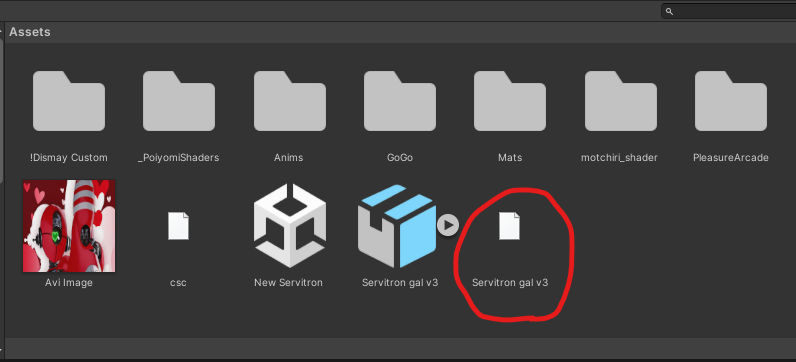
It should open up blender when you attempt to open it BUT if it doesn't and it instead asks you what program to use for opening the blendfile, just locate the blender.exe file in your steam folders (assuming you installed blender on steam as the readme says to do.) using the window that pops up asking you what program to use, and check off the box for 'always using this program for opening files of this type'.
Either way, once you manage to open up that blendfile in blender, the exact thing I did that made this work for me was looking in blender once it opened, going up to the top left of the blender window and clicking 'File' and then 'save'. That is all I did, and when I went back over to unity, because blender had just saved the blendfile that's in the unity projects assets, unity is going to look at it and attempt to automatically import the model from the blendfile on its own into the unity project.
You can see right here it did in fact work for me.
If there is any other issues people have, I probably will not be available to help, sorry. I just figured I'd offer what I learned on this specific problem as a small token of gratitude to the community.
I also apologize if anything I said was unclear, I did the best I can to elaborate.
For now, byeeeeeee!!!!
-
Can someone give me an idiot proof "fire and forget" instruction on how to upload the avatar?
@DirtyKenku my post just above is mostly for you
-
anyone able to reupload? :0



Hello! It looks like you're interested in this conversation, but you don't have an account yet.
Getting fed up of having to scroll through the same posts each visit? When you register for an account, you'll always come back to exactly where you were before, and choose to be notified of new replies (either via email, or push notification). You'll also be able to save bookmarks and upvote posts to show your appreciation to other community members.
With your input, this post could be even better 💗
Register Login