
[GIFT / TOOL] ImageToMeshExtruder v2.0 - Turn 2D Images into 3D VRChat Props! #
-
 ImageToMeshExtruder v2.0
 The Ultimate 2D-to-3D Unity Editor Tool for VRChat Avatar Creators
Hey everyone!

I want to share a handy Unity editor tool I developed called ImageToMeshExtruder. If you are tired of opening Blender just to turn logos, text, sigils, or icons into 3D props and accessories for your avatars, this tool does it directly inside Unity in 1 click!
 Key Features:
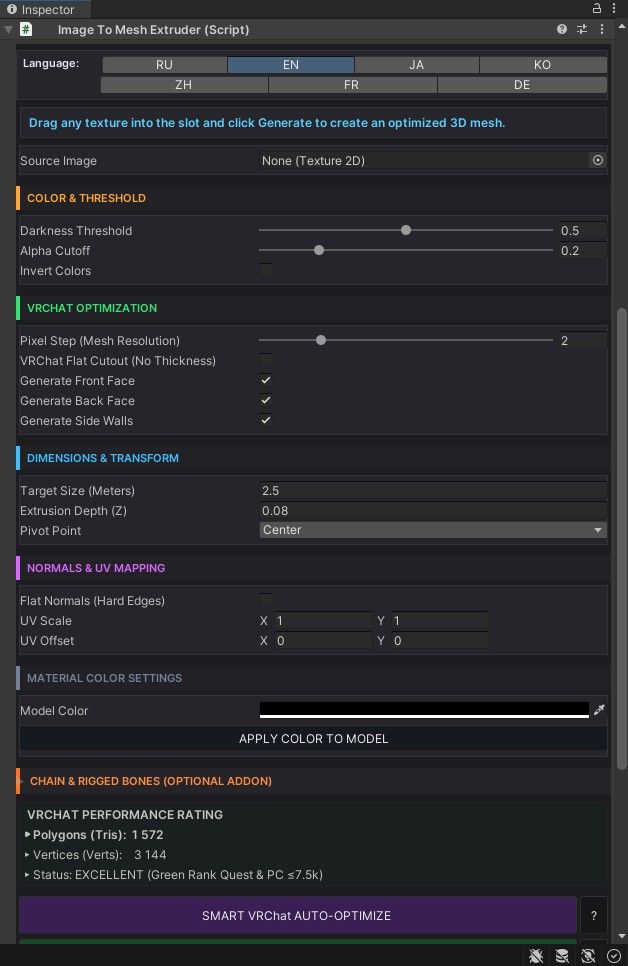
- Instant 2D-to-3D Conversion: Turn any PNG with a transparent background into an optimized 3D mesh.
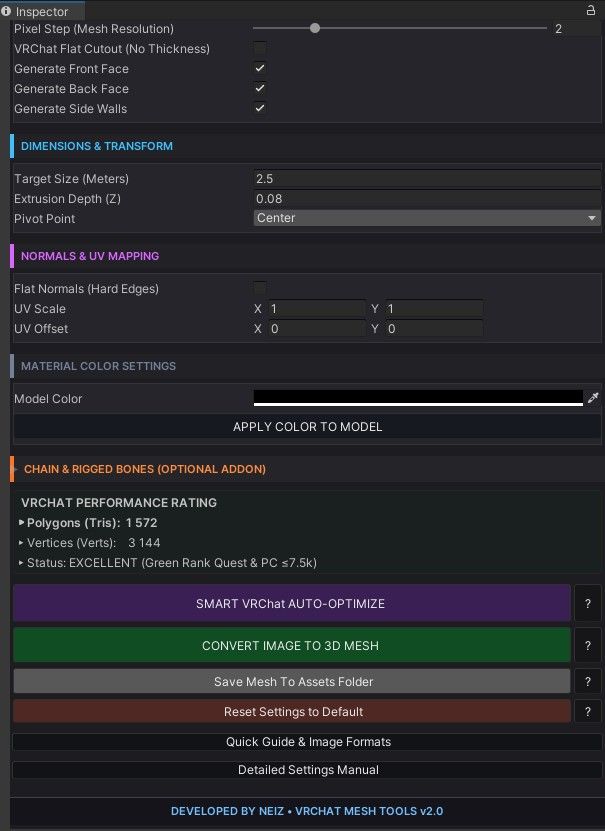
- Smart Auto-Optimize: Automatically scans details, protects quality, and guarantees a VRChat Green Performance Rank (< 7.5k Tris).
- VRChat Flat Cutout Mode: Instantly strips side walls to save ~75% of polygons while keeping front details ultra-crisp.
- Rigged Chain & PhysBone Generator: Automatically builds a custom chain with physics (
VRCPhysBone) attached to your pendant, ready for in-game grabbing and movement! - Multi-Language UI Support: Fully translated interface and manual in 7 languages (RU, EN, JA, KO, ZH, FR, DE).
- Dark Matte Theme Editor: Clean, modern, and easy-to-read custom inspector layout.
 How to Use:
- Drop the script into your Unity project (
Assets/). - Attach it to any GameObject.
- Drag your texture into the Source Image slot.
- Click "Smart Auto-Optimize" or "Convert Image to 3D Mesh"!
- Optional: Expand the Chain section to add a physics chain with 1 click.
 Support & Updates
You can find contact links and future updates directly at the bottom of the tool's inspector interface. If you have any questions, tips, or ideas on what can be improved or added, feel free to leave a comment under this post!
*Created by NEIZ. Enjoy and happy creating!
DL:
-
-



Hello! It looks like you're interested in this conversation, but you don't have an account yet.
Getting fed up of having to scroll through the same posts each visit? When you register for an account, you'll always come back to exactly where you were before, and choose to be notified of new replies (either via email, or push notification). You'll also be able to save bookmarks and upvote posts to show your appreciation to other community members.
With your input, this post could be even better 💗
Register Login