Skip to content
  • Categories
  • Recent
  • Tags
  • Popular
Skins
  • Light
  • Brite
  • Cerulean
  • Cosmo
  • Flatly
  • Journal
  • Litera
  • Lumen
  • Lux
  • Materia
  • Minty
  • Morph
  • Pulse
  • Sandstone
  • Simplex
  • Sketchy
  • Spacelab
  • United
  • Yeti
  • Zephyr
  • Dark
  • Cyborg
  • Darkly
  • Quartz
  • Slate
  • Solar
  • Superhero
  • Vapor

  • Default (Zephyr)
  • No Skin
Collapse
RipperStore Logo
  1. Home
  2. Assets
  3. Gifts / Downloads
  4. GIFT: リアル影システム (for Avatar) PCSS For VRC (サマーセール 1,500円⇒900円) and リアル影システム (for Avatar) PCSS For VRC (ワールドにも影が落ちるアドオン(ShadowCast Addon))

GIFT: リアル影システム (for Avatar) PCSS For VRC (サマーセール 1,500円⇒900円) and リアル影システム (for Avatar) PCSS For VRC (ワールドにも影が落ちるアドオン(ShadowCast Addon))

Scheduled Pinned Locked Moved Gifts / Downloads
pcssshaderpcss shadergiftbooth
15 Posts 10 Posters 3.5k Views 11 Watching
  • Oldest to Newest
  • Newest to Oldest
  • Most Votes
Reply
  • Reply as topic
Log in to reply
This topic has been deleted. Only users with topic management privileges can see it.
  • vladislav24.7V vladislav24.7

    @sayaaaa It’s incredibly cheeky to ask for a new version when this is the only post with the new version, but anyway-here’s the link, enjoy. pas 12345 🔗 Download Link (workupload.com)

    K
    K
    korekore12345678
    wrote on last edited by
    #5

    @vladislav24.7 ありがとう✨️

    1 Reply Last reply
    0
    • gumgummoosebushG
      gumgummoosebushG
      gumgummoosebush
      wrote on last edited by
      #6

      thank you so much<33

      1 Reply Last reply
      0
      • vladislav24.7V vladislav24.7

        @sayaaaa It’s incredibly cheeky to ask for a new version when this is the only post with the new version, but anyway-here’s the link, enjoy. pas 12345 🔗 Download Link (workupload.com)

        L
        L
        luves
        wrote on last edited by
        #7

        @vladislav24.7 said:

        234

        1 Reply Last reply
        0
        • U
          U
          unnamedxd123
          wrote last edited by
          #8

          BUMP for new version

          vladislav24.7V 2 Replies Last reply
          0
          • U unnamedxd123

            BUMP for new version

            vladislav24.7V
            vladislav24.7V
            vladislav24.7
            wrote last edited by
            #9

            @unnamedxd123 ok ok

            1 Reply Last reply
            0
            • U unnamedxd123

              BUMP for new version

              vladislav24.7V
              vladislav24.7V
              vladislav24.7
              wrote last edited by
              #10

              @unnamedxd123 [register or login to view this hidden content] pas 12345

              1 Reply Last reply
              0
              • U
                U
                unnamedxd123
                wrote last edited by
                #11

                @vladislav24.7 thankyu!!!!!!!!!

                1 Reply Last reply
                0
                • crystal808999C
                  crystal808999C
                  crystal808999
                  wrote last edited by
                  #12

                  how do i set it up?

                  🟥 idk i just find stuff 🟥

                  I 1 Reply Last reply
                  0
                  • crystal808999C crystal808999

                    how do i set it up?

                    I
                    I
                    ijbolitis
                    wrote last edited by
                    #13

                    @nittyttaa after you import the unity package, at the top next to VRChatSDK or Window, there should be a nHaruka.
                    Click on the first option and insert your avi and it should add it to your avi.

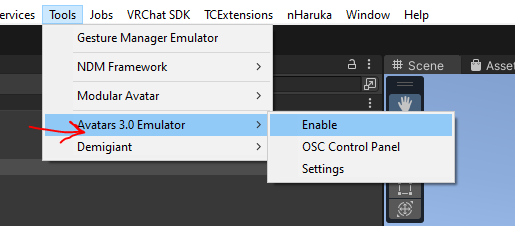
                    If you want it to show up in play mode you will need to enable AV3mulator and gesture manager (from packages section) and then in Tools -> Avatars 3.0 Emulator -> Enable, otherwise it will be dark. Then you can change light settings from the gesture manager menu.

                    ! Capture669.PNG
                    vladislav24.7V T 2 Replies Last reply
                    0
                    • I ijbolitis

                      @nittyttaa after you import the unity package, at the top next to VRChatSDK or Window, there should be a nHaruka.
                      Click on the first option and insert your avi and it should add it to your avi.

                      If you want it to show up in play mode you will need to enable AV3mulator and gesture manager (from packages section) and then in Tools -> Avatars 3.0 Emulator -> Enable, otherwise it will be dark. Then you can change light settings from the gesture manager menu.

                      ! Capture669.PNG

                      vladislav24.7V
                      vladislav24.7V
                      vladislav24.7
                      wrote last edited by
                      #14

                      @ijbolitis i already sent him screenshots on discord showing where to click

                      1 Reply Last reply
                      0
                      • I ijbolitis

                        @nittyttaa after you import the unity package, at the top next to VRChatSDK or Window, there should be a nHaruka.
                        Click on the first option and insert your avi and it should add it to your avi.

                        If you want it to show up in play mode you will need to enable AV3mulator and gesture manager (from packages section) and then in Tools -> Avatars 3.0 Emulator -> Enable, otherwise it will be dark. Then you can change light settings from the gesture manager menu.

                        ! Capture669.PNG

                        T
                        T
                        teatime1345
                        wrote last edited by
                        #15

                        @ijbolitis so for some reason, I import the unity packages but yet the nHaruka tab isn't there? and it says my unity package is unstable.

                        1 Reply Last reply
                        0

                        Hello! It looks like you're interested in this conversation, but you don't have an account yet.

                        Getting fed up of having to scroll through the same posts each visit? When you register for an account, you'll always come back to exactly where you were before, and choose to be notified of new replies (either via email, or push notification). You'll also be able to save bookmarks and upvote posts to show your appreciation to other community members.

                        With your input, this post could be even better 💗

                        Register Login
                        Reply
                        • Reply as topic
                        Log in to reply
                        • Oldest to Newest
                        • Newest to Oldest
                        • Most Votes


                        • Login

                        • Login or register to search.
                        • First post
                          Last post
                        0
                        • Categories
                        • Recent
                        • Tags
                        • Popular