
FOUND:Kroxigor 2.0 - SwampPuppy Edit
-
ive been putting files thru my scan tool for a while now and
 i have to genuinely ask why is there a polyglot payload attached to a single, random png texture in the files- does anyone know what it is before i even think about opening up the original edit in a project. the rest of the issues are simply alerts about unlit_wf info but this one has no actual info attached..
ETA: i scanned the one by @masterofspace to see if the polyglot thing was still in that one as well since they were working with the original and
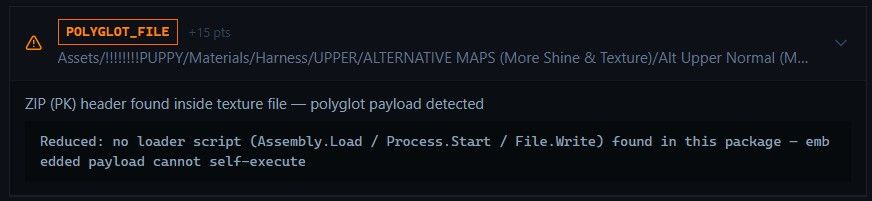
so what the hell is this supposed payload the original one has that masterofspace removed
Took one more look at the original
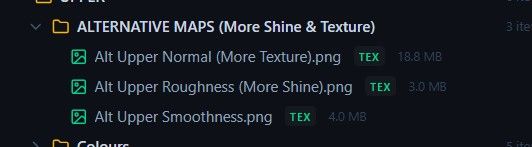 versus Space's
 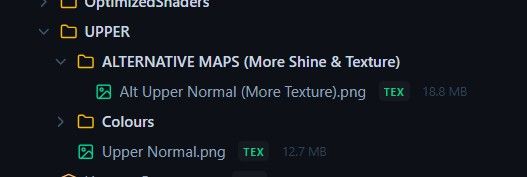 and space took out two of the textures
Is it the mapping information for the smoothness/roughness map that is a polyglot?
@ClaptasticFrag so idk what a polygot is, but im guessing its a virus of some sorts.
-
-
@claptasticfrag So, I've looked into the files and dissected its inner workings. It appears to be a false positive due to a funny lil math coincidence.
The .png appears to be compressed using zlib, to shrink its size. However, doing so generated a ton of random bytes, which out of chance generated a string that spells out something in the lines of "PK...." which is what being triggered as a zip. There's also a ton of other false positives.
It is highly unlikely for this file to contain any malicious payload. There is no central directory anywhere, CRC valid, no trailing garbage (no signs of tampering), consistent structure with images rather than something fishy.
If you recompress the .png it might not even be flagged again.
Obviously it is always natural and good to be wary of these kinds of things, which is why you should never blindly trust scripts.
Went a step further and did some deeper analysis, still no signs of a payload BUT it doesn't rule out a decoder-level exploit. But that would need to target a known vulnerability...@Trident707 thank you for looking into it!! glad to know it's most likely just a bug in how some compressions work
-
DROPPING THE EXPANDED VERSION IN A FEW HOURS THO
-
@masterofspace ITS BEEN 5 HOURS I NEED IT
@meth-head
here, idk if this one can physically be quest. ive tried
-
@meth-head
here, idk if this one can physically be quest. ive tried
@masterofspace FFFFFFFFFFFFFFFFFUUUUUUUUUUUUUUCKKKKKKKKKKKKKKKKKKKKKKKKKKKKKKKKKKKKKKKKKKKKKKKKKK ill try me best then
-
-
Hey so I just scrolled through all the above mess and was there a link provided to a full working file or is there still shit yall need to fix?
-
@meth-head
here, idk if this one can physically be quest. ive tried
@masterofspace i use her all the time as a questie you just gotta delete some clothes and downgrade texture
-
@masterofspace i use her all the time as a questie you just gotta delete some clothes and downgrade texture
@Goober1999 this is an expanded one with over 30 texters for the clothes though
-
Anyone know why it fails to verify? when i try and upload it it repeats avatar validation failed, saying wet and wet 18+ are missing parameters
@Mitchy_Cookie delete the menu items
-
@Goober1999 this is an expanded one with over 30 texters for the clothes though
@masterofspace yeah thats why you shift+click to grab all the textures and downgrade them together also u wont be using all of them since uk gotta delete the clothes attached to them anyway
-
@masterofspace yeah thats why you shift+click to grab all the textures and downgrade them together also u wont be using all of them since uk gotta delete the clothes attached to them anyway
@Goober1999 can you try making my version quest? its too hard for me
-
-
-
Hey so, is the download link good or?
-
-
@Goober1999 can you try making my version quest? its too hard for me
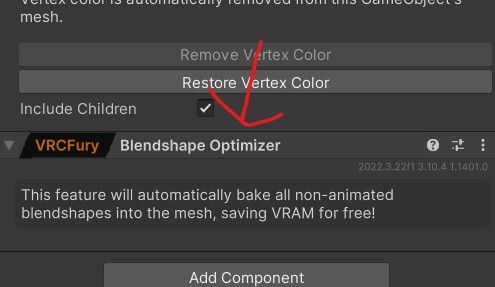
@masterofspace With VRCFURY on the main avatar where it says "add component" under avatar descriptor, put a blendshape optimizer on the avatar.
Next use VRCQuestTools to convert the avatar into a quest avatar, and when removing physbones you can just remove everything besides the ass, tits, and tail.
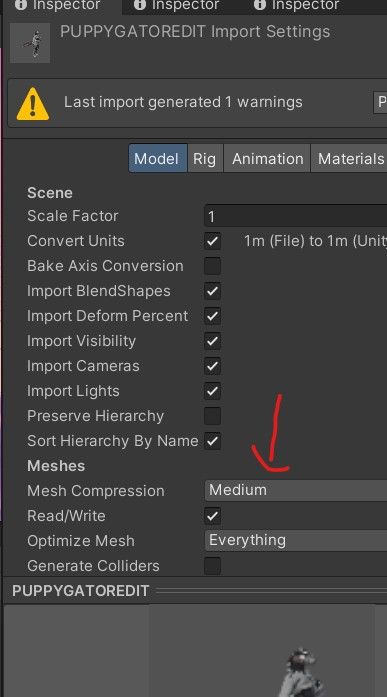
After that you can press on the avatar and again, and press where it says "avatar" in the animator component on the right. It'll take your Project/Assets tab to the avatar (where you see the fbx and stuff). Press on the avatar in that tab, and then on the right (or wherever your inspector is) where it says "model" change mesh compression to medium (it isn't really noticeable unike high).
You can also remove some items like fishnets (they don't look good on quest) and lower a lot of texture quality like eyes, normals, underwear, etc. You really should lower all quality since on pc they're always set to the max (or well, high, like 9.5mb high for each). If you keep the skin at 1k it'll be like 0.6, and personally I'd keep the skins medium at that size too.
Also remember to gesture manager test to see if there's other textures (like the alt skin) to lower the quality of.
I suggest using VRCQuestTools, Thryallo Performance tools, and FAC10Utilities as tools to help.
I can send a link to a quest version if you want soon.!
-
@masterofspace With VRCFURY on the main avatar where it says "add component" under avatar descriptor, put a blendshape optimizer on the avatar.
Next use VRCQuestTools to convert the avatar into a quest avatar, and when removing physbones you can just remove everything besides the ass, tits, and tail.
After that you can press on the avatar and again, and press where it says "avatar" in the animator component on the right. It'll take your Project/Assets tab to the avatar (where you see the fbx and stuff). Press on the avatar in that tab, and then on the right (or wherever your inspector is) where it says "model" change mesh compression to medium (it isn't really noticeable unike high).
You can also remove some items like fishnets (they don't look good on quest) and lower a lot of texture quality like eyes, normals, underwear, etc. You really should lower all quality since on pc they're always set to the max (or well, high, like 9.5mb high for each). If you keep the skin at 1k it'll be like 0.6, and personally I'd keep the skins medium at that size too.
Also remember to gesture manager test to see if there's other textures (like the alt skin) to lower the quality of.
I suggest using VRCQuestTools, Thryallo Performance tools, and FAC10Utilities as tools to help.
I can send a link to a quest version if you want soon.!
@SillyPupp did all that and it didnt go down, i even mesh compressed it and optimized it with d4rk's avatar optimizer
-



Hello! It looks like you're interested in this conversation, but you don't have an account yet.
Getting fed up of having to scroll through the same posts each visit? When you register for an account, you'll always come back to exactly where you were before, and choose to be notified of new replies (either via email, or push notification). You'll also be able to save bookmarks and upvote posts to show your appreciation to other community members.
With your input, this post could be even better 💗
Register Login