
I dont understand adding stuff as toggles to existing avis q-q pls help
-
I recently downloaded the chocolat avi
(https://forum.ripper.store/topic/108689/lf-komando-s-chocolat-avi-clothes-and-stuff-can-grow-with-time?_=1778570939264 from this post replies)
and it came with 2 avis in it?
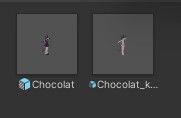
idk I am just very confused why i got two of them and if i could merge them q-q
I also have 2 clothing pieces that I would like to add as toggles and not be like on the avi no matter what, but only through toggling
I don't know what I am doing, the videos are confusing me
An example is, I added the bath towel how the videos said, but then it is just directly over the avis clothes q-q
can I please have help q-q
(P.S. can yall upvote so i can do more on the site q-q)
-
Hello! to answer your first question regarding the two avatars; they're the same avatar but one is in the clothes that the avatar comes with, and has toggles set up for them, and the one with kisekae—which means dress-up—in the name doesn't come with those clothes or toggles.
For putting clothes on avatars without merging the armatures which would be more difficult to undo and seperate, I would highly recommend Modular Avatar if you don't already have it. Once you have it in your project, most new clothes are as easy as dragging and dropping them onto your avatar in the hierarchy to set them up. A good way to tell if this is the case is to click on the Parent Object of the clothes (usually right above the clothes' armature in the Hierarchy) and looking at the Inspector tab for the MA Mesh Settings Component, or any other Component with MA in the name. If you do not find one, right click the Object you dragged into the Hierarchy which contains the armature and clothes Objects, navigate to Modular Avatar, and click Setup Outfit. After that, the outfit is fully merged, but can be removed at any time by simply deleting the clothes' Parent Object!
As for setting up toggles for clothes, I would recommend using Modular Avatar again, as it's a lot simpler than making animations, parameters, and adding them to an animator controller. To make a toggle for your clothes, simply right-click your avatar in the Hierarchy (or any Child Object of the avatar), navigate to Modular Avatar, and click Create Toggle. This creates a new Child Object—an Object attached and under the Object that you clicked on—named "New Toggle" which has the MA Object Toggle, MA Menu Item, and MA Menu Installer Components already in it. From there, drag and drop whichever Objects (such as clothes) that you would like to toggle on or off with a menu item from the Hierarchy into the MA Object Toggle Component. The area that you drop the Object into should highlight blue while you hover over it with an Object clicked when done correctly. To easily test if it works, make sure your clothes are enabled in the Hierarchy, make sure OFF is selected for the clothes Object in the MA Object Toggle Component, then click Inverse Condition or, alternatively, select Is Default in the MA Menu Item Component. This should toggle the clothes off in Scene and Game view.
The only things left to do are to name the menu item by editing the Name field in the MA Menu Item Component, and selecting where you want to have the menu item be located in the in-game menu with the MA Menu Installer Component. Also, make sure that the toggle Object is under your avatar in the Hierarchy, or it won't work if you try to test it with Gesture Manager or upload it to VRChat. As for further tips: If you're adding a lot of clothes or other toggles using Modular Avatar menu Objects, I would recommend that you store the clothes and the toggles in their own Parent Objects on the avatar, so that you can compress them in the Hierarchy when you don't need to work on them. When doing this, you can simplify things by removing the MA Menu Installer Component from each MA toggle Object then Add Component the MA Menu Item and MA Menu Installer Components to the Parent Object, select Sub Menu in the Parent Object's MA Menu Item Component and edit the Name field to something like Clothes or Toggles. If you want to be able to easily enable one clothes—or other—toggle and have all other toggles of the same type be automatically disabled, simply fill in the Parameter field of the MA Menu Item Component with a parameter like Outfit or Hairstyle for each outfit or hairstyle toggle.
To use your problem of the bath towel directly over the avi's clothes as an example, if you want to keep the avi's clothes as a toggleable outfit, I would make a seperate toggle for the default clothes and the bath towel—easily done by setting up one toggle and adding the Clothes parameter to the MA Menu Item Component, clicking the Object and pressing ctrl+D on your keyboard to duplicate the toggle, then editing the fields to their unique toggled Objects and names—to turn each set of clothes ON. Next, I would enable Is Default on one of the MA toggle Object's MA Menu Item Components so that by default when you load the avatar and when you disable any clothes, that Is Default toggle automatically enables. Finally, I would go in the Hierarchy and disable all the Objects that you added to the toggles. This would make it so that only the currently selected menu item's clothes are toggled on.
Hope this helps, feel free to ask for clarification or any other questions you have!
-
Hello! to answer your first question regarding the two avatars; they're the same avatar but one is in the clothes that the avatar comes with, and has toggles set up for them, and the one with kisekae—which means dress-up—in the name doesn't come with those clothes or toggles.
For putting clothes on avatars without merging the armatures which would be more difficult to undo and seperate, I would highly recommend Modular Avatar if you don't already have it. Once you have it in your project, most new clothes are as easy as dragging and dropping them onto your avatar in the hierarchy to set them up. A good way to tell if this is the case is to click on the Parent Object of the clothes (usually right above the clothes' armature in the Hierarchy) and looking at the Inspector tab for the MA Mesh Settings Component, or any other Component with MA in the name. If you do not find one, right click the Object you dragged into the Hierarchy which contains the armature and clothes Objects, navigate to Modular Avatar, and click Setup Outfit. After that, the outfit is fully merged, but can be removed at any time by simply deleting the clothes' Parent Object!
As for setting up toggles for clothes, I would recommend using Modular Avatar again, as it's a lot simpler than making animations, parameters, and adding them to an animator controller. To make a toggle for your clothes, simply right-click your avatar in the Hierarchy (or any Child Object of the avatar), navigate to Modular Avatar, and click Create Toggle. This creates a new Child Object—an Object attached and under the Object that you clicked on—named "New Toggle" which has the MA Object Toggle, MA Menu Item, and MA Menu Installer Components already in it. From there, drag and drop whichever Objects (such as clothes) that you would like to toggle on or off with a menu item from the Hierarchy into the MA Object Toggle Component. The area that you drop the Object into should highlight blue while you hover over it with an Object clicked when done correctly. To easily test if it works, make sure your clothes are enabled in the Hierarchy, make sure OFF is selected for the clothes Object in the MA Object Toggle Component, then click Inverse Condition or, alternatively, select Is Default in the MA Menu Item Component. This should toggle the clothes off in Scene and Game view.
The only things left to do are to name the menu item by editing the Name field in the MA Menu Item Component, and selecting where you want to have the menu item be located in the in-game menu with the MA Menu Installer Component. Also, make sure that the toggle Object is under your avatar in the Hierarchy, or it won't work if you try to test it with Gesture Manager or upload it to VRChat. As for further tips: If you're adding a lot of clothes or other toggles using Modular Avatar menu Objects, I would recommend that you store the clothes and the toggles in their own Parent Objects on the avatar, so that you can compress them in the Hierarchy when you don't need to work on them. When doing this, you can simplify things by removing the MA Menu Installer Component from each MA toggle Object then Add Component the MA Menu Item and MA Menu Installer Components to the Parent Object, select Sub Menu in the Parent Object's MA Menu Item Component and edit the Name field to something like Clothes or Toggles. If you want to be able to easily enable one clothes—or other—toggle and have all other toggles of the same type be automatically disabled, simply fill in the Parameter field of the MA Menu Item Component with a parameter like Outfit or Hairstyle for each outfit or hairstyle toggle.
To use your problem of the bath towel directly over the avi's clothes as an example, if you want to keep the avi's clothes as a toggleable outfit, I would make a seperate toggle for the default clothes and the bath towel—easily done by setting up one toggle and adding the Clothes parameter to the MA Menu Item Component, clicking the Object and pressing ctrl+D on your keyboard to duplicate the toggle, then editing the fields to their unique toggled Objects and names—to turn each set of clothes ON. Next, I would enable Is Default on one of the MA toggle Object's MA Menu Item Components so that by default when you load the avatar and when you disable any clothes, that Is Default toggle automatically enables. Finally, I would go in the Hierarchy and disable all the Objects that you added to the toggles. This would make it so that only the currently selected menu item's clothes are toggled on.
Hope this helps, feel free to ask for clarification or any other questions you have!
I do this kind of thing a lot and even I find this rather helpful.
-
Hello! to answer your first question regarding the two avatars; they're the same avatar but one is in the clothes that the avatar comes with, and has toggles set up for them, and the one with kisekae—which means dress-up—in the name doesn't come with those clothes or toggles.
For putting clothes on avatars without merging the armatures which would be more difficult to undo and seperate, I would highly recommend Modular Avatar if you don't already have it. Once you have it in your project, most new clothes are as easy as dragging and dropping them onto your avatar in the hierarchy to set them up. A good way to tell if this is the case is to click on the Parent Object of the clothes (usually right above the clothes' armature in the Hierarchy) and looking at the Inspector tab for the MA Mesh Settings Component, or any other Component with MA in the name. If you do not find one, right click the Object you dragged into the Hierarchy which contains the armature and clothes Objects, navigate to Modular Avatar, and click Setup Outfit. After that, the outfit is fully merged, but can be removed at any time by simply deleting the clothes' Parent Object!
As for setting up toggles for clothes, I would recommend using Modular Avatar again, as it's a lot simpler than making animations, parameters, and adding them to an animator controller. To make a toggle for your clothes, simply right-click your avatar in the Hierarchy (or any Child Object of the avatar), navigate to Modular Avatar, and click Create Toggle. This creates a new Child Object—an Object attached and under the Object that you clicked on—named "New Toggle" which has the MA Object Toggle, MA Menu Item, and MA Menu Installer Components already in it. From there, drag and drop whichever Objects (such as clothes) that you would like to toggle on or off with a menu item from the Hierarchy into the MA Object Toggle Component. The area that you drop the Object into should highlight blue while you hover over it with an Object clicked when done correctly. To easily test if it works, make sure your clothes are enabled in the Hierarchy, make sure OFF is selected for the clothes Object in the MA Object Toggle Component, then click Inverse Condition or, alternatively, select Is Default in the MA Menu Item Component. This should toggle the clothes off in Scene and Game view.
The only things left to do are to name the menu item by editing the Name field in the MA Menu Item Component, and selecting where you want to have the menu item be located in the in-game menu with the MA Menu Installer Component. Also, make sure that the toggle Object is under your avatar in the Hierarchy, or it won't work if you try to test it with Gesture Manager or upload it to VRChat. As for further tips: If you're adding a lot of clothes or other toggles using Modular Avatar menu Objects, I would recommend that you store the clothes and the toggles in their own Parent Objects on the avatar, so that you can compress them in the Hierarchy when you don't need to work on them. When doing this, you can simplify things by removing the MA Menu Installer Component from each MA toggle Object then Add Component the MA Menu Item and MA Menu Installer Components to the Parent Object, select Sub Menu in the Parent Object's MA Menu Item Component and edit the Name field to something like Clothes or Toggles. If you want to be able to easily enable one clothes—or other—toggle and have all other toggles of the same type be automatically disabled, simply fill in the Parameter field of the MA Menu Item Component with a parameter like Outfit or Hairstyle for each outfit or hairstyle toggle.
To use your problem of the bath towel directly over the avi's clothes as an example, if you want to keep the avi's clothes as a toggleable outfit, I would make a seperate toggle for the default clothes and the bath towel—easily done by setting up one toggle and adding the Clothes parameter to the MA Menu Item Component, clicking the Object and pressing ctrl+D on your keyboard to duplicate the toggle, then editing the fields to their unique toggled Objects and names—to turn each set of clothes ON. Next, I would enable Is Default on one of the MA toggle Object's MA Menu Item Components so that by default when you load the avatar and when you disable any clothes, that Is Default toggle automatically enables. Finally, I would go in the Hierarchy and disable all the Objects that you added to the toggles. This would make it so that only the currently selected menu item's clothes are toggled on.
Hope this helps, feel free to ask for clarification or any other questions you have!
@ChicTac Thank you, i'll work on this and get back to you
 (ty for upvoting me too, i'll make sure to pass it back when i get another c:)

Hello! It looks like you're interested in this conversation, but you don't have an account yet.
Getting fed up of having to scroll through the same posts each visit? When you register for an account, you'll always come back to exactly where you were before, and choose to be notified of new replies (either via email, or push notification). You'll also be able to save bookmarks and upvote posts to show your appreciation to other community members.
With your input, this post could be even better 💗
Register Login