
Asset Hunter, A tool to make RipperStore easier
-
Installation.
1. Install the Tampermonkey browser extension.
For Chromium Based Browsers
For Firefox Based Browsers2. Install the script.
Simply click HERE and Install!
3. Nothing! you're done lol
If even after doing that the script doesnt show up, follow THIS
Features
-
1 Click Posts
found an asset you like? no posts looking for it yet? simply click a button!
(Posts are completelly customizable. Title, body, tags, category, everything, both per-post or in your settings!) -
Automatically searches RipperStore for you!
You open the asset page, it pops up showing all the RipperStore posts that talk about it! -
Watchlist
Found an asset that already has a post in the forum?
simply add it to your watchlist and check it from time to time!
no need to bloat the Forums with multiple LF requests for the same item! -
Support for most mainstream stores!
Booth, PayHip, Gumroad and Jinxxy are supported! -
Fully supports 4 languages!
English (US), Português (Brazil), русский, 日本語
Screenshots (Old)
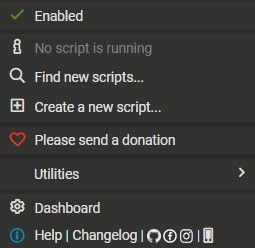
1 Click Posts (Automatically grabs the asset name and link (Fully customizable in settings))

Main Tab (Auto Search)

Watchlist

Asset Hunter was never intended to be a public tool, but at some point it got too good to keep it to myself lol
its my first time ever making anything public like this, so dont expect it to be 100% perfect.
Please upvote this post if the tool helps you!
-
-
-
-
-
idk what i did wrong i followed the steps and nothing... just nothing only time i saw it do anything was when it it failed to load itself ad showed image errors and stuff ive also reinstalled it like 5 times same just nothing click a post nothing, just same old forums.
-
-
-
-
@_Lua_
You need to install tampermonkey, THEN script separately. It's two different things.
Also,- You need to enable User Scripts in "Manage Extensions" of tampermonkey
- It's a tool used on Booth, PayHip, Gumroad and Jinxxy. Not within ripperstore.
-
-
Fantastic tool btw. Thanks for sharing!
@wobblyBirb thank you! also ty for helping them, i didnt see the notification
-
Installation.
1. Install the Tampermonkey browser extension.
For Chromium Based Browsers
For Firefox Based Browsers2. Install the script.
Simply click HERE and Install!
3. Nothing! you're done lol
If even after doing that the script doesnt show up, follow THIS
Features
-
1 Click Posts
found an asset you like? no posts looking for it yet? simply click a button!
(Posts are completelly customizable. Title, body, tags, category, everything, both per-post or in your settings!) -
Automatically searches RipperStore for you!
You open the asset page, it pops up showing all the RipperStore posts that talk about it! -
Watchlist
Found an asset that already has a post in the forum?
simply add it to your watchlist and check it from time to time!
no need to bloat the Forums with multiple LF requests for the same item! -
Support for most mainstream stores!
Booth, PayHip, Gumroad and Jinxxy are supported! -
Fully supports 4 languages!
English (US), Português (Brazil), русский, 日本語
Screenshots (Old)
1 Click Posts (Automatically grabs the asset name and link (Fully customizable in settings))
Main Tab (Auto Search)
Watchlist
Asset Hunter was never intended to be a public tool, but at some point it got too good to keep it to myself lol
its my first time ever making anything public like this, so dont expect it to be 100% perfect.
Please upvote this post if the tool helps you!
-
-
@anonberry no problem! if you find any problems with the translation let me know!
-
The hero we needed, not the one we deserved.
May your food be delicious, and your pillow always an adequate temperature.
-
The hero we needed, not the one we deserved.
May your food be delicious, and your pillow always an adequate temperature.
-
Is it at all possible to make a toggle for automatic searching? I ask because if you're just browsing a bunch of booth listings in bulk, all of them will try to search as soon as the page loads and I'm regularly getting rate limited on the forums. I'd like the ability to turn off automatically searching and instead just press a button to look for it once I've determined the item I've opened is actually something I want to look for
-
Is it at all possible to make a toggle for automatic searching? I ask because if you're just browsing a bunch of booth listings in bulk, all of them will try to search as soon as the page loads and I'm regularly getting rate limited on the forums. I'd like the ability to turn off automatically searching and instead just press a button to look for it once I've determined the item I've opened is actually something I want to look for
@mysterywizard sure i can add that, for me a usualy open a lot of pages and just refresh the page if it errors, but your idea is better
-
Is it at all possible to make a toggle for automatic searching? I ask because if you're just browsing a bunch of booth listings in bulk, all of them will try to search as soon as the page loads and I'm regularly getting rate limited on the forums. I'd like the ability to turn off automatically searching and instead just press a button to look for it once I've determined the item I've opened is actually something I want to look for
@mysterywizard done, either wait for auto update or update manually through the install link
-
-







Hello! It looks like you're interested in this conversation, but you don't have an account yet.
Getting fed up of having to scroll through the same posts each visit? When you register for an account, you'll always come back to exactly where you were before, and choose to be notified of new replies (either via email, or push notification). You'll also be able to save bookmarks and upvote posts to show your appreciation to other community members.
With your input, this post could be even better 💗
Register Login