Skip to content
  • Categories
  • Recent
  • Tags
  • Popular
Skins
  • Light
  • Brite
  • Cerulean
  • Cosmo
  • Flatly
  • Journal
  • Litera
  • Lumen
  • Lux
  • Materia
  • Minty
  • Morph
  • Pulse
  • Sandstone
  • Simplex
  • Sketchy
  • Spacelab
  • United
  • Yeti
  • Zephyr
  • Dark
  • Cyborg
  • Darkly
  • Quartz
  • Slate
  • Solar
  • Superhero
  • Vapor

  • Default (Zephyr)
  • No Skin
Collapse
RipperStore Logo
  1. Home
  2. Guides
  3. New User Help
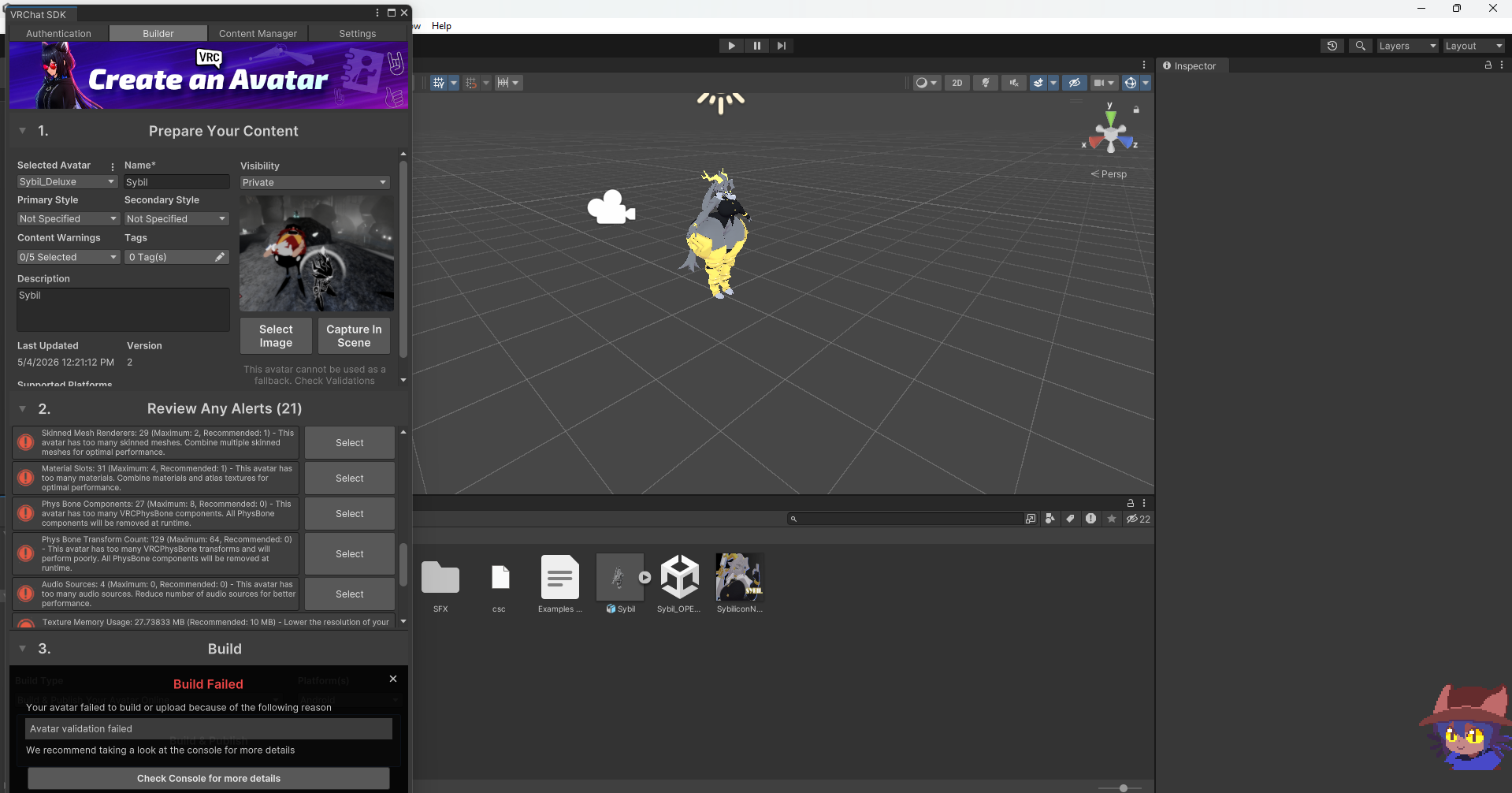
  4. does anyone know how to fix the avatar validation failed error?

does anyone know how to fix the avatar validation failed error?

Scheduled Pinned Locked Moved New User Help
help plz
5 Posts 3 Posters 165 Views
  • Oldest to Newest
  • Newest to Oldest
  • Most Votes
Reply
  • Reply as topic
Log in to reply
This topic has been deleted. Only users with topic management privileges can see it.
  • My5tcrimsonM
    My5tcrimsonM
    My5tcrimson
    wrote on last edited by
    #1

    image_2026-05-04_133551461.png

    1 Reply Last reply
    0
    • CHECHEC
      CHECHEC
      CHECHE
      wrote on last edited by
      #2

      bump i need help w this tooo

      1 Reply Last reply
      0
      • F
        F
        Forgotten
        wrote on last edited by Forgotten
        #3

        Yes. In the descriptor scroll down, sometimes it might be at the top. Look for something called prefab ID. You'll need to clear it. Once you do, leave it and try upload it. It'll create a new ID for the avatar. I can't promise this'll help but it might, it might also be due to script errors. If you don't have facs, you might have to go through every bone looking for the script errors. When you do click on the three lines, then press remove component. It could be both of these issues, one or none.

        1 Reply Last reply
        0
        • F
          F
          Forgotten
          wrote on last edited by
          #4

          Ah wait no scratch all that, I can see the issue in the script errors

          1 Reply Last reply
          0
          • F
            F
            Forgotten
            wrote on last edited by Forgotten
            #5

            You're uploading it to Quest and the avatar has too many physbones, physbone components, audio sources that don't work on Quest and the file size is also probably too big. You'll need to do a ton of optimising to get that Quest

            1 Reply Last reply
            0

            Hello! It looks like you're interested in this conversation, but you don't have an account yet.

            Getting fed up of having to scroll through the same posts each visit? When you register for an account, you'll always come back to exactly where you were before, and choose to be notified of new replies (either via email, or push notification). You'll also be able to save bookmarks and upvote posts to show your appreciation to other community members.

            With your input, this post could be even better 💗

            Register Login
            Reply
            • Reply as topic
            Log in to reply
            • Oldest to Newest
            • Newest to Oldest
            • Most Votes


            • Login

            • Login or register to search.
            • First post
              Last post
            0
            • Categories
            • Recent
            • Tags
            • Popular