
Disko Rex – Plug & Play Face Tracking Pack (v1) by GiG
-
Disko Rex – Plug & Play Face Tracking Pack (v1)
Hey everyone,
I finally found the time to create a proper plug-and-play face tracking Unity package for the Disko Rex.It works with all Disko versions and is compatible with SDK updates.
Features
- Easy plug & play setup
- Works across all Disko Rex versions
- Compatible with updated SDK packages
- No complex configuration required
Installation Guide
-
Remove existing face tracking (if installed)
- Delete any face tracking assets from your Package Manager or project.
-
Import the Unity package
- Drag and drop the Unity package into your project.
-
Add the prefab
- Drag the prefab onto your Disko avatar.
-
Done
><
Important Notice
This package replaces the previous “Ready_To_Go” Disko Rex version with built-in face tracking.
Please make a backup of your project first and test this on the backup before using it in your main project.
Version Info
Version 1 – Initial Release
Known Issues
- Gestures are completely disabled once the prefab is added (they are not deleted, just inactive)
- Hands no longer have pointing or other animations
If you know a workaround for this, feel free to contact me.
-
big W kust waiting for newer versions
-
big w thx so much for fixing this
-
Disko Rex – Plug & Play Face Tracking Pack (v1)
Hey everyone,
I finally found the time to create a proper plug-and-play face tracking Unity package for the Disko Rex.It works with all Disko versions and is compatible with SDK updates.
Features
- Easy plug & play setup
- Works across all Disko Rex versions
- Compatible with updated SDK packages
- No complex configuration required
Installation Guide
-
Remove existing face tracking (if installed)
- Delete any face tracking assets from your Package Manager or project.
-
Import the Unity package
- Drag and drop the Unity package into your project.
-
Add the prefab
- Drag the prefab onto your Disko avatar.
-
Done
><
Important Notice
This package replaces the previous “Ready_To_Go” Disko Rex version with built-in face tracking.
Please make a backup of your project first and test this on the backup before using it in your main project.
Version Info
Version 1 – Initial Release
Known Issues
- Gestures are completely disabled once the prefab is added (they are not deleted, just inactive)
- Hands no longer have pointing or other animations
If you know a workaround for this, feel free to contact me.
@gig btw i figured out an easy fix for a 1.1, remove your "Remove built-in hand gestures" thing in the prefab and make a custom FX file like this
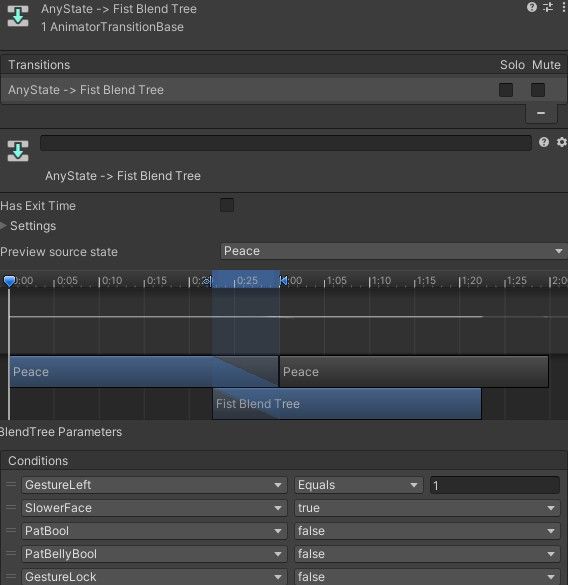
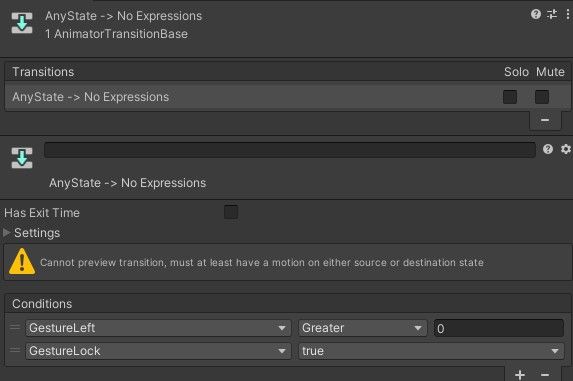 (Bool parameter called GestureLock and just replace the expression toggle paramter in the face tracking with that using your own menus and change the Gesture____ to the Right or Left, and both GestureRIght and Left for the both gestures one)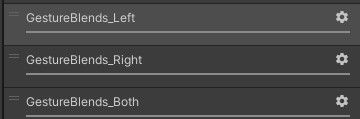
-
Like these -
-
-
How in god's green earth do I get the hands to work?
@drakefenrick I already made a prefab for it-... Just look up. It works fine for me

Hello! It looks like you're interested in this conversation, but you don't have an account yet.
Getting fed up of having to scroll through the same posts each visit? When you register for an account, you'll always come back to exactly where you were before, and choose to be notified of new replies (either via email, or push notification). You'll also be able to save bookmarks and upvote posts to show your appreciation to other community members.
With your input, this post could be even better 💗
Register Login