Skip to content
  • Categories
  • Recent
  • Tags
  • Popular
Skins
  • Light
  • Brite
  • Cerulean
  • Cosmo
  • Flatly
  • Journal
  • Litera
  • Lumen
  • Lux
  • Materia
  • Minty
  • Morph
  • Pulse
  • Sandstone
  • Simplex
  • Sketchy
  • Spacelab
  • United
  • Yeti
  • Zephyr
  • Dark
  • Cyborg
  • Darkly
  • Quartz
  • Slate
  • Solar
  • Superhero
  • Vapor

  • Default (Zephyr)
  • No Skin
Collapse
RipperStore Logo
  1. Home
  2. Assets
  3. Looking for...
  4. Furry Avatars
  5. Mouse by Chunkerbuns

Mouse by Chunkerbuns

Scheduled Pinned Locked Moved Unsolved Furry Avatars
looking forvrchatmousefurry
60 Posts 31 Posters 9.7k Views 55 Watching
  • Oldest to Newest
  • Newest to Oldest
  • Most Votes
Reply
  • Reply as topic
Log in to reply
This topic has been deleted. Only users with topic management privileges can see it.
  • ratsxratsR ratsxrats

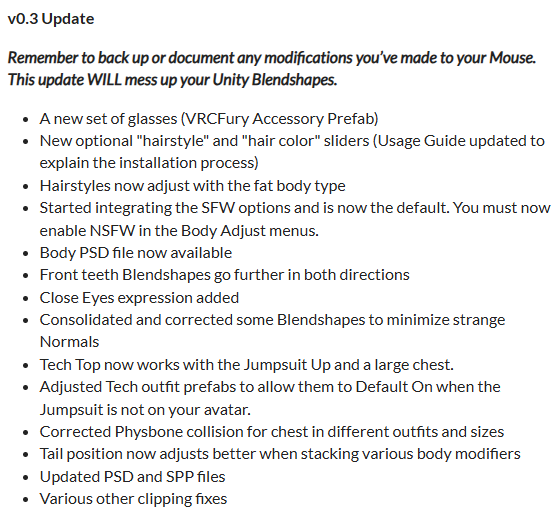
    Updated with v0.3 files

    CodeGiver_01C
    CodeGiver_01C
    CodeGiver_01
    wrote on last edited by
    #20

    @ratsxrats this guy is a w mans i gotta follow bro

    𝐕𝐞𝐧𝐝𝐮𝐞𝐫

    1 Reply Last reply
    0
    • ratsxratsR ratsxrats

      Updated with v0.3 files

      Blaze7689B
      Blaze7689B
      Blaze7689
      wrote on last edited by
      #21

      @ratsxrats Did I miss something? Cause this v0.3 still didn't fix the cheese toggle and still no hair changer. Unless uploaded the wrong one

      ratsxratsR 1 Reply Last reply
      0
      • Blaze7689B Blaze7689

        @ratsxrats Did I miss something? Cause this v0.3 still didn't fix the cheese toggle and still no hair changer. Unless uploaded the wrong one

        ratsxratsR
        ratsxratsR
        ratsxrats
        wrote on last edited by ratsxrats
        #22

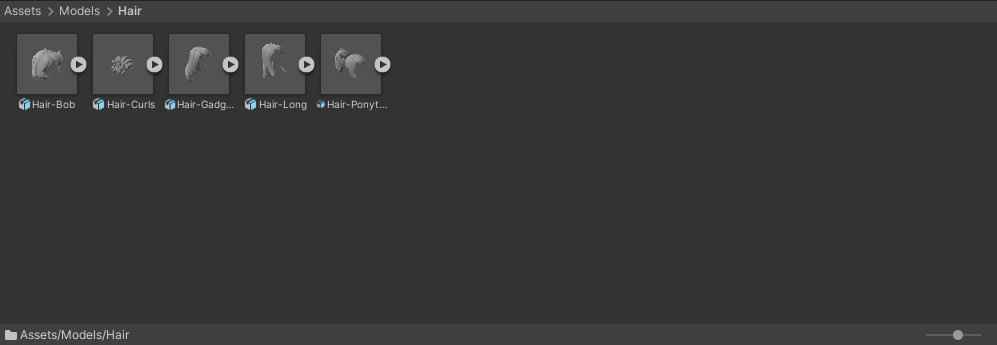
        @Sonic6908 As far as I'm aware there is no hair changer menu or anything like that. You have to change the hair style by manually placing it onto the avatar in unity. See pic:hair mouse.png
        Also the cheese toggle works fine for me, just reach into your chest to grab it.

        Blaze7689B catsyrup5000C 2 Replies Last reply
        0
        • ratsxratsR ratsxrats

          @Sonic6908 As far as I'm aware there is no hair changer menu or anything like that. You have to change the hair style by manually placing it onto the avatar in unity. See pic:hair mouse.png
          Also the cheese toggle works fine for me, just reach into your chest to grab it.

          Blaze7689B
          Blaze7689B
          Blaze7689
          wrote on last edited by
          #23

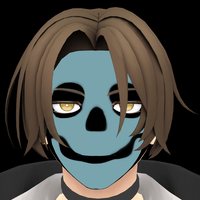
          @ratsxrats Okay I didn't know it was a contact. Also I should of clarify, I meant the hue shift cause it says its there but isn't. Also I'm not sure what they meant by the installation guide2b0741d7-5b2f-407b-9d90-cadea144c52b-image.png

          1 Reply Last reply
          0
          • eironE
            eironE
            eiron
            wrote on last edited by
            #24

            was chunkerbuns haylee model ever released for sale or was it a private model?
            alt text

            1 Reply Last reply
            0
            • darkLilly16D
              darkLilly16D
              darkLilly16
              wrote on last edited by
              #25

              till now private , chunker showed some WIP printable pics

              1 Reply Last reply
              0
              • ratsxratsR ratsxrats

                @LeaveMeAlone Out of pure spite for this user I coughed up 50 bucks for this model to share with you all.

                🔗 Download Link (pixeldrain.com)

                I'll keep this updated.

                ratsxratsR
                ratsxratsR
                ratsxrats
                wrote on last edited by
                #26

                Updated with v0.4 files + extras
                v04.gif

                catsyrup5000C 1 Reply Last reply
                👍
                4
                • ratsxratsR ratsxrats

                  Updated with v0.4 files + extras
                  v04.gif

                  catsyrup5000C
                  catsyrup5000C
                  catsyrup5000
                  wrote on last edited by
                  #27

                  @ratsxrats Thank you!

                  'preciate upvotes, but if I'm just pointing at somebody else's post, go give them an upvote, too :)

                  1 Reply Last reply
                  0
                  • ratsxratsR ratsxrats

                    @LeaveMeAlone Out of pure spite for this user I coughed up 50 bucks for this model to share with you all.

                    🔗 Download Link (pixeldrain.com)

                    I'll keep this updated.

                    ratsxratsR
                    ratsxratsR
                    ratsxrats
                    wrote on last edited by
                    #28

                    Added the v0.4 Quest version to the files. Now poor people Everyone can enjoy cute mouse girl!

                    1 Reply Last reply
                    1
                    • ratsxratsR ratsxrats

                      @Sonic6908 As far as I'm aware there is no hair changer menu or anything like that. You have to change the hair style by manually placing it onto the avatar in unity. See pic:hair mouse.png
                      Also the cheese toggle works fine for me, just reach into your chest to grab it.

                      catsyrup5000C
                      catsyrup5000C
                      catsyrup5000
                      wrote on last edited by catsyrup5000
                      #29

                      @ratsxrats said in Mouse by Chunkerbuns:

                      As far as I'm aware there is no hair changer menu or anything like that.

                      There are Hair parameters and a menu but it looks like they're just placeholders right now.
                      Edit: Guess I should've RTFM XD
                      From the user guide:

                      HSV and HairStyle Radials

                      If you would like to freely swap out your hairstyles in-game, add the “HairStyleRadial” utility into
                      your Hair folder on your avatar, as well as every hairstyle you would like to be able to swap to.
                      Only do this if you don’t care about performance, as it will bloat your polygon count
                      significantly.

                      hierarchy>Prefabs_VRCFury>Hair>Utilities>HairstyleRadial

                      The hair in the models folder are just the models; the ones in the Prefabs folder actually conform to the avatar when you drag/drop them on. Same with the outfits like the lab coat. It's pretty slick, VRCFury even adds/removes the menus and toggles automatically.
                      Making it look like Gadget was not very hard at all, I'll post a guide and a quick-and-dirty body skin I did in Substance later if anybody wants it. The white mouse skin actually has a toggle to turn off the pink just for the hands and feet, and then you can tint the white parts to peach/"skin color" - the gray and brown etc variants don't have that option. In unity you just turn on/off (can't remember) the color override for the red eyes and they turn blue,
                      Edit:
                      Select the Body in Hierarchy, then scroll down the Inspector to Eyes (Material)
                      Expand that, unlock the shader if it's locked, expand Color & Normals, then check the box for Color Adjust. Chunkerbuns already set it to blue, so you shouldn't need to tweak the hue etc.
                      Same thing to make the jumpsuit purple.
                      This was super helpful: [register or login to view this hidden content]

                      Thing is heckin' cute, I'll probably buy it once it's out of beta, assuming it's not priced like Once Upon a Time in Shaolin. Thanks again for letting us poors have a test drive 🙂

                      'preciate upvotes, but if I'm just pointing at somebody else's post, go give them an upvote, too :)

                      1 Reply Last reply
                      0
                      • F
                        F
                        FemboyWaifu
                        wrote on last edited by
                        #30

                        has anyone figured out NSFW texturing? The texture by default is NSFW, however the body toggles are SFW. When you turn on the NSFW toggle to turn on the nips, it ruins the texture - stretching the skin area down to the bottom of the breast. I've already looked on SPP to see if there's a separate area on the UV, but I don't see one.

                        1 Reply Last reply
                        0
                        • Artisy2024A
                          Artisy2024A
                          Artisy2024
                          wrote on last edited by
                          #31

                          bump for v1.0 update

                          1 Reply Last reply
                          0
                          • TheCoolioT
                            TheCoolioT
                            TheCoolio
                            wrote on last edited by
                            #32

                            Bump for update!

                            1 Reply Last reply
                            0
                            • OSRS GoblinoO
                              OSRS GoblinoO
                              OSRS Goblino
                              wrote on last edited by
                              #33

                              Bump for the v1.0 update!

                              1 Reply Last reply
                              0
                              • JaySergalJ
                                JaySergalJ
                                JaySergal
                                wrote on last edited by
                                #34

                                Bumparooni

                                1 Reply Last reply
                                0
                                • ratsxratsR ratsxrats

                                  @LeaveMeAlone Out of pure spite for this user I coughed up 50 bucks for this model to share with you all.

                                  🔗 Download Link (pixeldrain.com)

                                  I'll keep this updated.

                                  ratsxratsR
                                  ratsxratsR
                                  ratsxrats
                                  wrote on last edited by
                                  #35

                                  Sorry for the delay everyone. Mouse v1.0 is now up!

                                  TheCoolioT 1 Reply Last reply
                                  3
                                  • ratsxratsR ratsxrats

                                    Sorry for the delay everyone. Mouse v1.0 is now up!

                                    TheCoolioT
                                    TheCoolioT
                                    TheCoolio
                                    wrote on last edited by
                                    #36

                                    @ratsxrats yay, thanks!

                                    1 Reply Last reply
                                    2
                                    • TheCoolioT
                                      TheCoolioT
                                      TheCoolio
                                      wrote on last edited by
                                      #37

                                      Awh i cant upvote without reputation, dangit

                                      1 Reply Last reply
                                      2
                                      • TheCoolioT
                                        TheCoolioT
                                        TheCoolio
                                        wrote on last edited by
                                        #38

                                        Yay, here's an upvote 😄

                                        1 Reply Last reply
                                        0
                                        • ratsxratsR ratsxrats

                                          @LeaveMeAlone Out of pure spite for this user I coughed up 50 bucks for this model to share with you all.

                                          🔗 Download Link (pixeldrain.com)

                                          I'll keep this updated.

                                          ratsxratsR
                                          ratsxratsR
                                          ratsxrats
                                          wrote on last edited by
                                          #39

                                          v1.1 is up along with updated blender files.

                                          1 Reply Last reply
                                          2

                                          Hello! It looks like you're interested in this conversation, but you don't have an account yet.

                                          Getting fed up of having to scroll through the same posts each visit? When you register for an account, you'll always come back to exactly where you were before, and choose to be notified of new replies (either via email, or push notification). You'll also be able to save bookmarks and upvote posts to show your appreciation to other community members.

                                          With your input, this post could be even better 💗

                                          Register Login
                                          Reply
                                          • Reply as topic
                                          Log in to reply
                                          • Oldest to Newest
                                          • Newest to Oldest
                                          • Most Votes


                                          • Login

                                          • Login or register to search.
                                          • First post
                                            Last post
                                          0
                                          • Categories
                                          • Recent
                                          • Tags
                                          • Popular