Skip to content
  • Categories
  • Recent
  • Tags
  • Popular
Skins
  • Light
  • Brite
  • Cerulean
  • Cosmo
  • Flatly
  • Journal
  • Litera
  • Lumen
  • Lux
  • Materia
  • Minty
  • Morph
  • Pulse
  • Sandstone
  • Simplex
  • Sketchy
  • Spacelab
  • United
  • Yeti
  • Zephyr
  • Dark
  • Cyborg
  • Darkly
  • Quartz
  • Slate
  • Solar
  • Superhero
  • Vapor

  • Default (Zephyr)
  • No Skin
Collapse
RipperStore Logo
  1. Home
  2. Assets
  3. Looking for...
  4. Gumroad/Payhip Avatars
  5. LF: Pepsi Pupper (PREORDERS)

LF: Pepsi Pupper (PREORDERS)

Scheduled Pinned Locked Moved Unsolved Gumroad/Payhip Avatars
furrypeekabowosummer
156 Posts 41 Posters 24.1k Views 61 Watching
  • Oldest to Newest
  • Newest to Oldest
  • Most Votes
Reply
  • Reply as topic
Log in to reply
This topic has been deleted. Only users with topic management privileges can see it.
  • 33soloe3 33soloe

    @hai bro what the fuck are you even talking about. like saying u don’t want beef in my dms and then you proceed to @ me in a public post is just kinda ridiculous to me. never once complained, in fact YOU are the one that went in MY dms. please keep my name out your mouth, if you got nothing positive to say don’t say it at all.

    VapeV
    VapeV
    Vape
    wrote on last edited by
    #118

    @33soloe the more mature thing to do was to just ignore this. dont start unnecessary drama by responding

    33soloe3 1 Reply Last reply
    👍
    0
    • VapeV Vape

      @33soloe the more mature thing to do was to just ignore this. dont start unnecessary drama by responding

      33soloe3
      33soloe3
      33soloe
      wrote on last edited by
      #119

      @Sparkles and i would agree, however this is not the first time this user has mentioned me in a public post spreading misinformation

      ⋆ ˚。⋆୨ † ୧⋆ ˚。⋆

      1 Reply Last reply
      1
      • H
        H
        hai
        Banned
        wrote on last edited by hai
        #120

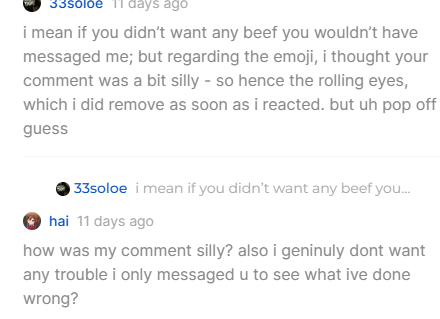
        hey so this is the first instance i ever had a bad ecounter with you so im not sure about not the first time spreading false info, this is not false info you are very rude.
        image.png
        Screenshot 2025-06-22 111054.png
        Screenshot 2025-06-22 111032.png
        @33soloe

        1 Reply Last reply
        0
        • H
          H
          hai
          Banned
          wrote on last edited by
          #121

          you were saying me complaining was silly but you did the exact same thing so im unsure of what you mean,

          1 Reply Last reply
          0
          • 33soloe3
            33soloe3
            33soloe
            wrote on last edited by
            #122

            you’re only showing the second half of that conversation, and yes i thought it was silly because it was just one person. so yea later on i say “bro this is the second time someone has the files but opt out” im no longer continuing this conversation

            ⋆ ˚。⋆୨ † ୧⋆ ˚。⋆

            1 Reply Last reply
            0
            • VapeV Vape

              image.png
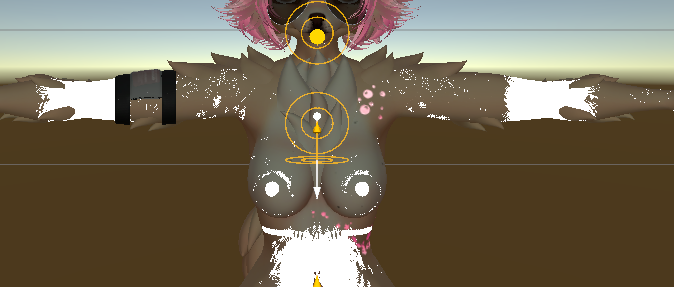
              holy shit, anyone else get this issue with the nsfw body?

              SooxiS
              SooxiS
              Sooxi
              wrote on last edited by
              #123

              @Sparkles i have the same issue with the nsfw sidde ;-;

              bunubunnB 1 Reply Last reply
              0
              • SooxiS Sooxi

                @Sparkles i have the same issue with the nsfw sidde ;-;

                bunubunnB
                bunubunnB
                bunubunn
                wrote on last edited by bunubunn
                #124

                @Sooxi yeah id, the blonde ver of the dlc is just white and i cant get it to fix image_2025-06-22_122116399.png

                SooxiS 2 Replies Last reply
                0
                • bunubunnB bunubunn

                  @Sooxi yeah id, the blonde ver of the dlc is just white and i cant get it to fix image_2025-06-22_122116399.png

                  SooxiS
                  SooxiS
                  Sooxi
                  wrote on last edited by
                  #125

                  @bunubunn same here.... im confused

                  1 Reply Last reply
                  0
                  • bunubunnB bunubunn

                    @Sooxi yeah id, the blonde ver of the dlc is just white and i cant get it to fix image_2025-06-22_122116399.png

                    SooxiS
                    SooxiS
                    Sooxi
                    wrote on last edited by
                    #126

                    @bunubunn go into the blond version nswf material and remove the matcap it fixed it for me so far

                    VapeV 1 Reply Last reply
                    😊
                    0
                    • SooxiS Sooxi

                      @bunubunn go into the blond version nswf material and remove the matcap it fixed it for me so far

                      VapeV
                      VapeV
                      Vape
                      wrote on last edited by
                      #127

                      @Sooxi remove matcap but also makesure to fully unpack the prefab.

                      bunubunnB 1 Reply Last reply
                      0
                      • VapeV
                        VapeV
                        Vape
                        wrote on last edited by
                        #128

                        just a quick tip aswell i recogmend just removing the tattoos since there isnt any on the nsfw body

                        1 Reply Last reply
                        0
                        • VapeV Vape

                          @Sooxi remove matcap but also makesure to fully unpack the prefab.

                          bunubunnB
                          bunubunnB
                          bunubunn
                          wrote on last edited by
                          #129

                          @Sparkles yeah i unpacked it but i wasnt sure why it wasmt working

                          1 Reply Last reply
                          0
                          • O OnlyOneBuzz
                            [[topic:post-is-deleted]]
                            noirN
                            noirN
                            noir
                            wrote on last edited by
                            #130

                            @OnlyOneBuzz Thank you! I reuped mine too LOL

                            1 Reply Last reply
                            0
                            • R
                              R
                              RawrBaby
                              wrote on last edited by
                              #131

                              is there any way to turn the unity package into an fbx or blend file? i wanna modify her ;((

                              VapeV kysK 2 Replies Last reply
                              0
                              • R RawrBaby

                                is there any way to turn the unity package into an fbx or blend file? i wanna modify her ;((

                                VapeV
                                VapeV
                                Vape
                                wrote on last edited by
                                #132

                                @RawrBaby there should be an fbx in the unity package, you just have to open unity

                                R 1 Reply Last reply
                                0
                                • VapeV Vape

                                  @RawrBaby there should be an fbx in the unity package, you just have to open unity

                                  R
                                  R
                                  RawrBaby
                                  wrote on last edited by
                                  #133

                                  @Sparkles but can you drag and drog it into blender though

                                  VapeV 1 Reply Last reply
                                  0
                                  • R RawrBaby

                                    @Sparkles but can you drag and drog it into blender though

                                    VapeV
                                    VapeV
                                    Vape
                                    wrote on last edited by
                                    #134

                                    @RawrBaby pretty sure youd have to export the fbx

                                    1 Reply Last reply
                                    0
                                    • R RawrBaby

                                      is there any way to turn the unity package into an fbx or blend file? i wanna modify her ;((

                                      kysK
                                      kysK
                                      kys
                                      wrote on last edited by
                                      #135

                                      @RawrBaby in unity, install the fbx exporter in windows then package manager. once its installed, left click the avatar in the hierarchy and there should be an option labeled "Export to FBX...", select that then switch the export format from ASCII to Binary, also select a folder you would like it to go in otherwise it'll just export to your project folder. From there, open blender and add something called Better FBX Importer and import it through that ,DONT import through the cats addon (it breaks the bones/mesh and messes up materials). After all that you can remove all un-needed bones, like hair bones if you aren't wanting to keep any hair and wish to replace it, then go ahead and modify away. When it is time to bring her back to unity, id recommend using pumpkins avatar tools to move the fx layer and all the parameters from the original model to your new version! Hope this is of any help!

                                      R 1 Reply Last reply
                                      0
                                      • kysK kys

                                        @RawrBaby in unity, install the fbx exporter in windows then package manager. once its installed, left click the avatar in the hierarchy and there should be an option labeled "Export to FBX...", select that then switch the export format from ASCII to Binary, also select a folder you would like it to go in otherwise it'll just export to your project folder. From there, open blender and add something called Better FBX Importer and import it through that ,DONT import through the cats addon (it breaks the bones/mesh and messes up materials). After all that you can remove all un-needed bones, like hair bones if you aren't wanting to keep any hair and wish to replace it, then go ahead and modify away. When it is time to bring her back to unity, id recommend using pumpkins avatar tools to move the fx layer and all the parameters from the original model to your new version! Hope this is of any help!

                                        R
                                        R
                                        RawrBaby
                                        wrote on last edited by RawrBaby
                                        #136

                                        @kys this is way too confusing for me, where in windows is the fbx exporter, and where is package manager??? like im not understanding where to actually find it, am i supposed to be in unity HUB or the unity project with the avatar in it?????

                                        edited: sorry i found a tutorial! thank you for helping me! my brain really fried itself lol

                                        noirN 1 Reply Last reply
                                        1
                                        • R RawrBaby

                                          @kys this is way too confusing for me, where in windows is the fbx exporter, and where is package manager??? like im not understanding where to actually find it, am i supposed to be in unity HUB or the unity project with the avatar in it?????

                                          edited: sorry i found a tutorial! thank you for helping me! my brain really fried itself lol

                                          noirN
                                          noirN
                                          noir
                                          wrote on last edited by
                                          #137

                                          @RawrBaby You can just right click the FBX in unity, click "Show in explorer" and then copy that file path, go to blender and Import FBX, paste the file path, import the fbx for the avatar

                                          1 Reply Last reply
                                          0

                                          Hello! It looks like you're interested in this conversation, but you don't have an account yet.

                                          Getting fed up of having to scroll through the same posts each visit? When you register for an account, you'll always come back to exactly where you were before, and choose to be notified of new replies (either via email, or push notification). You'll also be able to save bookmarks and upvote posts to show your appreciation to other community members.

                                          With your input, this post could be even better 💗

                                          Register Login
                                          Reply
                                          • Reply as topic
                                          Log in to reply
                                          • Oldest to Newest
                                          • Newest to Oldest
                                          • Most Votes


                                          • Login

                                          • Login or register to search.
                                          • First post
                                            Last post
                                          0
                                          • Categories
                                          • Recent
                                          • Tags
                                          • Popular