
✔ (FOUND by sleepy_puppy & ᴋᴏʀɪ) 007 by ZarZar & 001 by Animee
-
-
male found here > https://forum.ripper.store/topic/48094/found-by-sleepy_puppy-001-by-animee-007-by-zarzar/13
⊱ ────── {⋆♥⋆} ────── ⊰
Please do NOT leave unnecessary comments about the appearance of the models I choose to post.
⊱ ────── {⋆♥⋆} ────── ⊰ -
 A avicollector moved this topic from Gumroad/Payhip Avatars on
-
@avicollector The toggles don't seem to work unless I'm doing something wrong.
-
@avicollector The toggles don't seem to work unless I'm doing something wrong.
@eternalseoul Alright suspicions right , toggles dont work so here show to fix them : so with your avatar uploaded into unity , you are gonna click on it in the hierarchy.. Then on the RIGHT side you are going to look for the tab marked "Animator" .. directly under it should be a tab marked "Controller" on that you should click it and scroll up on the pop up till you see "! 007 FX" click on it .. Now you have that one set .... After you do that your gonna wanna scroll down on the same avatar settings window till you find the tab marked "Playable Layers".. under that there should be a tab marked "FX" click on it and scroll up on the pop up till you see "! 007 FX" click it ... AND BOOM ITS ALL SET .. After is optional but going into the "Tools" tab at the top of the screen and adding "Gesture Manager" to see if the toggles now work.. then again (optional)
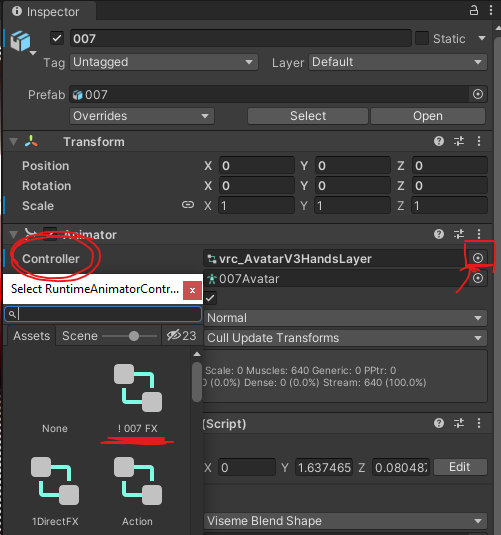
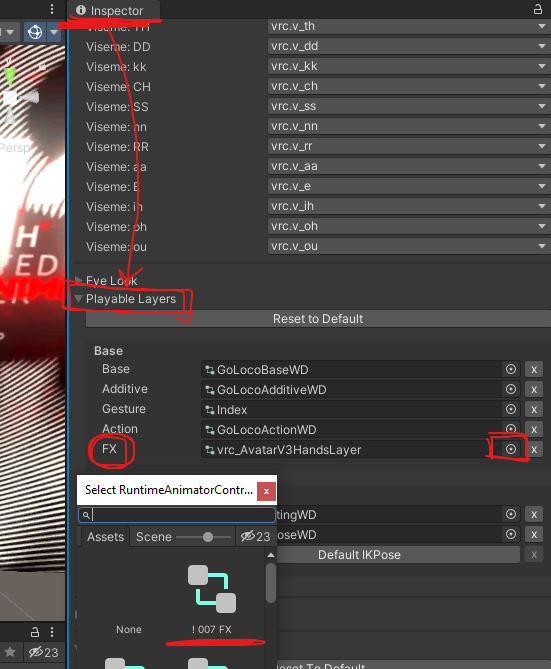 ** (this is what it should look like)**
 -
@eternalseoul Alright suspicions right , toggles dont work so here show to fix them : so with your avatar uploaded into unity , you are gonna click on it in the hierarchy.. Then on the RIGHT side you are going to look for the tab marked "Animator" .. directly under it should be a tab marked "Controller" on that you should click it and scroll up on the pop up till you see "! 007 FX" click on it .. Now you have that one set .... After you do that your gonna wanna scroll down on the same avatar settings window till you find the tab marked "Playable Layers".. under that there should be a tab marked "FX" click on it and scroll up on the pop up till you see "! 007 FX" click it ... AND BOOM ITS ALL SET .. After is optional but going into the "Tools" tab at the top of the screen and adding "Gesture Manager" to see if the toggles now work.. then again (optional)
** (this is what it should look like)**@Zenteshin Thanks for taking the time to post a fix
-
decription key - GGjbeiq1ipLiaIAdixg2u0TZJSCpHx_hkhpWe3saG0E
(found by me lmk if there's anything wrong w her ido not own the male or quest files)
-
-
-
-
-
-
-
found on vrm https://vrmodels.store/avatars/46079-001.html
@woowoo can you please give me the quest ??
-




Hello! It looks like you're interested in this conversation, but you don't have an account yet.
Getting fed up of having to scroll through the same posts each visit? When you register for an account, you'll always come back to exactly where you were before, and choose to be notified of new replies (either via email, or push notification). You'll also be able to save bookmarks and upvote posts to show your appreciation to other community members.
With your input, this post could be even better 💗
Register Login