
Looking for Tetsuko model with attachments
-
This model here: https://torinyan.gumroad.com/l/gywilo
and it's accessories:
https://torinyan.gumroad.com/l/ospkq
https://torinyan.gumroad.com/l/B0-0BA -
These one's require Poiyomi Pro and DPS. (could work with PoiToon, but it must have something to do with PoiPro's DPS alternative.)
Since it was free, I'll even throw in the found on Booth. Just note that it is incompatible with the attachments.
This avatar is "Good" rating iirc, so it should be good as a fallback avatar.
Requires
All anonfiles links are dead; long live anonfiles.
All, if not, most of them have been backed up to my Terabox:
https://terabox.com/s/1okc55Iw4joYkYNjyplK1CQ
No reuploads of old links, sorry! -
These one's require Poiyomi Pro and DPS. (could work with PoiToon, but it must have something to do with PoiPro's DPS alternative.)
Since it was free, I'll even throw in the found on Booth. Just note that it is incompatible with the attachments.
This avatar is "Good" rating iirc, so it should be good as a fallback avatar.
Requires
@DumpingStuff It says the Instructions came with the "Vent" on how to set it up but the package didnt come with it.
-
@DumpingStuff It says the Instructions came with the "Vent" on how to set it up but the package didnt come with it.
-
@DumpingStuff It says the Instructions came with the "Vent" on how to set it up but the package didnt come with it.
@Sub-Pup
After a bit of testing, I believe this video made by c0deless (the one who made the "vent" and "b0-0ba" attachments) does more than enough.Basically, everything needed should be imported, then open up the scene imported from the main tetsuko package.
Then, drag the "vent" prefab into the hierarchy.
Unpack the prefab by right clicking the "vent" item in the hierarchy.
Drag the contents of the "vent" armature (in this case, "parent_me_to_hips") over the "hips" part inside the main model's armature.
Next, drag "tsipussy" over "74tetsuko".This should be all that is needed. I've tested through AV3 emulator, and it seems to lock to the avatar. Though, I couldn't get the DPS parts tested because I can't seem to get the avatar to build (something to do with PoiPro?).
Hopefully this works for you. If not, I can do more testing.
All anonfiles links are dead; long live anonfiles.
All, if not, most of them have been backed up to my Terabox:
https://terabox.com/s/1okc55Iw4joYkYNjyplK1CQ
No reuploads of old links, sorry! -
@Sub-Pup
After a bit of testing, I believe this video made by c0deless (the one who made the "vent" and "b0-0ba" attachments) does more than enough.Basically, everything needed should be imported, then open up the scene imported from the main tetsuko package.
Then, drag the "vent" prefab into the hierarchy.
Unpack the prefab by right clicking the "vent" item in the hierarchy.
Drag the contents of the "vent" armature (in this case, "parent_me_to_hips") over the "hips" part inside the main model's armature.
Next, drag "tsipussy" over "74tetsuko".This should be all that is needed. I've tested through AV3 emulator, and it seems to lock to the avatar. Though, I couldn't get the DPS parts tested because I can't seem to get the avatar to build (something to do with PoiPro?).
Hopefully this works for you. If not, I can do more testing.
@DumpingStuff Will give it a go, Thank you. Also yes it probably is. Seems I have to delete and re import Poi Pro every other session.
-
@Sub-Pup
After a bit of testing, I believe this video made by c0deless (the one who made the "vent" and "b0-0ba" attachments) does more than enough.Basically, everything needed should be imported, then open up the scene imported from the main tetsuko package.
Then, drag the "vent" prefab into the hierarchy.
Unpack the prefab by right clicking the "vent" item in the hierarchy.
Drag the contents of the "vent" armature (in this case, "parent_me_to_hips") over the "hips" part inside the main model's armature.
Next, drag "tsipussy" over "74tetsuko".This should be all that is needed. I've tested through AV3 emulator, and it seems to lock to the avatar. Though, I couldn't get the DPS parts tested because I can't seem to get the avatar to build (something to do with PoiPro?).
Hopefully this works for you. If not, I can do more testing.
@DumpingStuff
i know the thread is a couple months old but you wouldn't happen to have the Wrecker kit do you?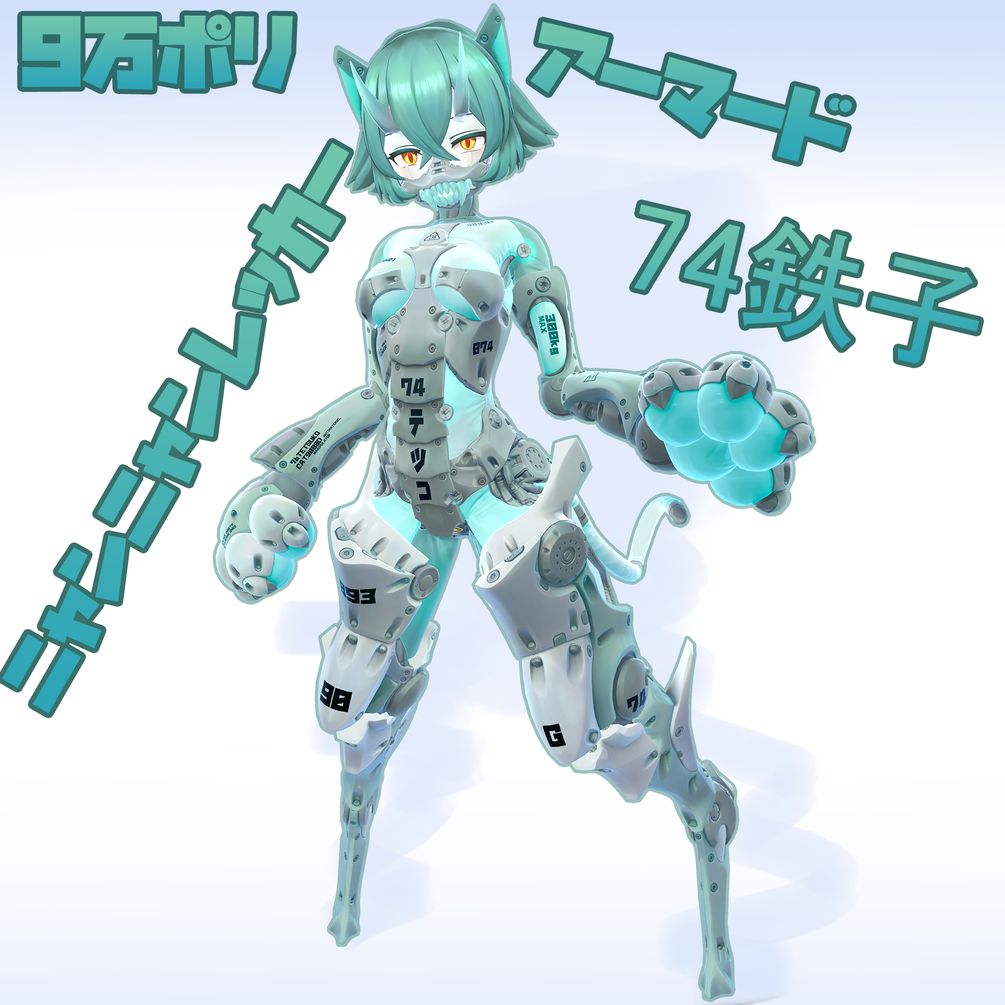
-
boo ba please i need
-
System moved this topic from Looking for... on
-
These one's require Poiyomi Pro and DPS. (could work with PoiToon, but it must have something to do with PoiPro's DPS alternative.)
Since it was free, I'll even throw in the found on Booth. Just note that it is incompatible with the attachments.
This avatar is "Good" rating iirc, so it should be good as a fallback avatar.
Requires
@AkaiDump re-up please??
₊ ⠀ֹ ༷ʈᧉll ݂ ۫𝑚ᧉ ۫𝚢σ𝑢’ll ₊ ۫
༷𝓼tα𝚢 𓏻𝑏𝚢 ოᧉ ˳ /thgll ♡
-
These one's require Poiyomi Pro and DPS. (could work with PoiToon, but it must have something to do with PoiPro's DPS alternative.)
Since it was free, I'll even throw in the found on Booth. Just note that it is incompatible with the attachments.
This avatar is "Good" rating iirc, so it should be good as a fallback avatar.
Requires



Hello! It looks like you're interested in this conversation, but you don't have an account yet.
Getting fed up of having to scroll through the same posts each visit? When you register for an account, you'll always come back to exactly where you were before, and choose to be notified of new replies (either via email, or push notification). You'll also be able to save bookmarks and upvote posts to show your appreciation to other community members.
With your input, this post could be even better 💗
Register Login