Skip to content
  • Categories
  • Recent
  • Tags
  • Popular
Skins
  • Light
  • Brite
  • Cerulean
  • Cosmo
  • Flatly
  • Journal
  • Litera
  • Lumen
  • Lux
  • Materia
  • Minty
  • Morph
  • Pulse
  • Sandstone
  • Simplex
  • Sketchy
  • Spacelab
  • United
  • Yeti
  • Zephyr
  • Dark
  • Cyborg
  • Darkly
  • Quartz
  • Slate
  • Solar
  • Superhero
  • Vapor

  • Default (Zephyr)
  • No Skin
Collapse
RipperStore Logo
  1. Home
  2. Assets
  3. Gifts / Downloads
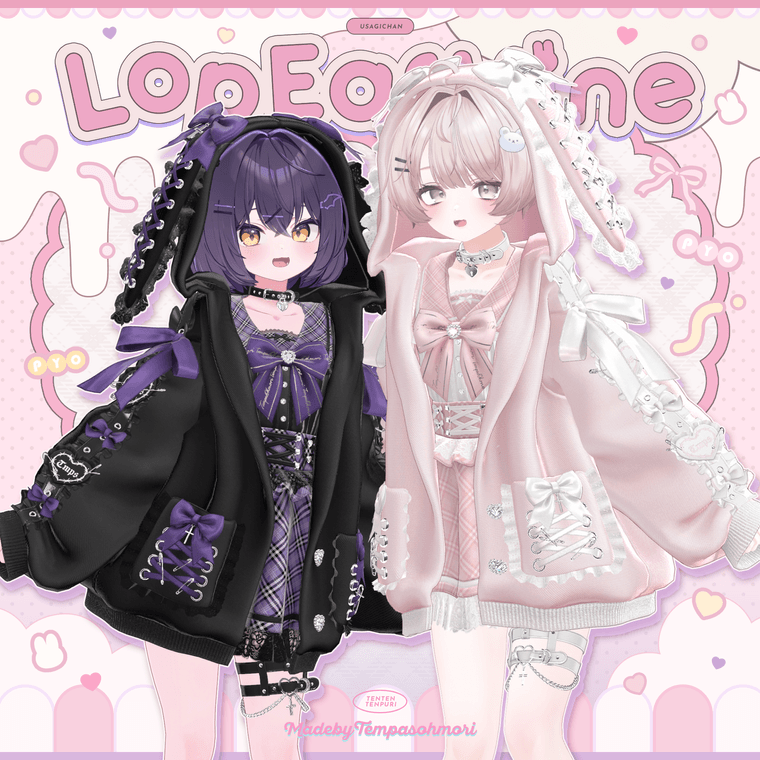
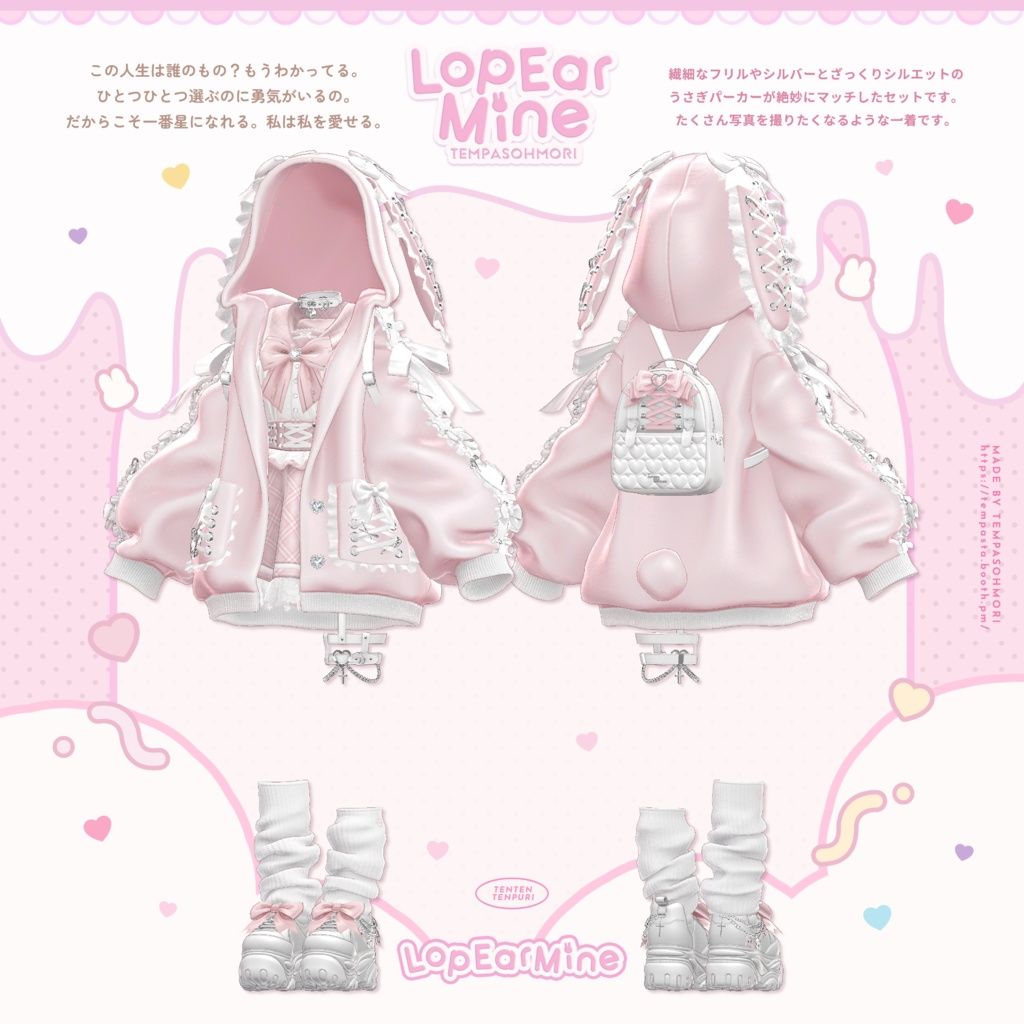
  4. Sale! 🩷『Lop Ear Mine』ロップイヤーマイン🩷【15アバター対応】

Sale! 🩷『Lop Ear Mine』ロップイヤーマイン🩷【15アバター対応】

Scheduled Pinned Locked Moved Gifts / Downloads
boothbnnuytempura pastagift-booth
75 Posts 40 Posters 28.5k Views 34 Watching
  • Oldest to Newest
  • Newest to Oldest
  • Most Votes
Reply
  • Reply as topic
Log in to reply
This topic has been deleted. Only users with topic management privileges can see it.
  • ace01617A
    ace01617A
    ace01617
    wrote on last edited by
    #17

    bump for update
    2025/04/06
    Material render queue adjustments, early purchase bonus added

    1 Reply Last reply
    1
    • H
      H
      HelloBunny7777
      wrote on last edited by
      #18

      For Chocolat?

      1 Reply Last reply
      1
      • Mako_koM Mako_ko

        4bf0d46d-b18d-4bd6-97fd-feb860dfe844-42b960b9-0121-43aa-a720-27639dbf2c9b.png
        ef156c5e-bd97-4671-8e75-d3ab78bad992-af6e391a-49a6-49b3-9d5e-632364d92351_base_resized.jpg

        BOOTH || DOWNLOAD
        Full set!

        Compatible with: Flare, Shinra, Moe, Airi, Sio, Selestia, Anomea, Manuka, Shinano, Lime (Chiffon and Chocolat), Milltina, Milfy, Mamefriends, Leefa/Lunalitt, Kikyo,
        Will update as more compatibility is added!

        H
        H
        HelloBunny7777
        wrote on last edited by
        #19

        @Mako_ko For Chocolat PLEASE

        Mako_koM 2 Replies Last reply
        1
        • R
          R
          Rooti
          wrote on last edited by
          #20

          bump for update
          2025/04/01 Adjusted due to the inclusion of the "Jacket_Pocket_Pin" from the Mame Friends version v1.1
          2025/04/05 Added Kikyo version, Leefa & Lunarite versions

          I would really appreciate it if you're willing to share ❤

          Shinano

          Mako_koM 1 Reply Last reply
          1
          • H HelloBunny7777

            @Mako_ko For Chocolat PLEASE

            Mako_koM
            Mako_koM
            Mako_ko
            wrote on last edited by
            #21

            @HelloBunny7777 Patience. I was not awake then. It will be updated soon.

            Anything for Meiyun, Ragussiel, Neviathan, and Rurune.

            1 Reply Last reply
            1
            • H HelloBunny7777

              @Mako_ko For Chocolat PLEASE

              Mako_koM
              Mako_koM
              Mako_ko
              wrote on last edited by
              #22

              @HelloBunny7777 Also, Chocolat is already in there. Chocolat shares the same body as Chiffon and Lime.

              Anything for Meiyun, Ragussiel, Neviathan, and Rurune.

              1 Reply Last reply
              1
              • R Rooti

                bump for update
                2025/04/01 Adjusted due to the inclusion of the "Jacket_Pocket_Pin" from the Mame Friends version v1.1
                2025/04/05 Added Kikyo version, Leefa & Lunarite versions

                I would really appreciate it if you're willing to share ❤

                Mako_koM
                Mako_koM
                Mako_ko
                wrote on last edited by
                #23

                @Rooti The link should be updated. Please tell me if there are any issues!

                Anything for Meiyun, Ragussiel, Neviathan, and Rurune.

                1 Reply Last reply
                😘
                2
                • dreamytenshiD
                  dreamytenshiD
                  dreamytenshi
                  wrote on last edited by
                  #24

                  Material + PSD is access denied!

                  Mako_koM 1 Reply Last reply
                  1
                  • dreamytenshiD dreamytenshi

                    Material + PSD is access denied!

                    Mako_koM
                    Mako_koM
                    Mako_ko
                    wrote on last edited by
                    #25

                    @dreamytenshi Should be fixed. The issue was that there were two material files--the 1.0 and the 1.1. I made the file private because I did not understand Workupload at the time and did not know how to remove files from archive. I have removed the private 1.0 material file. Thank you for letting me know. Please download the 1.1 file. Please tell me if you are continuing to have issues.

                    Anything for Meiyun, Ragussiel, Neviathan, and Rurune.

                    K U 2 Replies Last reply
                    1
                    • Mako_koM Mako_ko

                      @dreamytenshi Should be fixed. The issue was that there were two material files--the 1.0 and the 1.1. I made the file private because I did not understand Workupload at the time and did not know how to remove files from archive. I have removed the private 1.0 material file. Thank you for letting me know. Please download the 1.1 file. Please tell me if you are continuing to have issues.

                      K
                      K
                      Kakemiru
                      wrote on last edited by
                      #26

                      @Mako_ko Miltina v1.2, Airi v1.1, Celestia v1.1 have been updated. Thanks for the update 💗

                      1 Reply Last reply
                      2
                      • Haku884H
                        Haku884H
                        Haku884
                        wrote on last edited by
                        #27

                        hey i need help i cant find the textures

                        1 Reply Last reply
                        1
                        • Haku884H
                          Haku884H
                          Haku884
                          wrote on last edited by
                          #28

                          nev

                          1 Reply Last reply
                          1
                          • kawaiikittiesK
                            kawaiikittiesK
                            kawaiikitties
                            wrote on last edited by
                            #29

                            TYYY

                            1 Reply Last reply
                            1
                            • KyokoHanaK
                              KyokoHanaK
                              KyokoHana
                              wrote on last edited by
                              #30

                              I'm having trouble with the missing mats for the hood on set for shinra, is anyone having the same problem? I'm still new to this so i will be really appreciate if anyone can help me with this.

                              • Sorry if my English is not good.
                              • I'm learning
                              • Will buy things you recc if it fits my taste
                              • In love with Lumina
                              Mako_koM 1 Reply Last reply
                              0
                              • KyokoHanaK KyokoHana

                                I'm having trouble with the missing mats for the hood on set for shinra, is anyone having the same problem? I'm still new to this so i will be really appreciate if anyone can help me with this.

                                Mako_koM
                                Mako_koM
                                Mako_ko
                                wrote on last edited by
                                #31

                                @Hannah I have checked myself some days ago and I do not have an immediate solution for this. The materials for me are not missing, just not set. What I did to fix this myself was to add the materials manually to the outfit. It is not the fastest, but it is what I have done, and it works well enough for me.

                                Anything for Meiyun, Ragussiel, Neviathan, and Rurune.

                                KyokoHanaK 1 Reply Last reply
                                😊
                                0
                                • Mako_koM Mako_ko

                                  @Hannah I have checked myself some days ago and I do not have an immediate solution for this. The materials for me are not missing, just not set. What I did to fix this myself was to add the materials manually to the outfit. It is not the fastest, but it is what I have done, and it works well enough for me.

                                  KyokoHanaK
                                  KyokoHanaK
                                  KyokoHana
                                  wrote on last edited by
                                  #32

                                  @Mako_ko I guess i can do the same but how do i add the mats in?

                                  • Sorry if my English is not good.
                                  • I'm learning
                                  • Will buy things you recc if it fits my taste
                                  • In love with Lumina
                                  Mako_koM 1 Reply Last reply
                                  0
                                  • KyokoHanaK KyokoHana

                                    @Mako_ko I guess i can do the same but how do i add the mats in?

                                    Mako_koM
                                    Mako_koM
                                    Mako_ko
                                    wrote on last edited by
                                    #33

                                    @Hannah Material folder, drag and drop the materials onto the prefab. This asset has each individual part listed in its own folder (like the jacket, skirt, metals, frills, etc.) so it is a little less confusing than other times I have done this.

                                    Anything for Meiyun, Ragussiel, Neviathan, and Rurune.

                                    KyokoHanaK 1 Reply Last reply
                                    😊
                                    0
                                    • Mako_koM Mako_ko

                                      @Hannah Material folder, drag and drop the materials onto the prefab. This asset has each individual part listed in its own folder (like the jacket, skirt, metals, frills, etc.) so it is a little less confusing than other times I have done this.

                                      KyokoHanaK
                                      KyokoHanaK
                                      KyokoHana
                                      wrote on last edited by
                                      #34

                                      @Mako_ko thank you so much ❤ ❤ ❤

                                      • Sorry if my English is not good.
                                      • I'm learning
                                      • Will buy things you recc if it fits my taste
                                      • In love with Lumina
                                      1 Reply Last reply
                                      0
                                      • mimisiM
                                        mimisiM
                                        mimisi
                                        wrote on last edited by
                                        #35

                                        when i put it on milfy it looks all pink idk how to fix it.. i have the liltoon shaders can someone help pls😭

                                        1 Reply Last reply
                                        0
                                        • R
                                          R
                                          RokiTokii
                                          wrote on last edited by
                                          #36

                                          @mimisi i had the same issue, imported materials and the milfy one the materials are bright pink, my solution is that you just drag and drop the milfy prefab onto the avatar and then manually drag and drop all the metal, lace and gem materials onto the pink error textures also make sure you do the same to the 2nd skirt theres another that toggles on when you toggle the jacket off, also do it for the socks when you toggle the loose socks off
                                          F 1 Reply Last reply
                                          0
                                          • mxmiM mxmi referenced this topic on

                                          Hello! It looks like you're interested in this conversation, but you don't have an account yet.

                                          Getting fed up of having to scroll through the same posts each visit? When you register for an account, you'll always come back to exactly where you were before, and choose to be notified of new replies (either via email, or push notification). You'll also be able to save bookmarks and upvote posts to show your appreciation to other community members.

                                          With your input, this post could be even better 💗

                                          Register Login
                                          Reply
                                          • Reply as topic
                                          Log in to reply
                                          • Oldest to Newest
                                          • Newest to Oldest
                                          • Most Votes


                                          • Login

                                          • Login or register to search.
                                          • First post
                                            Last post
                                          0
                                          • Categories
                                          • Recent
                                          • Tags
                                          • Popular