
LF Redesigned Frenni Unity Package
-
Can't y'all just wait until they are Released? Those model gonna have a lot of new stuff
@AsgoreDreemurr Bru waiting for cryptia curve to do enything is like watching paint dry
-
Nah bro I seen how they are now and is best to wait because all of them are almost fully finished. Ripped is incomplete and not good
-
I'll take a look at it, strangely the version I have had no issues, but I'll look at it just in case before uploading. I also have the updated Bonfie.
-
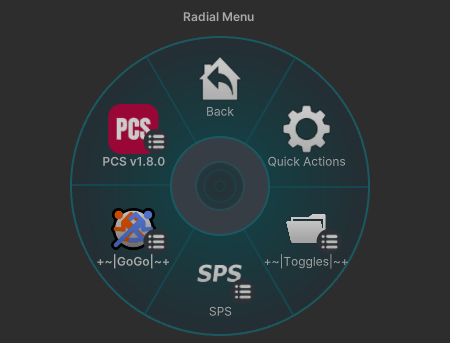
Almost done with it, just double checking things then I'll create the download with simple instructions on the requirements just in case. This package contains the Updated Frenni and Bonfie, both are also PC & Quest. One thing to note is that these seem to not have the Object Toggles, due to probably being a slightly outdated Version of the new Avatars. This is what both their Menus look like:
-
Here they are:
ʚ I create Avatar Edits
ʚ I also repair VRCA's & turn them in Unity Packages
ʚ I do have Avatars & VRCA's to trade, just ask and I'll show what I have -
Here they are:
-
should be good
 Download Link (drive.google.com)
@Pod thank you for uploading the files.
-
@Pod I have a problem that happened with few avatars even before, i uploaded the pc version just fine. So i linked the quest one uploaded it but when it uploaded it completely broke the avi it only shows up as pc and its just the default error bot. Any ideas?
@SecretJuws Did you ever figure out this issue? I tried uploading it yesterday and the exact thing happened to me
-
@SecretJuws Did you ever figure out this issue? I tried uploading it yesterday and the exact thing happened to me
@CupidsCupcake Yep i just made my own quest version with quest tools from the pc one. I THINK i dont remember this has been ages ago
-
@CupidsCupcake Yep i just made my own quest version with quest tools from the pc one. I THINK i dont remember this has been ages ago
@SecretJuws I did that but it always breaks, should i try changing the shader on the quest version?
-
@SecretJuws I did that but it always breaks, should i try changing the shader on the quest version?
@CupidsCupcake Make sure EVERYTHING actually converted becouse usually there are hidden components on the avi that didnt change so the pc shader thats not found by unity controll that would normally stop you from uploading it to quest slips by and corrups the avi giving you the issue, if that doesnt work idk man as i said i have no clue how i fixed it.
-
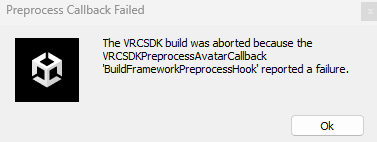
@Pod I'm not sure what I did wrong, then. This is the error I keep getting, and I've done everything the exact same. It was giving me errors as soon as I imported it, even before I fixed any animations. Can you show us the exact versions you're using for your project?
@SulfuricKara ever found a fix? im having the same issue
-
@Pod I'm not sure what I did wrong, then. This is the error I keep getting, and I've done everything the exact same. It was giving me errors as soon as I imported it, even before I fixed any animations. Can you show us the exact versions you're using for your project?
@SulfuricKara Having this issue as well, looking for a fix to this myself.







Hello! It looks like you're interested in this conversation, but you don't have an account yet.
Getting fed up of having to scroll through the same posts each visit? When you register for an account, you'll always come back to exactly where you were before, and choose to be notified of new replies (either via email, or push notification). You'll also be able to save bookmarks and upvote posts to show your appreciation to other community members.
With your input, this post could be even better 💗
Register Login