Skip to content
  • Categories
  • Recent
  • Tags
  • Popular
Skins
  • Light
  • Brite
  • Cerulean
  • Cosmo
  • Flatly
  • Journal
  • Litera
  • Lumen
  • Lux
  • Materia
  • Minty
  • Morph
  • Pulse
  • Sandstone
  • Simplex
  • Sketchy
  • Spacelab
  • United
  • Yeti
  • Zephyr
  • Dark
  • Cyborg
  • Darkly
  • Quartz
  • Slate
  • Solar
  • Superhero
  • Vapor

  • Default (Zephyr)
  • No Skin
Collapse
RipperStore Logo
  1. Home
  2. Assets
  3. Found Avatars and Assets
  4. Penetration Contact System (Detects & Plays Sound FX for your X Interaction) (found) ✔

Penetration Contact System (Detects & Plays Sound FX for your X Interaction) (found) ✔

Scheduled Pinned Locked Moved Found Avatars and Assets
261 Posts 116 Posters 122.6k Views 230 Watching
  • Oldest to Newest
  • Newest to Oldest
  • Most Votes
Reply
  • Reply as topic
Log in to reply
This topic has been deleted. Only users with topic management privileges can see it.
  • Gothic KibbyG
    Gothic KibbyG
    Gothic Kibby
    wrote on last edited by
    #158
    This post is deleted!
    1 Reply Last reply
    0
    • SulfuricKaraS SulfuricKara

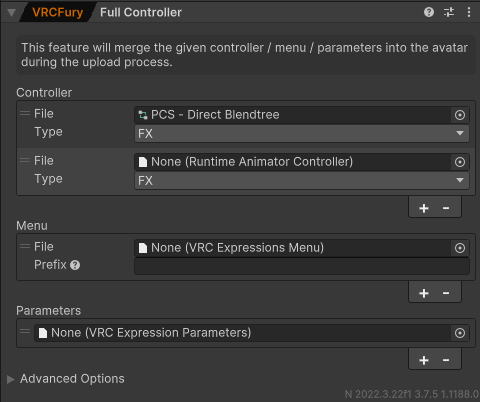
      @Gothic-Kibby Just ran into this, but at a much more exaggerated amount. Check the actual PCS system in the hierarchy to make sure none of the 4 controllers/menus/param slots have an error/say missing.

      Gothic KibbyG
      Gothic KibbyG
      Gothic Kibby
      wrote on last edited by
      #159

      @SulfuricKara I'll check it out but won't be till monday. I'll be leaving for work soon and won't be home for the weekend

      1 Reply Last reply
      0
      • SulfuricKaraS SulfuricKara

        @Gothic-Kibby Just ran into this, but at a much more exaggerated amount. Check the actual PCS system in the hierarchy to make sure none of the 4 controllers/menus/param slots have an error/say missing.

        Gothic KibbyG
        Gothic KibbyG
        Gothic Kibby
        wrote on last edited by
        #160

        @SulfuricKara Yeah, they say missing and the Generated folder is empty.

        SulfuricKaraS 1 Reply Last reply
        0
        • Gothic KibbyG Gothic Kibby

          @SulfuricKara Yeah, they say missing and the Generated folder is empty.

          SulfuricKaraS
          SulfuricKaraS
          SulfuricKara
          wrote on last edited by
          #161

          @Gothic-Kibby Yep! Just delete the current penetration contact system in the hierarchy, as well as delete all of the PCS targets from the SPS sockets (if you have them), and then re-add PCS to the avatar. The error is literally just PCS mis-placing the folder/deleting it somehow by accident, so it literally can't find the generated PCS System folder for that specific avatar.

          I've uninstalled Unity Hub/Unity Editors and can no longer help :( I just can't justify the costs of spending time doing this anymore.

          Gothic KibbyG 2 Replies Last reply
          0
          • SulfuricKaraS SulfuricKara

            @Gothic-Kibby Yep! Just delete the current penetration contact system in the hierarchy, as well as delete all of the PCS targets from the SPS sockets (if you have them), and then re-add PCS to the avatar. The error is literally just PCS mis-placing the folder/deleting it somehow by accident, so it literally can't find the generated PCS System folder for that specific avatar.

            Gothic KibbyG
            Gothic KibbyG
            Gothic Kibby
            wrote on last edited by
            #162

            @SulfuricKara Uh.. I've actually tried that several times and gives me the same error lol... I'll try again after a couple avi uploads.

            1 Reply Last reply
            0
            • SulfuricKaraS SulfuricKara

              @Gothic-Kibby Yep! Just delete the current penetration contact system in the hierarchy, as well as delete all of the PCS targets from the SPS sockets (if you have them), and then re-add PCS to the avatar. The error is literally just PCS mis-placing the folder/deleting it somehow by accident, so it literally can't find the generated PCS System folder for that specific avatar.

              Gothic KibbyG
              Gothic KibbyG
              Gothic Kibby
              wrote on last edited by
              #163

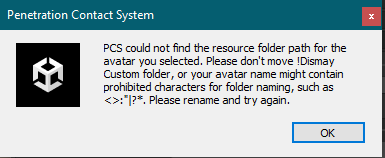
              @SulfuricKara 1d672a7b-0719-417e-a8d9-0415ab9ca827-image.png

              This is what it shows

              1 Reply Last reply
              0
              • SulfuricKaraS
                SulfuricKaraS
                SulfuricKara
                wrote on last edited by
                #164

                Delete your PCS folder and then re-import PCS to the project

                I've uninstalled Unity Hub/Unity Editors and can no longer help :( I just can't justify the costs of spending time doing this anymore.

                1 Reply Last reply
                0
                • Gothic KibbyG
                  Gothic KibbyG
                  Gothic Kibby
                  wrote on last edited by
                  #165

                  I've done that many times and same error.

                  MyNameIsJeffM 1 Reply Last reply
                  0
                  • Gothic KibbyG Gothic Kibby

                    I've done that many times and same error.

                    MyNameIsJeffM
                    MyNameIsJeffM
                    MyNameIsJeff
                    wrote on last edited by
                    #166

                    @Gothic-Kibby Sometimes there's just a small space after the avatars name in the hierarchy so you could try deleting it the space then readding pcs within tools then dragging the generated menu and params in if they don't auto add.

                    Editing avatars from SFW to NSFW

                    My Edits
                    https://forum.ripper.store/user/mynameisjeff/topics

                    SulfuricKaraS 1 Reply Last reply
                    0
                    • MyNameIsJeffM MyNameIsJeff

                      @Gothic-Kibby Sometimes there's just a small space after the avatars name in the hierarchy so you could try deleting it the space then readding pcs within tools then dragging the generated menu and params in if they don't auto add.

                      SulfuricKaraS
                      SulfuricKaraS
                      SulfuricKara
                      wrote on last edited by
                      #167

                      @MyNameIsJeff This as well! Check the avatar prefab's name in the hierarchy as well, in case there's a space after its name. I had that happen, and it confused the hell out of my for too long.

                      I've uninstalled Unity Hub/Unity Editors and can no longer help :( I just can't justify the costs of spending time doing this anymore.

                      Gothic KibbyG 1 Reply Last reply
                      0
                      • SulfuricKaraS SulfuricKara

                        @MyNameIsJeff This as well! Check the avatar prefab's name in the hierarchy as well, in case there's a space after its name. I had that happen, and it confused the hell out of my for too long.

                        Gothic KibbyG
                        Gothic KibbyG
                        Gothic Kibby
                        wrote on last edited by
                        #168

                        @SulfuricKara Hmmm, I'll check that out tonight after work, I'm a head to bed for now.

                        1 Reply Last reply
                        0
                        • Gothic KibbyG
                          Gothic KibbyG
                          Gothic Kibby
                          wrote on last edited by
                          #169

                          Didn't work

                          1 Reply Last reply
                          0
                          • exE
                            exE
                            ex
                            wrote on last edited by
                            #170

                            bmp

                            shhh

                            plz bmp!

                            1 Reply Last reply
                            0
                            • yumyuriY
                              yumyuriY
                              yumyuri
                              wrote on last edited by yumyuri
                              #171

                              the vrcfury version work better

                              1 Reply Last reply
                              0
                              • LalondeL Lalonde

                                🔗 Download Link (workupload.com) ask and you shall receive!

                                A
                                A
                                avelynnova
                                wrote on last edited by
                                #172

                                @whisperwhiskers 1.9.1 is out

                                LalondeL 1 Reply Last reply
                                0
                                • A avelynnova

                                  @whisperwhiskers 1.9.1 is out

                                  LalondeL
                                  LalondeL
                                  Lalonde
                                  wrote on last edited by Lalonde
                                  #173

                                  @avelynnova I'll upload it when I can, right now they don't have it updated on Gumroad.
                                  Edit: Speak of the devil, someone brought it to their attention and now it's fixed, so here:

                                  [register or login to view this hidden content]

                                  YiffaliciousY 1 Reply Last reply
                                  👍
                                  6
                                  • LalondeL Lalonde

                                    @avelynnova I'll upload it when I can, right now they don't have it updated on Gumroad.
                                    Edit: Speak of the devil, someone brought it to their attention and now it's fixed, so here:

                                    [register or login to view this hidden content]

                                    YiffaliciousY
                                    YiffaliciousY
                                    Yiffalicious
                                    wrote on last edited by
                                    #174

                                    @whisperwhiskers madlad

                                    ˗ˏˋ ★ certified silly femboy furball ★ ˎˊ˗
                                    。・::・゚★,。・::・゚☆

                                    1 Reply Last reply
                                    1
                                    • D
                                      D
                                      Deviant
                                      wrote on last edited by
                                      #175

                                      Anyone happen to have LMS?

                                      1 Reply Last reply
                                      0
                                      • Gothic KibbyG Gothic Kibby

                                        Screenshot 2025-02-26 223355.png

                                        Anyone know how to get past this? Never ran into this before.

                                        Ao_xDA
                                        Ao_xDA
                                        Ao_xD
                                        wrote on last edited by
                                        #176

                                        @Gothic-Kibby Hi hi i ran into this same problem many times, but then for me i realized is because i kept putting the Original folder into an organized folder. I like to keep eveything organized to i have Clothes, hair, Gimmicks, R-18, etc folders and i put all the assets accordingly. When you upload PCS dont move it anywhere. Just leave it in the assets area.

                                        Gothic KibbyG 1 Reply Last reply
                                        0
                                        • Ao_xDA Ao_xD

                                          @Gothic-Kibby Hi hi i ran into this same problem many times, but then for me i realized is because i kept putting the Original folder into an organized folder. I like to keep eveything organized to i have Clothes, hair, Gimmicks, R-18, etc folders and i put all the assets accordingly. When you upload PCS dont move it anywhere. Just leave it in the assets area.

                                          Gothic KibbyG
                                          Gothic KibbyG
                                          Gothic Kibby
                                          wrote on last edited by
                                          #177

                                          @Steiner_xD I never moved anything.

                                          1 Reply Last reply
                                          0

                                          Hello! It looks like you're interested in this conversation, but you don't have an account yet.

                                          Getting fed up of having to scroll through the same posts each visit? When you register for an account, you'll always come back to exactly where you were before, and choose to be notified of new replies (either via email, or push notification). You'll also be able to save bookmarks and upvote posts to show your appreciation to other community members.

                                          With your input, this post could be even better 💗

                                          Register Login
                                          Reply
                                          • Reply as topic
                                          Log in to reply
                                          • Oldest to Newest
                                          • Newest to Oldest
                                          • Most Votes


                                          • Login

                                          • Login or register to search.
                                          • First post
                                            Last post
                                          0
                                          • Categories
                                          • Recent
                                          • Tags
                                          • Popular