Skip to content
  • Categories
  • Recent
  • Tags
  • Popular
Skins
  • Light
  • Brite
  • Cerulean
  • Cosmo
  • Flatly
  • Journal
  • Litera
  • Lumen
  • Lux
  • Materia
  • Minty
  • Morph
  • Pulse
  • Sandstone
  • Simplex
  • Sketchy
  • Spacelab
  • United
  • Yeti
  • Zephyr
  • Dark
  • Cyborg
  • Darkly
  • Quartz
  • Slate
  • Solar
  • Superhero
  • Vapor

  • Default (Zephyr)
  • No Skin
Collapse
RipperStore Logo
  1. Home
  2. Assets
  3. Looking for...
  4. Furry Avatars
  5. Looking For FoxMoth Loona Edit

Looking For FoxMoth Loona Edit

Scheduled Pinned Locked Moved Furry Avatars
furry avatarfurrydarbi
78 Posts 37 Posters 18.5k Views 48 Watching
  • Oldest to Newest
  • Newest to Oldest
  • Most Votes
Reply
  • Reply as topic
Log in to reply
This topic has been deleted. Only users with topic management privileges can see it.
  • V
    V
    VRCRipper
    wrote on last edited by
    #12

    here a link to the fox moth avi with the loona skin alrdy on it, this model is ripped so all the scripes are broken so u will need to remove them and rebuild all the toggle on the avi yourself, enjoy [register or login to view this hidden content]

    1 Reply Last reply
    2
    • SulfuricKaraS
      SulfuricKaraS
      SulfuricKara
      wrote on last edited by
      #13

      Huge bump! I would love to have the hair and texture, as I'm fairly certain the foxmoth is already available!

      I've uninstalled Unity Hub/Unity Editors and can no longer help :( I just can't justify the costs of spending time doing this anymore.

      1 Reply Last reply
      0
      • SulfuricKaraS
        SulfuricKaraS
        SulfuricKara
        wrote on last edited by
        #14

        @the_stupid I know. Someone linked the gumroad where the textures and hair come from, however, the public avatar they posted uses those assets as well.

        https://darbi.gumroad.com/l/helluvastyle
        https://vrchat.com/home/avatar/avtr_dfa6c16c-7175-43e0-89d5-3587f45982e8

        I'm personally not sure of how to rip, nor how to do so safely, which is why I bumped.

        I've uninstalled Unity Hub/Unity Editors and can no longer help :( I just can't justify the costs of spending time doing this anymore.

        1 Reply Last reply
        0
        • N
          N
          Naminen
          wrote on last edited by
          #15

          Does anyone have blend files for foxmoth?

          1 Reply Last reply
          0
          • C
            C
            cosmicwolfz21
            wrote on last edited by
            #16

            ill make an aio uploadable version and upload the unity file in a day or 2

            1 Reply Last reply
            0
            • M
              M
              Midday47
              wrote on last edited by
              #17

              Bump, looks great but i need it on a foxmoth facetracking base

              ashleyloireA 1 Reply Last reply
              0
              • M Midday47

                Bump, looks great but i need it on a foxmoth facetracking base

                ashleyloireA
                ashleyloireA
                ashleyloire
                wrote on last edited by
                #18

                @Midday47 you can grab the textures, tail, and hair from the ripped one and apply them to the foxmoth FT base. tis what i did in the end, but i personally like the foxmoth ears better so i didn't worry about the ears or the head fluff. Though it may be better overall to just drag the edited mesh into the foxmoth FT fbx in blender and work from there.

                Also bump, and maybe @cosmicwolfz21 is done.

                1 Reply Last reply
                👍
                0
                • C
                  C
                  cosmicwolfz21
                  wrote on last edited by
                  #19

                  I am indeed done
                  i have tested in game on both pc and quest
                  the only thing thats not working is the nose boop but im sure its an easy fix
                  i have also added 3 outfits of the foxmoth clothes
                  [register or login to view this hidden content]

                  C0rd3dC G 2 Replies Last reply
                  👍
                  1
                  • C cosmicwolfz21

                    I am indeed done
                    i have tested in game on both pc and quest
                    the only thing thats not working is the nose boop but im sure its an easy fix
                    i have also added 3 outfits of the foxmoth clothes
                    [register or login to view this hidden content]

                    C0rd3dC
                    C0rd3dC
                    C0rd3d
                    wrote on last edited by
                    #20

                    @cosmicwolfz21 Thank you so much!

                    Furry femboy looking for things because money is hard to come by.

                    1 Reply Last reply
                    0
                    • womperwompW
                      womperwompW
                      womperwomp
                      wrote on last edited by
                      #21

                      anyone know how to make this nsfw

                      C0rd3dC 1 Reply Last reply
                      0
                      • ashleyloireA
                        ashleyloireA
                        ashleyloire
                        wrote on last edited by
                        #22

                        gonna have to do it yourself in blender, can combine the nsfw foxmoth with the loona textures and ears or some combination of the two you feel comfy with (maybe editing the textures to include the nsfw pieces from the former). I ended up just making my own blendshapes on the NSFW version of the foxmoth to make it loona-ish, but im not good at it by any means.

                        B 1 Reply Last reply
                        0
                        • womperwompW womperwomp

                          anyone know how to make this nsfw

                          C0rd3dC
                          C0rd3dC
                          C0rd3d
                          wrote on last edited by
                          #23

                          @womperwomp
                          Just go to blender grab the texture + hair, slap it onto the nsfw model. then add the foxmoth clothing using Cats merge armatures. Then just make them toggles in unity (also make the nips to flatten for those clothing toggles)

                          Furry femboy looking for things because money is hard to come by.

                          1 Reply Last reply
                          0
                          • ashleyloireA
                            ashleyloireA
                            ashleyloire
                            wrote on last edited by
                            #24

                            in blender you'll not only need a nip flatten blendshape, but also a mound flatten, as it protrudes a bit as well through the non-nsfw clothing. vrcfury in unity is a godsend for making those toggles to include those blendshape tweaks.

                            1 Reply Last reply
                            0
                            • N
                              N
                              nonohun
                              wrote on last edited by
                              #25

                              i can make a edit of the fbx and send it over

                              dyslexic and half asleep when on here ,small text is very hard to read for me

                              JustDaFoxJ 1 Reply Last reply
                              0
                              • N nonohun

                                i can make a edit of the fbx and send it over

                                JustDaFoxJ
                                JustDaFoxJ
                                JustDaFox
                                wrote on last edited by
                                #26

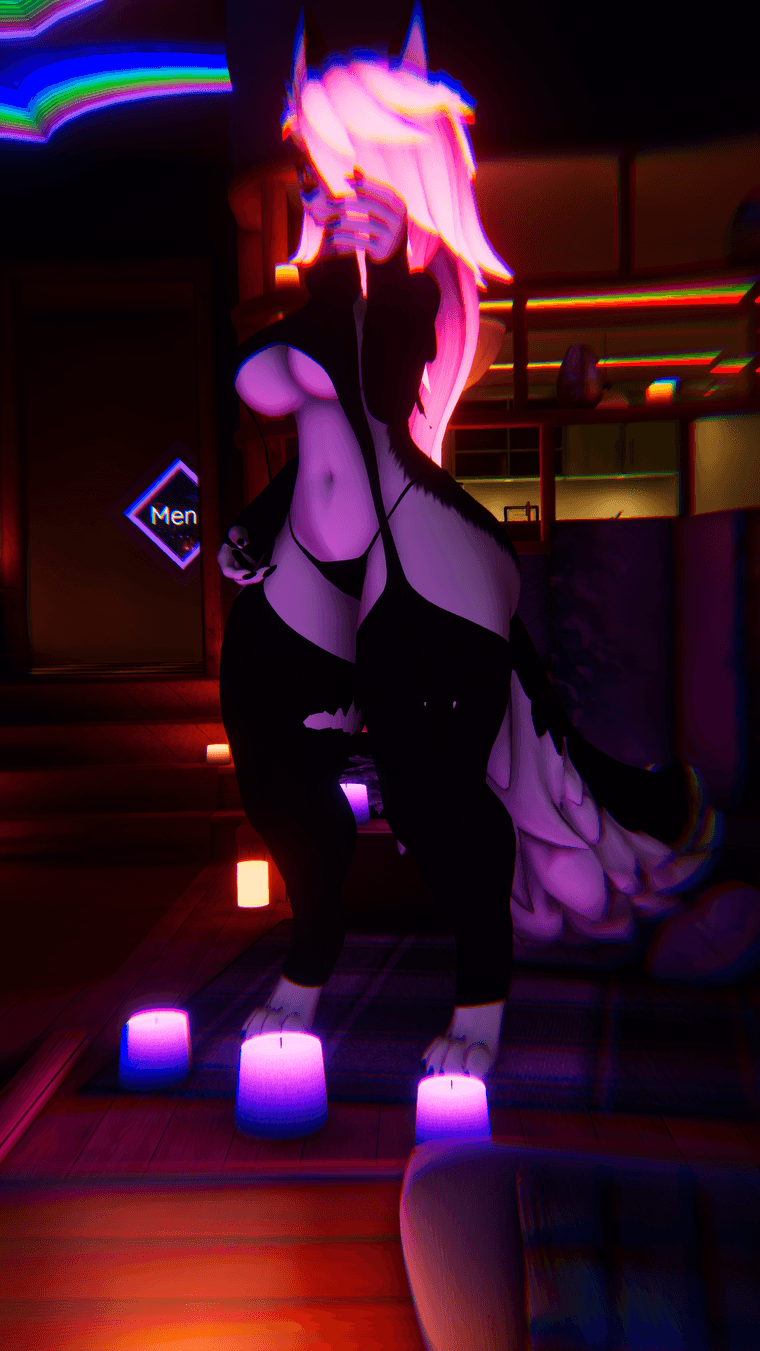
                                @nonohun If you could that would be great also another thing all the versions of this Avi i have found have issues with the thighs having clipping issues with custom clothing i been buying for the fox moth base the only ones that don't clip is the comfy set the Panda VD keeps clipping along with the thigh highs on the lounge and twitter outfit VRChat_2025-01-21_14-22-02.983_2160x3840.png as you can see in the thighs here
                                MasterCheeksM 1 Reply Last reply
                                0
                                • ashleyloireA ashleyloire

                                  gonna have to do it yourself in blender, can combine the nsfw foxmoth with the loona textures and ears or some combination of the two you feel comfy with (maybe editing the textures to include the nsfw pieces from the former). I ended up just making my own blendshapes on the NSFW version of the foxmoth to make it loona-ish, but im not good at it by any means.

                                  B
                                  B
                                  BBBRIP
                                  wrote on last edited by
                                  #27

                                  @ashleyloire I've been looking for the NSFW version of the foxmoth for a while but couldn't find it anywhere. Think you could help me out? Please? Will definitely appreciate it ♥

                                  ashleyloireA 1 Reply Last reply
                                  0
                                  • JustDaFoxJ JustDaFox

                                    @nonohun If you could that would be great also another thing all the versions of this Avi i have found have issues with the thighs having clipping issues with custom clothing i been buying for the fox moth base the only ones that don't clip is the comfy set the Panda VD keeps clipping along with the thigh highs on the lounge and twitter outfit VRChat_2025-01-21_14-22-02.983_2160x3840.png as you can see in the thighs here

                                    MasterCheeksM
                                    MasterCheeksM
                                    MasterCheeks
                                    wrote on last edited by
                                    #28

                                    @JKL45 that issues is already fixable, should be under the "Under Wear" blendshapes. thats what I had to do

                                    1 Reply Last reply
                                    0
                                    • B BBBRIP

                                      @ashleyloire I've been looking for the NSFW version of the foxmoth for a while but couldn't find it anywhere. Think you could help me out? Please? Will definitely appreciate it ♥

                                      ashleyloireA
                                      ashleyloireA
                                      ashleyloire
                                      wrote on last edited by
                                      #29

                                      @RikhRip https://forum.ripper.store/topic/48522/lf-nsfw-fox-moth/30?_=1740404822967

                                      B 1 Reply Last reply
                                      0
                                      • ashleyloireA ashleyloire

                                        @RikhRip https://forum.ripper.store/topic/48522/lf-nsfw-fox-moth/30?_=1740404822967

                                        B
                                        B
                                        BBBRIP
                                        wrote on last edited by
                                        #30

                                        @ashleyloire You're a SWEETHEART!! Thank you SO MUCH!! ♥

                                        1 Reply Last reply
                                        ♥
                                        1
                                        • M
                                          M
                                          machinegunslade
                                          wrote on last edited by
                                          #31

                                          Would it be possible to get the fixed ripped avatar with the original clothes from the public Loona as well as the ones from the fix (comfy, twitter, etc)? I'd do it myself but I'm terrible at this stuff x.x

                                          I'm good at editing 2D texture files, anything 3D or dealing with scripts and I'm all thumbs. Also, speaking of scripts, none of the clothes in the fix were actually attached to the avatar or had gesture menu toggles...again, I'd do it myself but...all thumbs. v.v

                                          Thank you in advance if anyone can do those.

                                          VoidAuraV 1 Reply Last reply
                                          1

                                          Hello! It looks like you're interested in this conversation, but you don't have an account yet.

                                          Getting fed up of having to scroll through the same posts each visit? When you register for an account, you'll always come back to exactly where you were before, and choose to be notified of new replies (either via email, or push notification). You'll also be able to save bookmarks and upvote posts to show your appreciation to other community members.

                                          With your input, this post could be even better 💗

                                          Register Login
                                          Reply
                                          • Reply as topic
                                          Log in to reply
                                          • Oldest to Newest
                                          • Newest to Oldest
                                          • Most Votes


                                          • Login

                                          • Login or register to search.
                                          • First post
                                            Last post
                                          0
                                          • Categories
                                          • Recent
                                          • Tags
                                          • Popular