Skip to content
  • Categories
  • Recent
  • Tags
  • Popular
Skins
  • Light
  • Brite
  • Cerulean
  • Cosmo
  • Flatly
  • Journal
  • Litera
  • Lumen
  • Lux
  • Materia
  • Minty
  • Morph
  • Pulse
  • Sandstone
  • Simplex
  • Sketchy
  • Spacelab
  • United
  • Yeti
  • Zephyr
  • Dark
  • Cyborg
  • Darkly
  • Quartz
  • Slate
  • Solar
  • Superhero
  • Vapor

  • Default (Zephyr)
  • No Skin
Collapse
RipperStore Logo
  1. Home
  2. Assets
  3. Looking for...
  4. Furry Avatars
  5. LF: Any avatars by Bene

LF: Any avatars by Bene

Scheduled Pinned Locked Moved Unsolved Furry Avatars
lookinglooking fornsfwfurry
193 Posts 73 Posters 19.9k Views 119 Watching
  • Oldest to Newest
  • Newest to Oldest
  • Most Votes
Reply
  • Reply as topic
Log in to reply
This topic has been deleted. Only users with topic management privileges can see it.
  • CrystalDustC
    CrystalDustC
    CrystalDust
    wrote on last edited by CrystalDust
    #4
    This post is deleted!
    1 Reply Last reply
    0
    • FallenShadowF FallenShadow

      the one tim gave out is named tai kitty or something

      CrystalDustC
      CrystalDustC
      CrystalDust
      wrote on last edited by
      #5

      @BasedKawaii enjoy

      FallenShadowF 2 Replies Last reply
      0
      • CrystalDustC CrystalDust

        @BasedKawaii enjoy

        FallenShadowF
        FallenShadowF
        FallenShadow
        wrote on last edited by
        #6

        @crystaldustie pog tysm

        ૮ • ﻌ - ა - Any upvotes are appreciated - ૮ ˶ᵔ ᵕ ᵔ˶ ა

        1 Reply Last reply
        0
        • CrystalDustC CrystalDust

          @BasedKawaii enjoy

          FallenShadowF
          FallenShadowF
          FallenShadow
          wrote on last edited by FallenShadow
          #7

          @crystaldustie how do i open a vrca btw or could you turn it into a unity package

          ૮ • ﻌ - ა - Any upvotes are appreciated - ૮ ˶ᵔ ᵕ ᵔ˶ ა

          1 Reply Last reply
          0
          • CrystalDustC
            CrystalDustC
            CrystalDust
            wrote on last edited by
            #8

            use Sars im busy atm

            FallenShadowF 1 Reply Last reply
            0
            • CrystalDustC CrystalDust

              use Sars im busy atm

              FallenShadowF
              FallenShadowF
              FallenShadow
              wrote on last edited by
              #9

              @crystaldustie i don't have sars, could you make it a unity package when you're able

              ૮ • ﻌ - ა - Any upvotes are appreciated - ૮ ˶ᵔ ᵕ ᵔ˶ ა

              CrystalDustC 1 Reply Last reply
              0
              • FallenShadowF FallenShadow

                @crystaldustie i don't have sars, could you make it a unity package when you're able

                CrystalDustC
                CrystalDustC
                CrystalDust
                wrote on last edited by CrystalDust
                #10
                This post is deleted!
                1 Reply Last reply
                0
                • Saltspyre_BnuuiS
                  Saltspyre_BnuuiS
                  Saltspyre_Bnuui
                  wrote on last edited by
                  #11

                  @crystaldustie I downloaded the file, but it doesn't really seem to WORK.
                  It's a zip file, yet it has a WINrar image. I cannot extract it in either!
                  Am I dumb? Doing something wrong? Please I'm very confused here.

                  1 Reply Last reply
                  0
                  • Saltspyre_BnuuiS
                    Saltspyre_BnuuiS
                    Saltspyre_Bnuui
                    wrote on last edited by
                    #12

                    @crystaldustie so I downloaded the avatar file, and its a ZIP file, but for some reason has a WINrar open location? I tried winrar, couldn't extract it. All I found was prefab files inside. Same with ZIP. I'm very confused, and can't tell if I'm doing something wrong?

                    silly_kittyS 1 Reply Last reply
                    0
                    • N
                      N
                      NightmareGT1952
                      wrote on last edited by
                      #13

                      VRCA File i know how to work around it but take me be time

                      1 Reply Last reply
                      0
                      • Saltspyre_BnuuiS
                        Saltspyre_BnuuiS
                        Saltspyre_Bnuui
                        wrote on last edited by
                        #14

                        @NightmareGT1952 thanks, please post whenever you do, or make some type of progress

                        1 Reply Last reply
                        0
                        • Saltspyre_BnuuiS Saltspyre_Bnuui

                          @crystaldustie so I downloaded the avatar file, and its a ZIP file, but for some reason has a WINrar open location? I tried winrar, couldn't extract it. All I found was prefab files inside. Same with ZIP. I'm very confused, and can't tell if I'm doing something wrong?

                          silly_kittyS
                          silly_kittyS
                          silly_kitty
                          wrote on last edited by
                          #15

                          @Saltspyre_Bnuui your supposed open the folder with vrcc191fe465-ec2d-438e-8bd7-a52fb819f664-image.png

                          Top 500 Jerkmate player

                          1 Reply Last reply
                          0
                          • Saltspyre_BnuuiS
                            Saltspyre_BnuuiS
                            Saltspyre_Bnuui
                            wrote on last edited by
                            #16

                            @orggybun Ok, so I MUST be doing something wrong here then....
                            Did you just place the file inside VRCC?

                            silly_kittyS 1 Reply Last reply
                            0
                            • Saltspyre_BnuuiS Saltspyre_Bnuui

                              @orggybun Ok, so I MUST be doing something wrong here then....
                              Did you just place the file inside VRCC?

                              silly_kittyS
                              silly_kittyS
                              silly_kitty
                              wrote on last edited by
                              #17

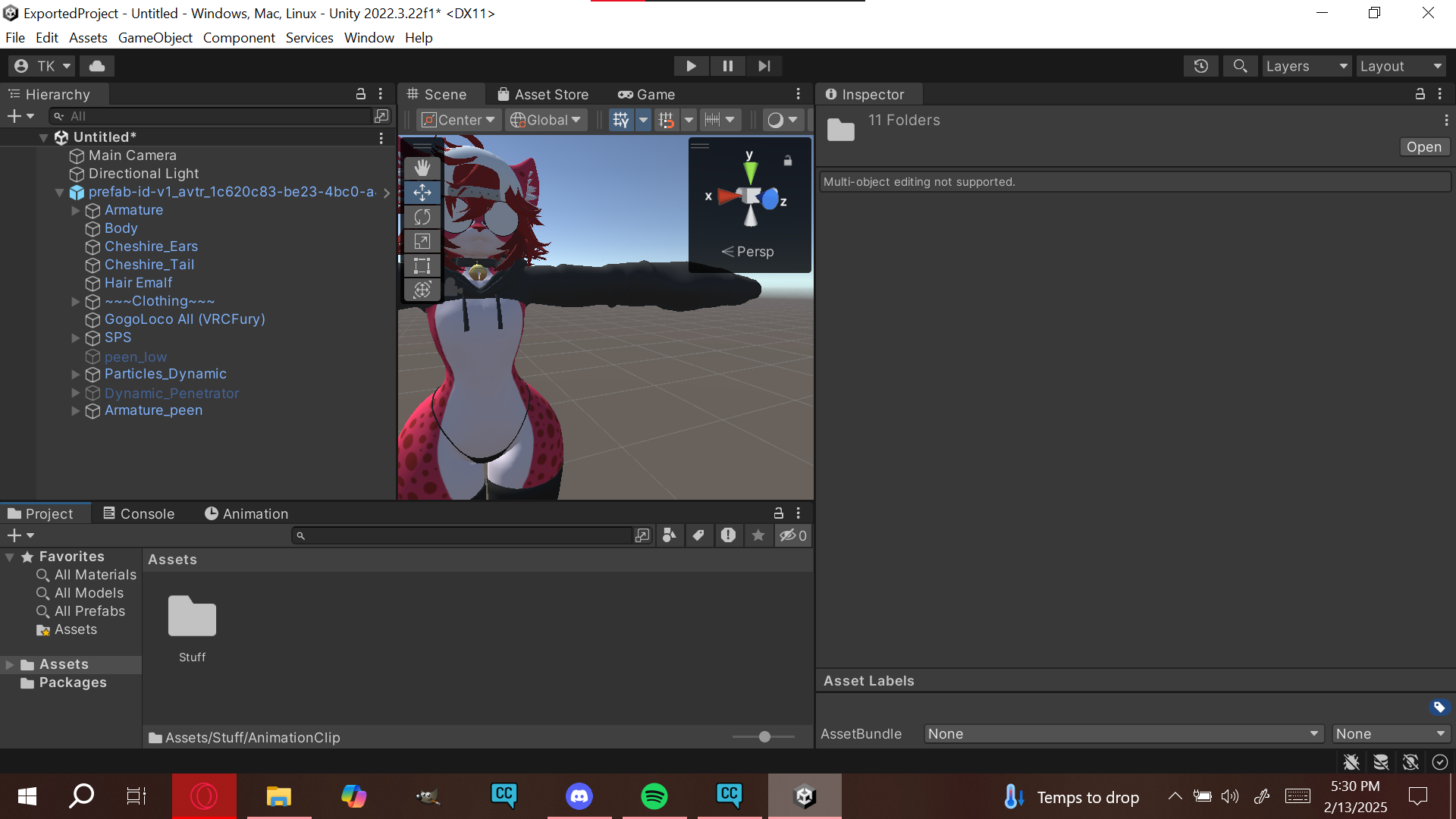
                              @Saltspyre_Bnuui so you unzip the folder then once thats done you go to vrcc there is an arrow next to open project and it will say open project FOLDER then you open the click the folder you just unzipped and let it all open up then you add ur vrc fury and polytoons and what not
                              Top 500 Jerkmate player

                              bunnyiscringeB 1 Reply Last reply
                              1
                              • Saltspyre_BnuuiS
                                Saltspyre_BnuuiS
                                Saltspyre_Bnuui
                                wrote on last edited by
                                #18

                                Ahhh...THANK YOU!!!!

                                silly_kittyS 1 Reply Last reply
                                0
                                • Saltspyre_BnuuiS Saltspyre_Bnuui

                                  Ahhh...THANK YOU!!!!

                                  silly_kittyS
                                  silly_kittyS
                                  silly_kitty
                                  wrote on last edited by
                                  #19

                                  @Saltspyre_Bnuui np happy to helpp

                                  Top 500 Jerkmate player

                                  1 Reply Last reply
                                  0
                                  • CrystalDustC
                                    CrystalDustC
                                    CrystalDust
                                    wrote on last edited by
                                    #20

                                    i use 7 zip to zip folder

                                    1 Reply Last reply
                                    0
                                    • Saltspyre_BnuuiS
                                      Saltspyre_BnuuiS
                                      Saltspyre_Bnuui
                                      wrote on last edited by
                                      #21

                                      ahhh...ok

                                      1 Reply Last reply
                                      0
                                      • darknovaD
                                        darknovaD
                                        darknova
                                        wrote on last edited by
                                        #22

                                        I do not know how to do it the proper way can somebody upload for me

                                        CrystalDustC 1 Reply Last reply
                                        0
                                        • silly_kittyS silly_kitty

                                          @Saltspyre_Bnuui so you unzip the folder then once thats done you go to vrcc there is an arrow next to open project and it will say open project FOLDER then you open the click the folder you just unzipped and let it all open up then you add ur vrc fury and polytoons and what not
                                          bunnyiscringeB
                                          bunnyiscringeB
                                          bunnyiscringe
                                          wrote on last edited by
                                          #23

                                          @orggybun when you mean add vrcfury and poiyomi, do you mean through vcc or import it manually in the project, cause it tends to install the base VRC-SDK through VRCC and break all enitre project

                                          silly_kittyS 1 Reply Last reply
                                          0

                                          Hello! It looks like you're interested in this conversation, but you don't have an account yet.

                                          Getting fed up of having to scroll through the same posts each visit? When you register for an account, you'll always come back to exactly where you were before, and choose to be notified of new replies (either via email, or push notification). You'll also be able to save bookmarks and upvote posts to show your appreciation to other community members.

                                          With your input, this post could be even better 💗

                                          Register Login
                                          Reply
                                          • Reply as topic
                                          Log in to reply
                                          • Oldest to Newest
                                          • Newest to Oldest
                                          • Most Votes


                                          • Login

                                          • Login or register to search.
                                          • First post
                                            Last post
                                          0
                                          • Categories
                                          • Recent
                                          • Tags
                                          • Popular