Skip to content
  • Categories
  • Recent
  • Tags
  • Popular
Skins
  • Light
  • Brite
  • Cerulean
  • Cosmo
  • Flatly
  • Journal
  • Litera
  • Lumen
  • Lux
  • Materia
  • Minty
  • Morph
  • Pulse
  • Sandstone
  • Simplex
  • Sketchy
  • Spacelab
  • United
  • Yeti
  • Zephyr
  • Dark
  • Cyborg
  • Darkly
  • Quartz
  • Slate
  • Solar
  • Superhero
  • Vapor

  • Default (Zephyr)
  • No Skin
Collapse
RipperStore Logo
  1. Home
  2. Assets
  3. Looking for...
  4. Booth Avatars
  5. LF: Someone to rip this Rusk avatar for me

LF: Someone to rip this Rusk avatar for me

Scheduled Pinned Locked Moved Booth Avatars
ruskcyborgkomadoripripper
16 Posts 5 Posters 2.2k Views 2 Watching
  • Oldest to Newest
  • Newest to Oldest
  • Most Votes
Reply
  • Reply as topic
Log in to reply
This topic has been deleted. Only users with topic management privileges can see it.
  • Coolcat2023C
    Coolcat2023C
    Coolcat2023
    wrote on last edited by
    #2

    uhm just ype in rusk in the search and you find it there 😛

    Windows_XpW 1 Reply Last reply
    0
    • Coolcat2023C Coolcat2023

      uhm just ype in rusk in the search and you find it there 😛

      Windows_XpW
      Windows_XpW
      Windows_Xp
      wrote on last edited by
      #3

      @Coolcat2023 yea ik but i want to have this one with the robot body so i can make a custom one. And as i dont know were to get the robot body or how to put it on rusk im asking here

      1 Reply Last reply
      0
      • Coolcat2023C
        Coolcat2023C
        Coolcat2023
        wrote on last edited by
        #4

        oh you mean the cyberpunk mod ???

        Windows_XpW 1 Reply Last reply
        0
        • Coolcat2023C Coolcat2023

          oh you mean the cyberpunk mod ???

          Windows_XpW
          Windows_XpW
          Windows_Xp
          wrote on last edited by
          #5

          @Coolcat2023 yes?

          1 Reply Last reply
          0
          • Coolcat2023C
            Coolcat2023C
            Coolcat2023
            wrote on last edited by
            #6

            i got that 🙂

            Windows_XpW 2 Replies Last reply
            0
            • Coolcat2023C Coolcat2023

              i got that 🙂

              Windows_XpW
              Windows_XpW
              Windows_Xp
              wrote on last edited by
              #7

              @Coolcat2023 can you tell me where to buy it and or upload a download link?

              1 Reply Last reply
              0
              • Coolcat2023C Coolcat2023

                i got that 🙂

                Windows_XpW
                Windows_XpW
                Windows_Xp
                wrote on last edited by
                #8

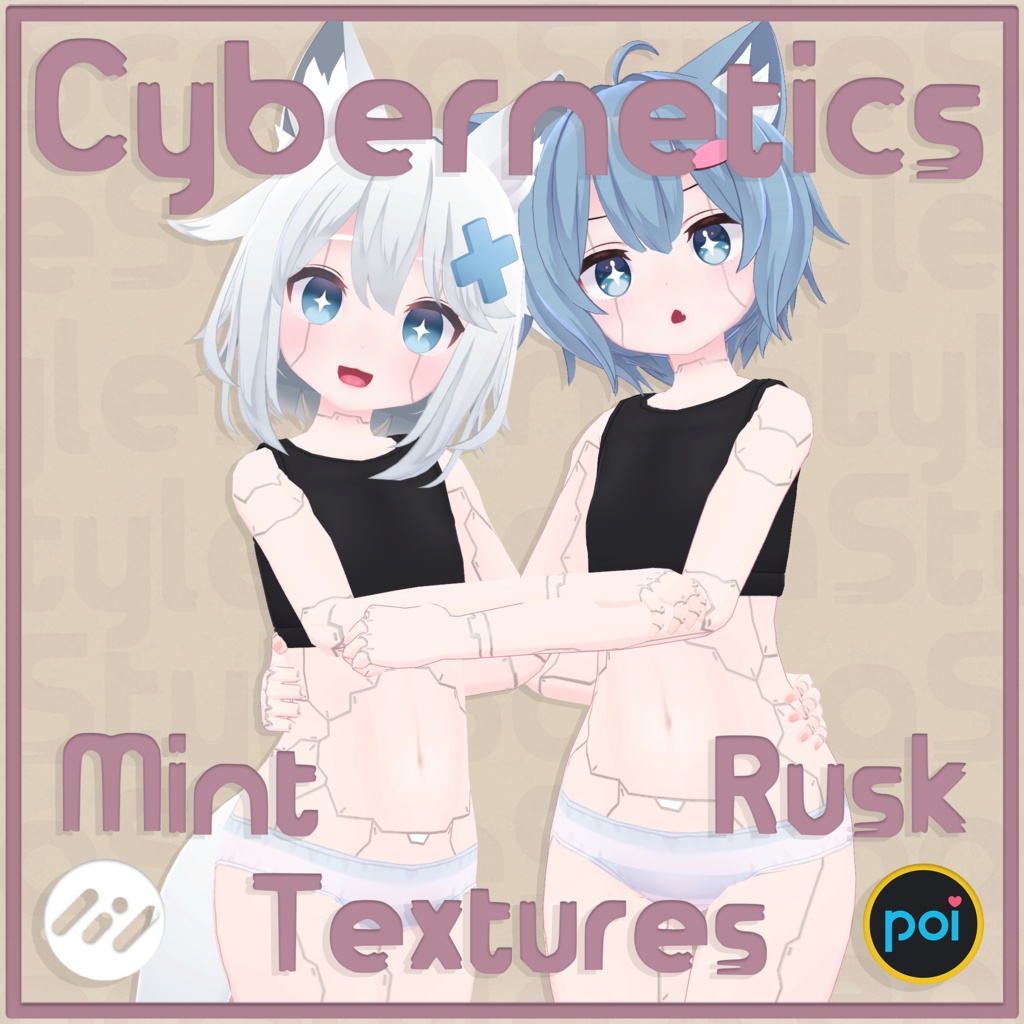
                @Coolcat2023 also just to check is it this body you have Robot rusk body
                Or is it this one Cybernetic Body Textures

                1 Reply Last reply
                0
                • Coolcat2023C
                  Coolcat2023C
                  Coolcat2023
                  wrote on last edited by
                  #9

                  [register or login to view this hidden content] 😛

                  Windows_XpW 1 Reply Last reply
                  0
                  • Coolcat2023C Coolcat2023

                    [register or login to view this hidden content] 😛

                    Windows_XpW
                    Windows_XpW
                    Windows_Xp
                    wrote on last edited by
                    #10

                    @Coolcat2023 sadly i already had that i want the robot body you can see in the img above.
                    thanks for trying to help tho ^^

                    1 Reply Last reply
                    0
                    • R
                      R
                      Randomlad
                      wrote on last edited by Randomlad
                      #11

                      Do it yourself! Its not too hard, ill explain it here. (altho some basic unity knowledge is required)
                      Note: This will give you a recovered project, not a unity package, extracting to unity packages breaks everything from my experience, and is not recommended. (you can still ctrl+x the folder to merge it with a different project)

                      1. Download SARS (ARC): https://github.com/Dean2k/SARS
                        2.Clear your cache, then restart vrc, preferrably with you already being switched into the avatar, either via vrcx or the website.
                      2. Wait for it to download and for you to load into the avatar.
                      3. Go to C:\Users\yourusername\AppData\LocalLow\VRChat\VRChat\Cache-WindowsPlayer, if you cleared your cache, there should be one folder, and only one.
                      4. Rename the _data file to _data.vrca
                      5. Open SARS (ARC)
                      6. Open the VRCA Information tab.
                      7. Click on "Load VRCA/VRCW", then select the _data.vrca you renamed before.
                      8. Click on "Extract VRCA/VRCW"
                      9. Under the install folder of your SARS (ARC) installation, youll find a folder called "VRCA", the extracted project will be in there, either drag it into the assets folder of your main project, or import it into VCC by clicking on the arrow next to "Create New Project", then clicking on add existing project.
                      lalal44L 1 Reply Last reply
                      👍
                      1
                      • L
                        L
                        lol03k
                        wrote on last edited by
                        #12

                        ur lazy as hell lmao

                        Windows_XpW 1 Reply Last reply
                        0
                        • L lol03k

                          ur lazy as hell lmao

                          Windows_XpW
                          Windows_XpW
                          Windows_Xp
                          wrote on last edited by Windows_Xp
                          #13

                          @lol03k i tried and got confused because it kept giving me errors

                          1 Reply Last reply
                          0
                          • Windows_XpW
                            Windows_XpW
                            Windows_Xp
                            wrote on last edited by
                            #14

                            Got it working now since i moved ARC to my desktop. Thanks @Randomlad for telling me how to do it

                            1 Reply Last reply
                            0
                            • R Randomlad

                              Do it yourself! Its not too hard, ill explain it here. (altho some basic unity knowledge is required)
                              Note: This will give you a recovered project, not a unity package, extracting to unity packages breaks everything from my experience, and is not recommended. (you can still ctrl+x the folder to merge it with a different project)

                              1. Download SARS (ARC): https://github.com/Dean2k/SARS
                                2.Clear your cache, then restart vrc, preferrably with you already being switched into the avatar, either via vrcx or the website.
                              2. Wait for it to download and for you to load into the avatar.
                              3. Go to C:\Users\yourusername\AppData\LocalLow\VRChat\VRChat\Cache-WindowsPlayer, if you cleared your cache, there should be one folder, and only one.
                              4. Rename the _data file to _data.vrca
                              5. Open SARS (ARC)
                              6. Open the VRCA Information tab.
                              7. Click on "Load VRCA/VRCW", then select the _data.vrca you renamed before.
                              8. Click on "Extract VRCA/VRCW"
                              9. Under the install folder of your SARS (ARC) installation, youll find a folder called "VRCA", the extracted project will be in there, either drag it into the assets folder of your main project, or import it into VCC by clicking on the arrow next to "Create New Project", then clicking on add existing project.
                              lalal44L
                              lalal44L
                              lalal44
                              wrote on last edited by lalal44
                              #15

                              @Randomlad this got me banned my main and alt so i can say is to be careful for doing this and its up to u if u want to risk ur account

                              Milfy, chocolat, milk-re and cute Avis main
                              i got riru from gift but nobody loves riru ;-;
                              Kaguyahooooooooo

                              R 1 Reply Last reply
                              0
                              • lalal44L lalal44

                                @Randomlad this got me banned my main and alt so i can say is to be careful for doing this and its up to u if u want to risk ur account

                                R
                                R
                                Randomlad
                                wrote on last edited by Randomlad
                                #16

                                @lalal44 This will only get you banned if you login to A.R.C. // S.A.R.S. (in other words, if youre and idiot)
                                If you copy stuff from cache while VRC is NOT RUNNING then it should be completely safe.
                                Please note that ripping at all is currently not possible due to the cache having some form encryption now. (surprised it took them so long)


                                1 Reply Last reply
                                0

                                Hello! It looks like you're interested in this conversation, but you don't have an account yet.

                                Getting fed up of having to scroll through the same posts each visit? When you register for an account, you'll always come back to exactly where you were before, and choose to be notified of new replies (either via email, or push notification). You'll also be able to save bookmarks and upvote posts to show your appreciation to other community members.

                                With your input, this post could be even better 💗

                                Register Login
                                Reply
                                • Reply as topic
                                Log in to reply
                                • Oldest to Newest
                                • Newest to Oldest
                                • Most Votes


                                • Login

                                • Login or register to search.
                                • First post
                                  Last post
                                0
                                • Categories
                                • Recent
                                • Tags
                                • Popular