Skip to content
  • Categories
  • Recent
  • Tags
  • Popular
Skins
  • Light
  • Brite
  • Cerulean
  • Cosmo
  • Flatly
  • Journal
  • Litera
  • Lumen
  • Lux
  • Materia
  • Minty
  • Morph
  • Pulse
  • Sandstone
  • Simplex
  • Sketchy
  • Spacelab
  • United
  • Yeti
  • Zephyr
  • Dark
  • Cyborg
  • Darkly
  • Quartz
  • Slate
  • Solar
  • Superhero
  • Vapor

  • Default (Zephyr)
  • No Skin
Collapse
RipperStore Logo
  1. Home
  2. Guides
  3. New User Help
  4. Selestia's breasts keep popping out o_o

Selestia's breasts keep popping out o_o

Scheduled Pinned Locked Moved New User Help
6 Posts 4 Posters 1.1k Views
  • Oldest to Newest
  • Newest to Oldest
  • Most Votes
Reply
  • Reply as topic
Log in to reply
This topic has been deleted. Only users with topic management privileges can see it.
  • UnicorgasmzU
    UnicorgasmzU
    Unicorgasmz
    wrote on last edited by
    #1

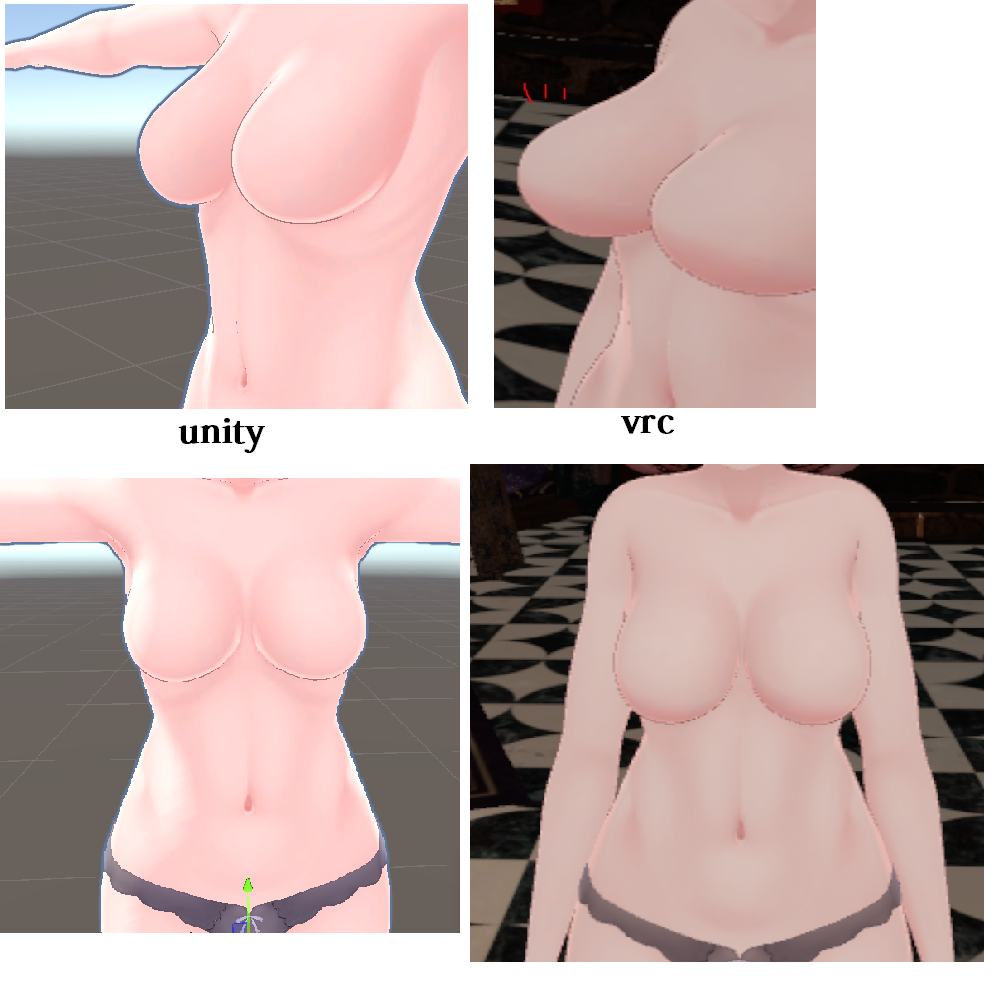
    So, this isn't a weight painting issue or physics or clipping etc.
    They keep growning back to their full size.

    Using the Selestia Base and she is wearing clothing made for Selestia and that can be applied via the modular avi system.
    I have lowered her breast size from the base size. 43.8 on the smaller breast scale.
    I have lowered it to that same size for all of her tops so that they match and then .

    But every time I finish her up and load into vrchat they are back at full-size again and obviously bursting through the tops.

    Is there some kind of setting somewhere I have to turn off?
    I'm doing this avi for a friend. I usually use the Manuka base and this has never been an issue with her.
    why3.PNG

    I buy a lot of stuff but post on a delay. :p
    Currently: Looking for cute, frilly, lolita stuff for Kipfel, Chocolat, & Manuka!

    c0tt0nc4ndyC 1 Reply Last reply
    0
    • Aloice21A
      Aloice21A
      Aloice21
      wrote on last edited by
      #2

      The og model has a breast toggle, either make sure everything about that is deleted or just change the size in game through that toggle.

      1 Reply Last reply
      0
      • UnicorgasmzU Unicorgasmz

        So, this isn't a weight painting issue or physics or clipping etc.
        They keep growning back to their full size.

        Using the Selestia Base and she is wearing clothing made for Selestia and that can be applied via the modular avi system.
        I have lowered her breast size from the base size. 43.8 on the smaller breast scale.
        I have lowered it to that same size for all of her tops so that they match and then .

        But every time I finish her up and load into vrchat they are back at full-size again and obviously bursting through the tops.

        Is there some kind of setting somewhere I have to turn off?
        I'm doing this avi for a friend. I usually use the Manuka base and this has never been an issue with her.

        why3.PNG

        c0tt0nc4ndyC
        c0tt0nc4ndyC
        c0tt0nc4ndy
        wrote on last edited by
        #3

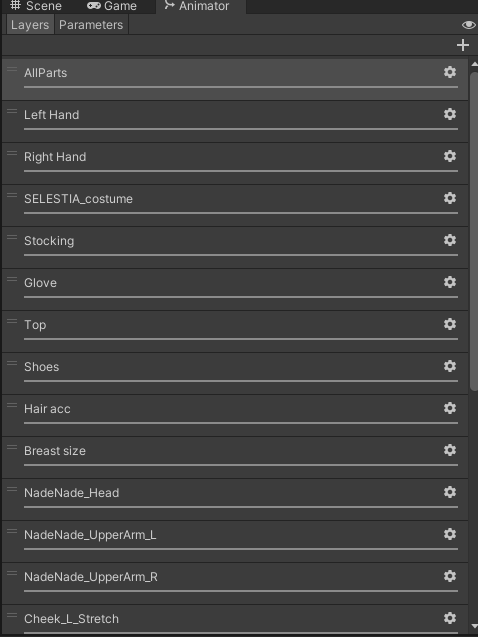
        @Unicorgasmz go in selestias fx layer and delete the breast parameter and animation

        mwa ꒰ᐢ. .ᐢ꒱₊˚⊹

        c0tt0nc4ndyC 1 Reply Last reply
        0
        • c0tt0nc4ndyC c0tt0nc4ndy

          @Unicorgasmz go in selestias fx layer and delete the breast parameter and animation

          c0tt0nc4ndyC
          c0tt0nc4ndyC
          c0tt0nc4ndy
          wrote on last edited by
          #4

          @c0tt0nc4ndy Screenshot 2024-07-26 143408.png Screenshot 2024-07-26 143358.png @Unicorgasmz

          mwa ꒰ᐢ. .ᐢ꒱₊˚⊹

          UnicorgasmzU 1 Reply Last reply
          0
          • c0tt0nc4ndyC c0tt0nc4ndy

            @c0tt0nc4ndy Screenshot 2024-07-26 143408.png Screenshot 2024-07-26 143358.png @Unicorgasmz

            UnicorgasmzU
            UnicorgasmzU
            Unicorgasmz
            wrote on last edited by
            #5

            @c0tt0nc4ndy @Aloice21 Thank you both very much! I appreciate the help!

            I buy a lot of stuff but post on a delay. :p
            Currently: Looking for cute, frilly, lolita stuff for Kipfel, Chocolat, & Manuka!

            1 Reply Last reply
            0
            • J
              J
              JorJor
              wrote on last edited by JorJor
              #6

              instead of deleting the original layers you can disable them by sliding the weight to zero on the desired layer, this way if you need to ever use that toggle you can just change the weight again, Or you can dupelicate the original fx controller by clicking and selecting the FX Controller then pressing CRTL+D to dupelicate

              1 Reply Last reply
              0

              Hello! It looks like you're interested in this conversation, but you don't have an account yet.

              Getting fed up of having to scroll through the same posts each visit? When you register for an account, you'll always come back to exactly where you were before, and choose to be notified of new replies (either via email, or push notification). You'll also be able to save bookmarks and upvote posts to show your appreciation to other community members.

              With your input, this post could be even better 💗

              Register Login
              Reply
              • Reply as topic
              Log in to reply
              • Oldest to Newest
              • Newest to Oldest
              • Most Votes


              • Login

              • Login or register to search.
              • First post
                Last post
              0
              • Categories
              • Recent
              • Tags
              • Popular