Skip to content
  • Categories
  • Recent
  • Tags
  • Popular
Skins
  • Light
  • Brite
  • Cerulean
  • Cosmo
  • Flatly
  • Journal
  • Litera
  • Lumen
  • Lux
  • Materia
  • Minty
  • Morph
  • Pulse
  • Sandstone
  • Simplex
  • Sketchy
  • Spacelab
  • United
  • Yeti
  • Zephyr
  • Dark
  • Cyborg
  • Darkly
  • Quartz
  • Slate
  • Solar
  • Superhero
  • Vapor

  • Default (Zephyr)
  • No Skin
Collapse
RipperStore Logo
  1. Home
  2. Assets
  3. Looking for...
  4. Gumroad/Payhip Avatars
  5. LF: Kitt By NetPet (FRIDAY)

LF: Kitt By NetPet (FRIDAY)

Scheduled Pinned Locked Moved Unsolved Gumroad/Payhip Avatars
nsfwunisexnetpetcutepuppygirlfemale
178 Posts 82 Posters 6.9k Views 65 Watching
  • Oldest to Newest
  • Newest to Oldest
  • Most Votes
Reply
  • Reply as topic
Log in to reply
This topic has been deleted. Only users with topic management privileges can see it.
  • GhostRocket811G GhostRocket811

    @currydon replace the FX layer on the avatar with the new one thats it

    C
    C
    currydon
    wrote on last edited by
    #169

    @GhostRocket811 wheres the new fx layer

    1 Reply Last reply
    0
    • T TehUndead

      @GhostRocket811 Where is the New FX?

      GhostRocket811G
      GhostRocket811G
      GhostRocket811
      wrote last edited by
      #170

      @TehUndead @currydon u have to import the other unitypackage

      1 Reply Last reply
      0
      • NotVKN
        NotVKN
        NotVK
        wrote last edited by
        #171

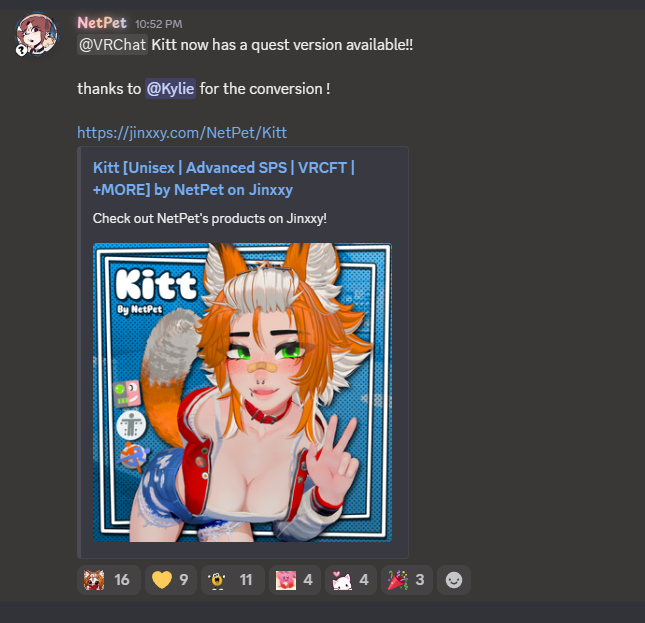
        Bump for quest update!
        image_2026-09-21_231900623.png

        1 Reply Last reply
        1
        • luvslemonL luvslemon

          🔗 Download Link (workupload.com) here you goo!!

          uwumonsterzU
          uwumonsterzU
          uwumonsterz
          wrote last edited by
          #172

          @luvslemon Hey there sorry ik its been a hot minute since you shared, do you still have access to the files? Someone made her a quest side! 😄 listing just got updated with it today

          luvslemonL 1 Reply Last reply
          0
          • uwumonsterzU uwumonsterz

            @luvslemon Hey there sorry ik its been a hot minute since you shared, do you still have access to the files? Someone made her a quest side! 😄 listing just got updated with it today

            luvslemonL
            luvslemonL
            luvslemon
            wrote last edited by
            #173

            @uwumonsterz uploading it rn!

            1 Reply Last reply
            1
            • luvslemonL
              luvslemonL
              luvslemon
              wrote last edited by
              #174

              [register or login to view this hidden content] quest vers!!

              uwumonsterzU 1 Reply Last reply
              3
              • luvslemonL luvslemon

                [register or login to view this hidden content] quest vers!!

                uwumonsterzU
                uwumonsterzU
                uwumonsterz
                wrote last edited by
                #175

                @luvslemon TYSM :DD

                1 Reply Last reply
                0
                • A
                  A
                  AveragePuppyGirl
                  wrote last edited by
                  #176

                  Unity and windows defender are mraking Kitt Quest.unitypackage as a virus, why is this happening?

                  1 Reply Last reply
                  0
                  • n2oinN n2oin

                    I can't seem to figure out where the pulls on the clothing are (I've been testing with Gesture Manager before uploading, and it seems only the socks can be pulled, toggling clothing pull on or off doesn't do anything for some reason).
                    Don't know why, nor how, but I'll screw around with it later.
                    Also, how you get that edited FX layer to work is just, import the avatar, then import the edited fx layer package. Should be auto applied.

                    GhostRocket811G
                    GhostRocket811G
                    GhostRocket811
                    wrote last edited by GhostRocket811
                    #177

                    @n2oin cloth pull previewing only works with Avatars 3.0 Manager in Game Scene (need a camera set up) then u hold left click and pull on the sides of the pants. u need to pull one until u hear a cloth sfx, then whilst holding it w left click, right click to freeze it, then left click hold the opposite side to pull up and down (a bit finnicky)

                    1 Reply Last reply
                    0
                    • OovikatO
                      OovikatO
                      Oovikat
                      wrote last edited by
                      #178

                      Has anyone edited her with clothing or hairs yet?
                      I'm pretty terrible when it comes to editing so I was wondering if anyone here could share something with me, send me a DM if you have or know how to pls so we can talk! ❤

                      1 Reply Last reply
                      0

                      Hello! It looks like you're interested in this conversation, but you don't have an account yet.

                      Getting fed up of having to scroll through the same posts each visit? When you register for an account, you'll always come back to exactly where you were before, and choose to be notified of new replies (either via email, or push notification). You'll also be able to save bookmarks and upvote posts to show your appreciation to other community members.

                      With your input, this post could be even better 💗

                      Register Login
                      Reply
                      • Reply as topic
                      Log in to reply
                      • Oldest to Newest
                      • Newest to Oldest
                      • Most Votes


                      • Login

                      • Login or register to search.
                      • First post
                        Last post
                      0
                      • Categories
                      • Recent
                      • Tags
                      • Popular