Skip to content
  • Categories
  • Recent
  • Tags
  • Popular
Skins
  • Light
  • Brite
  • Cerulean
  • Cosmo
  • Flatly
  • Journal
  • Litera
  • Lumen
  • Lux
  • Materia
  • Minty
  • Morph
  • Pulse
  • Sandstone
  • Simplex
  • Sketchy
  • Spacelab
  • United
  • Yeti
  • Zephyr
  • Dark
  • Cyborg
  • Darkly
  • Quartz
  • Slate
  • Solar
  • Superhero
  • Vapor

  • Default (Zephyr)
  • No Skin
Collapse
RipperStore Logo
  1. Home
  2. Assets
  3. Looking for...
  4. Furry Avatars
  5. PsiCorpVR - Sergal

PsiCorpVR - Sergal

Scheduled Pinned Locked Moved Unsolved Furry Avatars
furry avatarsolved
416 Posts 24 Posters 27.6k Views 40 Watching
  • Oldest to Newest
  • Newest to Oldest
  • Most Votes
Reply
  • Reply as topic
Log in to reply
This topic has been deleted. Only users with topic management privileges can see it.
  • SirlockinbottomS Sirlockinbottom

    Lucky day my dudes, got a guy who assisted, up my rep please:

    @newbkid
    🔗 Download Link (workupload.com)

    See if you can get the nsfw texture for me, that would be great, thank you.

    MasterBaiterM
    MasterBaiterM
    MasterBaiter
    wrote on last edited by
    #405

    @Sirlockinbottom OMG THANK YOU SO MUCH <33

    1 Reply Last reply
    1
    • SirlockinbottomS Sirlockinbottom

      Lucky day my dudes, got a guy who assisted, up my rep please:

      @newbkid
      🔗 Download Link (workupload.com)

      See if you can get the nsfw texture for me, that would be great, thank you.

      NewbKidN
      NewbKidN
      NewbKid
      wrote on last edited by
      #406

      @Sirlockinbottom Damn, after like a year of @sirlockinbottom and I bumping, thank you very much, friend. Rep deserved.

      1 Reply Last reply
      2
      • NewbKidN
        NewbKidN
        NewbKid
        wrote on last edited by
        #407

        Sry for the double mention, still waking up with my coffee

        SirlockinbottomS 2 Replies Last reply
        1
        • NewbKidN NewbKid

          Sry for the double mention, still waking up with my coffee

          SirlockinbottomS
          SirlockinbottomS
          Sirlockinbottom
          wrote on last edited by
          #408

          @NewbKid

          Take my double ups my bro, i will give you my whole 5.

          We both wanted this, enjoy your coffee.

          And hope you can help out with the NSFW texture. ^^

          𝙏𝙃𝙀 𝙂𝙐𝙔

          1 Reply Last reply
          1
          • NewbKidN NewbKid

            Sry for the double mention, still waking up with my coffee

            SirlockinbottomS
            SirlockinbottomS
            Sirlockinbottom
            wrote on last edited by
            #409

            @NewbKid

            P.s make sure to have this post as solved, thank you.

            𝙏𝙃𝙀 𝙂𝙐𝙔

            1 Reply Last reply
            1
            • JaySergalJ
              JaySergalJ
              JaySergal
              wrote on last edited by
              #410

              Major problem with this, though. These already have blueprints attached, so make sure to detach your blueprints or risk overriding everyone else's avatar or potentially linking accounts with others in the eyes of VRC. You wouldn't want to get your account taken down because VRC mistakes you for someone else who's evading bans while using the same avi.

              SirlockinbottomS 1 Reply Last reply
              2
              • SirlockinbottomS Sirlockinbottom

                Lucky day my dudes, got a guy who assisted, up my rep please:

                @newbkid
                🔗 Download Link (workupload.com)

                See if you can get the nsfw texture for me, that would be great, thank you.

                CodeGiver_01C
                CodeGiver_01C
                CodeGiver_01
                wrote on last edited by
                #411

                @Sirlockinbottom Been a bit lol

                𝐕𝐞𝐧𝐝𝐮𝐞𝐫

                1 Reply Last reply
                1
                • JaySergalJ JaySergal

                  Major problem with this, though. These already have blueprints attached, so make sure to detach your blueprints or risk overriding everyone else's avatar or potentially linking accounts with others in the eyes of VRC. You wouldn't want to get your account taken down because VRC mistakes you for someone else who's evading bans while using the same avi.

                  SirlockinbottomS
                  SirlockinbottomS
                  Sirlockinbottom
                  wrote on last edited by
                  #412

                  @JaySergal

                  I am not using them for VR, but that is something i did not know; mind msg me to help me learn more?

                  I am curious now.

                  𝙏𝙃𝙀 𝙂𝙐𝙔

                  JaySergalJ 1 Reply Last reply
                  0
                  • SirlockinbottomS Sirlockinbottom

                    @JaySergal

                    I am not using them for VR, but that is something i did not know; mind msg me to help me learn more?

                    I am curious now.

                    JaySergalJ
                    JaySergalJ
                    JaySergal
                    wrote on last edited by
                    #413

                    @Sirlockinbottom A blueprint is something that gets added to an avatar upon upload.
                    Essentially, it's a signature that tells VRChat what upload of the avatar it is and makes it so when you update an avatar and upload it, it updates that instance of the avatar instead of uploading an entirely new version, because it knows it's the same upload.
                    It also links the avatar to your account so if you you were banned after uploading it, make a new account, and try to reupload the same avatar with the same blueprint then it will detect this and tie your new account to your banned account and ban the new account for evasion.

                    In essence, just detach the blueprint just in case.

                    FluffDraginF 1 Reply Last reply
                    1
                    • JaySergalJ JaySergal

                      @Sirlockinbottom A blueprint is something that gets added to an avatar upon upload.
                      Essentially, it's a signature that tells VRChat what upload of the avatar it is and makes it so when you update an avatar and upload it, it updates that instance of the avatar instead of uploading an entirely new version, because it knows it's the same upload.
                      It also links the avatar to your account so if you you were banned after uploading it, make a new account, and try to reupload the same avatar with the same blueprint then it will detect this and tie your new account to your banned account and ban the new account for evasion.

                      In essence, just detach the blueprint just in case.

                      FluffDraginF
                      FluffDraginF
                      FluffDragin
                      wrote last edited by
                      #414

                      @JaySergal
                      Curious if this is seen but - What are they steps on Detaching the blueprints so it will be safe to upload, Wear? o:

                      :3

                      JaySergalJ 1 Reply Last reply
                      0
                      • FluffDraginF FluffDragin

                        @JaySergal
                        Curious if this is seen but - What are they steps on Detaching the blueprints so it will be safe to upload, Wear? o:

                        :3

                        JaySergalJ
                        JaySergalJ
                        JaySergal
                        wrote last edited by
                        #415

                        @FluffDragin Just click on the main avatar in the hierarchy. On the right you''ll get all the details about your avatar, like the menus, the animation FX's, etc. Under Pipeline Manager you'll find the BLUEPRINT.

                        Currently this says "ATTACH BLUEPRINT" because I haven't uploaded this particular avatar yet, but on the sergal it will say "DETACH BLUEPRINT". You'll want to click that and then you'll have detached the blueprint.
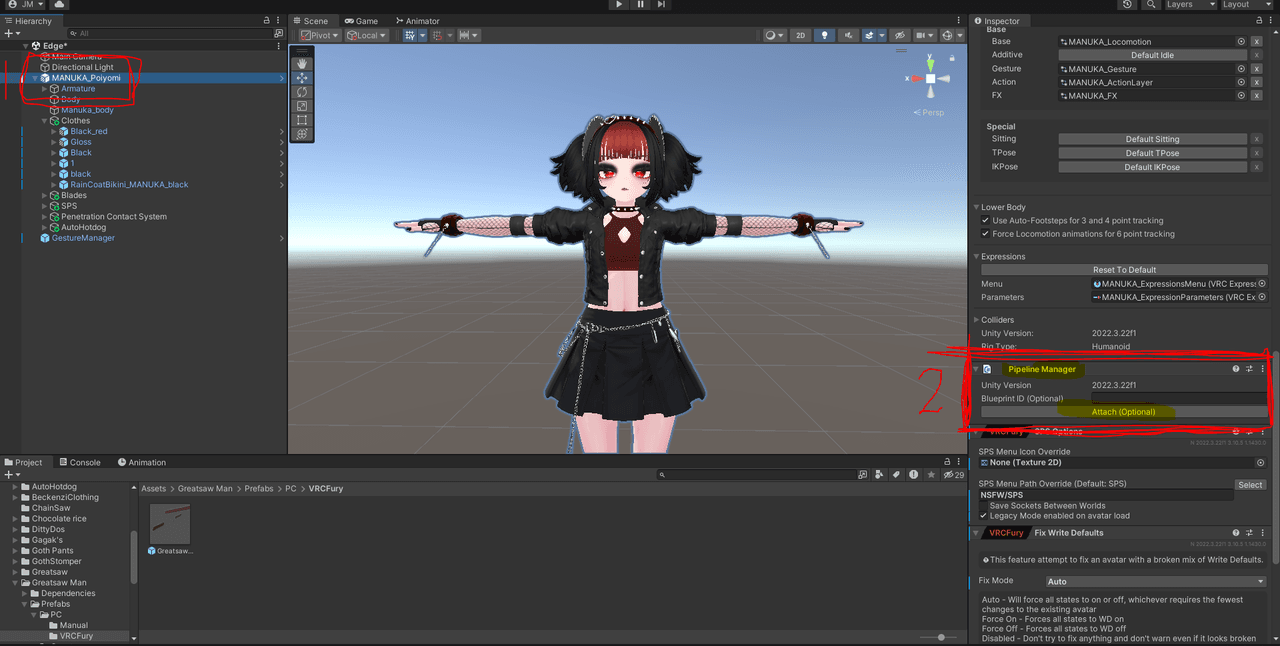
                        Blueprint removal.PNG

                        FluffDraginF 1 Reply Last reply
                        👍
                        1
                        • JaySergalJ JaySergal

                          @FluffDragin Just click on the main avatar in the hierarchy. On the right you''ll get all the details about your avatar, like the menus, the animation FX's, etc. Under Pipeline Manager you'll find the BLUEPRINT.

                          Currently this says "ATTACH BLUEPRINT" because I haven't uploaded this particular avatar yet, but on the sergal it will say "DETACH BLUEPRINT". You'll want to click that and then you'll have detached the blueprint.

                          Blueprint removal.PNG

                          FluffDraginF
                          FluffDraginF
                          FluffDragin
                          wrote last edited by
                          #416

                          @JaySergal
                          Ohh That :3
                          Thnx ~

                          1 Reply Last reply
                          0

                          Hello! It looks like you're interested in this conversation, but you don't have an account yet.

                          Getting fed up of having to scroll through the same posts each visit? When you register for an account, you'll always come back to exactly where you were before, and choose to be notified of new replies (either via email, or push notification). You'll also be able to save bookmarks and upvote posts to show your appreciation to other community members.

                          With your input, this post could be even better 💗

                          Register Login
                          Reply
                          • Reply as topic
                          Log in to reply
                          • Oldest to Newest
                          • Newest to Oldest
                          • Most Votes


                          • Login

                          • Login or register to search.
                          • First post
                            Last post
                          0
                          • Categories
                          • Recent
                          • Tags
                          • Popular