Skip to content
  • Categories
  • Recent
  • Tags
  • Popular
Skins
  • Light
  • Brite
  • Cerulean
  • Cosmo
  • Flatly
  • Journal
  • Litera
  • Lumen
  • Lux
  • Materia
  • Minty
  • Morph
  • Pulse
  • Sandstone
  • Simplex
  • Sketchy
  • Spacelab
  • United
  • Yeti
  • Zephyr
  • Dark
  • Cyborg
  • Darkly
  • Quartz
  • Slate
  • Solar
  • Superhero
  • Vapor

  • Default (Zephyr)
  • No Skin
Collapse
RipperStore Logo
  1. Home
  2. Assets
  3. Gifts / Downloads
  4. GIFT: Evrine by Asphyxiya {PC, QUEST, GREEN}

GIFT: Evrine by Asphyxiya {PC, QUEST, GREEN}

Scheduled Pinned Locked Moved Gifts / Downloads
giftvrchat avatarfemalepc & questasphyxiya
84 Posts 19 Posters 5.4k Views 38 Watching
  • Oldest to Newest
  • Newest to Oldest
  • Most Votes
Reply
  • Reply as topic
Log in to reply
This topic has been deleted. Only users with topic management privileges can see it.
  • J
    J
    Jdoe12666
    wrote last edited by
    #67

    My poi issues were with the PC version. But The optimized version (which uses poi) is in the same package as quest.

    AlètaA 1 Reply Last reply
    0
    • J Jdoe12666

      My poi issues were with the PC version. But The optimized version (which uses poi) is in the same package as quest.

      AlètaA
      AlètaA
      Alèta
      wrote last edited by
      #68

      @Jdoe12666 wish I could help, I don't bother uploading quest version of avatars anymore. So I have no clue what the issue could be sorry :< ❤ But yes you should be using what it says 10.0.11 (pro) I had no issues with it when I uploaded the 1.4 version of the avatar, basically the only working one. She just broke it again for no reason. I'd just wait if I were you for a new update. I did the same thing when uploading 1.6 version and it worked fine. Also don't unlock anything. Besides that I really don't know

      J 1 Reply Last reply
      0
      • AlètaA Alèta

        @Jdoe12666 wish I could help, I don't bother uploading quest version of avatars anymore. So I have no clue what the issue could be sorry :< ❤ But yes you should be using what it says 10.0.11 (pro) I had no issues with it when I uploaded the 1.4 version of the avatar, basically the only working one. She just broke it again for no reason. I'd just wait if I were you for a new update. I did the same thing when uploading 1.6 version and it worked fine. Also don't unlock anything. Besides that I really don't know

        J
        J
        Jdoe12666
        wrote last edited by
        #69

        @Alèta Ok thank you. I have noticed that toggling some of the clothes off doesn't properly restore some of the blendshapes. Like the bra for example. The boobs still have an indent there. Same with the thigh area. Hopefully they fix it. Or I'll do it myself when I'm not lazy lol. Avatar is really nice but seems it's been having a lot of issues from what others are saying.

        AlètaA 1 Reply Last reply
        0
        • J Jdoe12666

          @Alèta Ok thank you. I have noticed that toggling some of the clothes off doesn't properly restore some of the blendshapes. Like the bra for example. The boobs still have an indent there. Same with the thigh area. Hopefully they fix it. Or I'll do it myself when I'm not lazy lol. Avatar is really nice but seems it's been having a lot of issues from what others are saying.

          AlètaA
          AlètaA
          Alèta
          wrote last edited by
          #70

          @Jdoe12666 the boobs get "indented" if you have the pull up physbone enabled if you have her bra off, turn it off if you're not wearing a bra and it should restore properly. And yea she's missing a lot of stuff, like she broke the gestures again on 1.6. Right now 1.4 is the only one without any glaring issues, Glad I didn't overwrite my 1.4 with the new 1.6 lol.

          1 Reply Last reply
          0
          • L
            L
            Lunella_gremlin
            wrote last edited by
            #71

            I'm not able to find the up to date files they sat they were last updated on the 2026/07/08 buts there's a posy on here for an update since then

            J PinkcatgirlP 2 Replies Last reply
            0
            • L Lunella_gremlin

              I'm not able to find the up to date files they sat they were last updated on the 2026/07/08 buts there's a posy on here for an update since then

              J
              J
              Jdoe12666
              wrote last edited by
              #72

              @Lunella_gremlin If you go to "Product Contents" on the jinxxy page you can see the latest versions. PC is 1.6 and quest is 1.41. The original poster has updated the download link. But not the post itself which is why the date is older. But if you check the download link you will see they are the latest versions

              1 Reply Last reply
              0
              • BeppinDOJOB
                BeppinDOJOB
                BeppinDOJO
                wrote last edited by
                #73

                I don't know why the skin looks inverted; I've already tried different versions of Poi, but it still comes out the same way. Help.
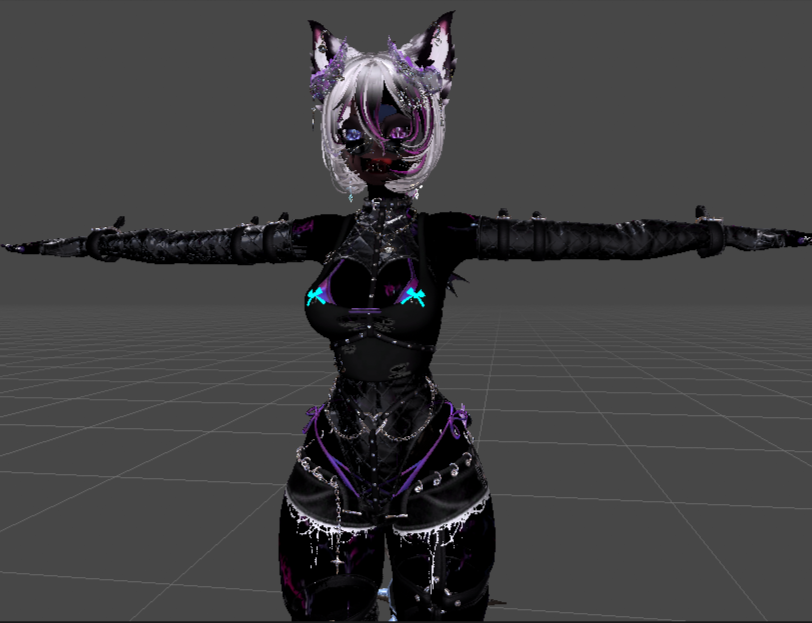
                2026_10_09_07_43_55_screenshot.png

                J 1 Reply Last reply
                0
                • BeppinDOJOB BeppinDOJO

                  I don't know why the skin looks inverted; I've already tried different versions of Poi, but it still comes out the same way. Help.

                  2026_10_09_07_43_55_screenshot.png

                  J
                  J
                  Jdoe12666
                  wrote last edited by
                  #74

                  @BeppinDOJO Have you tested it in game? Also, almost all the materials are locked by default in the package. So as long as you don't unlock them it will look fine even if you didn't use the exact poi version. But the specific version they state is Poi 10.0.11. I'd test it in game first if you haven't already. If it still looks weird then I'd reimport the avatar and don't unlock the materials. Maybe a fresh project to be sure

                  1 Reply Last reply
                  🙌
                  0
                  • L
                    L
                    Lunella_gremlin
                    wrote last edited by
                    #75

                    do you need to have pio pro to upload it??

                    PinkcatgirlP 1 Reply Last reply
                    0
                    • L Lunella_gremlin

                      I'm not able to find the up to date files they sat they were last updated on the 2026/07/08 buts there's a posy on here for an update since then

                      PinkcatgirlP
                      PinkcatgirlP
                      Pinkcatgirl
                      wrote last edited by
                      #76

                      @Lunella_gremlin there has not been an update since PC 1.6 and quest 1.4.1 came out.

                      1 Reply Last reply
                      0
                      • L Lunella_gremlin

                        do you need to have pio pro to upload it??

                        PinkcatgirlP
                        PinkcatgirlP
                        Pinkcatgirl
                        wrote last edited by
                        #77

                        @Lunella_gremlin No, you do not.

                        L 1 Reply Last reply
                        0
                        • PinkcatgirlP Pinkcatgirl

                          @Lunella_gremlin No, you do not.

                          L
                          L
                          Lunella_gremlin
                          wrote last edited by
                          #78

                          @Pinkcatgirl for quest what are the ones i need? im at 10.82 MB at the moment

                          PinkcatgirlP 1 Reply Last reply
                          0
                          • L Lunella_gremlin

                            @Pinkcatgirl for quest what are the ones i need? im at 10.82 MB at the moment

                            PinkcatgirlP
                            PinkcatgirlP
                            Pinkcatgirl
                            wrote last edited by
                            #79

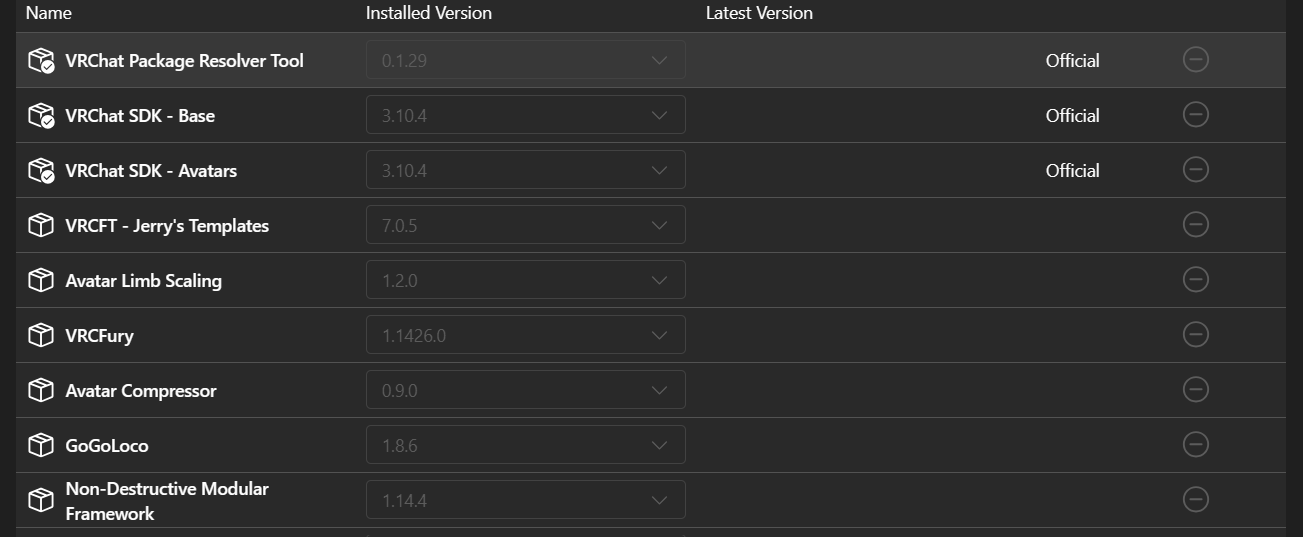
                            @Lunella_gremlin image_2026-10-09_182500702.png this is what i use

                            L 2 Replies Last reply
                            0
                            • L
                              L
                              Lunella_gremlin
                              wrote last edited by
                              #80

                              hmm i have them only them it still said the quest FT is to big trying to go down to your versions now

                              1 Reply Last reply
                              0
                              • PinkcatgirlP Pinkcatgirl

                                @Lunella_gremlin image_2026-10-09_182500702.png this is what i use

                                L
                                L
                                Lunella_gremlin
                                wrote last edited by
                                #81

                                @Pinkcatgirl which version did you upload??? its not working for me i have the same versions for everything and all

                                1 Reply Last reply
                                0
                                • PinkcatgirlP Pinkcatgirl

                                  @Lunella_gremlin image_2026-10-09_182500702.png this is what i use

                                  L
                                  L
                                  Lunella_gremlin
                                  wrote last edited by
                                  #82

                                  @Pinkcatgirl also when i upload the green version it says none of the shaders are compatible with android
                                  this is the mesage:

                                  You are currently building an avatar for Android/Quest/iOS and are using shaders that are not mobile compatible. You have likely switched build target by mistake and simply need to switch back to Windows mode using the VRChat SDK Control Panel. If you have not switched by mistake and want to build for mobile, you will need to change your materials to use shaders found in VRChat/Mobile.

                                  Face 3 in Body
                                  Norn 2 in Body
                                  HAIR 9 in Body
                                  Body 6 in Body
                                  Eyes 1 in Body
                                  Stocking 3 in Body
                                  SoutBody 10 in Body

                                  L PinkcatgirlP 2 Replies Last reply
                                  0
                                  • L Lunella_gremlin

                                    @Pinkcatgirl also when i upload the green version it says none of the shaders are compatible with android
                                    this is the mesage:

                                    You are currently building an avatar for Android/Quest/iOS and are using shaders that are not mobile compatible. You have likely switched build target by mistake and simply need to switch back to Windows mode using the VRChat SDK Control Panel. If you have not switched by mistake and want to build for mobile, you will need to change your materials to use shaders found in VRChat/Mobile.

                                    Face 3 in Body
                                    Norn 2 in Body
                                    HAIR 9 in Body
                                    Body 6 in Body
                                    Eyes 1 in Body
                                    Stocking 3 in Body
                                    SoutBody 10 in Body

                                    L
                                    L
                                    Lunella_gremlin
                                    wrote last edited by
                                    #83

                                    Turns out i could just not do the facetracking version 😞

                                    1 Reply Last reply
                                    0
                                    • L Lunella_gremlin

                                      @Pinkcatgirl also when i upload the green version it says none of the shaders are compatible with android
                                      this is the mesage:

                                      You are currently building an avatar for Android/Quest/iOS and are using shaders that are not mobile compatible. You have likely switched build target by mistake and simply need to switch back to Windows mode using the VRChat SDK Control Panel. If you have not switched by mistake and want to build for mobile, you will need to change your materials to use shaders found in VRChat/Mobile.

                                      Face 3 in Body
                                      Norn 2 in Body
                                      HAIR 9 in Body
                                      Body 6 in Body
                                      Eyes 1 in Body
                                      Stocking 3 in Body
                                      SoutBody 10 in Body

                                      PinkcatgirlP
                                      PinkcatgirlP
                                      Pinkcatgirl
                                      wrote last edited by
                                      #84

                                      @Lunella_gremlin you dont need to import the shaders the PC side needs. you do not import any shaders at all with the quest and green.
                                      1 Reply Last reply
                                      0

                                      Hello! It looks like you're interested in this conversation, but you don't have an account yet.

                                      Getting fed up of having to scroll through the same posts each visit? When you register for an account, you'll always come back to exactly where you were before, and choose to be notified of new replies (either via email, or push notification). You'll also be able to save bookmarks and upvote posts to show your appreciation to other community members.

                                      With your input, this post could be even better 💗

                                      Register Login
                                      Reply
                                      • Reply as topic
                                      Log in to reply
                                      • Oldest to Newest
                                      • Newest to Oldest
                                      • Most Votes


                                      • Login

                                      • Login or register to search.
                                      • First post
                                        Last post
                                      0
                                      • Categories
                                      • Recent
                                      • Tags
                                      • Popular