Skip to content
  • Categories
  • Recent
  • Tags
  • Popular
Skins
  • Light
  • Brite
  • Cerulean
  • Cosmo
  • Flatly
  • Journal
  • Litera
  • Lumen
  • Lux
  • Materia
  • Minty
  • Morph
  • Pulse
  • Sandstone
  • Simplex
  • Sketchy
  • Spacelab
  • United
  • Yeti
  • Zephyr
  • Dark
  • Cyborg
  • Darkly
  • Quartz
  • Slate
  • Solar
  • Superhero
  • Vapor

  • Default (Zephyr)
  • No Skin
Collapse
RipperStore Logo
  1. Home
  2. Off-Topic
  3. Modding
  4. πŸš€ [Release] VRC Avatar Uploader β€” A New Tool for the Community

πŸš€ [Release] VRC Avatar Uploader β€” A New Tool for the Community

Scheduled Pinned Locked Moved Modding
vrcareuploaderprogramfreeripping
1 Cross-posts 52 Posts 28 Posters 7.6k Views 33 Watching
  • Oldest to Newest
  • Newest to Oldest
  • Most Votes
Reply
  • Reply as topic
Log in to reply
This topic has been deleted. Only users with topic management privileges can see it.
  • W
    W
    wawafufu
    wrote last edited by
    #43

    interested in an invite to VRCA server

    1 Reply Last reply
    0
    • M
      M
      MellowYippie
      wrote last edited by MellowYippie
      #44

      @Miku any new invite to your server :3 ?

      1 Reply Last reply
      0
      • L
        L
        Loona Rae
        wrote last edited by
        #45

        Can I get an invite to the vrca discird please?

        I dont do trades. Ever. Dont ask.

        1 Reply Last reply
        0
        • LargestBoiL
          LargestBoiL
          LargestBoi
          wrote last edited by
          #46

          @zerynth. @candythemayu @wawafufu @mellowyippie @loona-rae
          Invites to the VRCA server are closed off for the time being however the uploader server is still open.

          candythemayuC 1 Reply Last reply
          0
          • LargestBoiL LargestBoi

            @zerynth. @candythemayu @wawafufu @mellowyippie @loona-rae
            Invites to the VRCA server are closed off for the time being however the uploader server is still open.

            candythemayuC
            candythemayuC
            candythemayu
            wrote last edited by
            #47

            @LargestBoi yeah that’s what I’m looking for, the uploader server

            Retired owner of The Galaxy | PRIVATED |

            Owner of .gg/pawbclient <3 | VRC CLIENT SERVER |

            1 Reply Last reply
            0
            • MikuM Miku

              Download + Install

              thanks @SpookyVersace and now here is the rest of the info for everyone

              Download

              • Main executable: VrcAvatarUploader.exe
              • Required companion runtime tool: ubzig.exe
              • Keep both files in the same folder.

              official download link here:

              • πŸ”— Download Link (gofile.io)

              Video

              • https://www.youtube.com/watch?v=KHIYG3AFSGk

              GUI mode (normal users)

              • Double-click VrcAvatarUploader.exe with no arguments.
              • Go to Upload page.
              • Select your .vrca file.
              • Select your avatar image.
              • Enter your avatar name.
              • Upload.

              CLI mode (tool/mod developers)

              Direct upload command:

              VrcAvatarUploader.exe --vrca "avatar.vrca" --image "avatar.png" --name "Avatar Name"
              

              Interactive console workflow:

              VrcAvatarUploader.exe --cli
              

              Force GUI mode explicitly:

              VrcAvatarUploader.exe --gui
              

              Troubleshooting

              • --vrca
                • Check path and quotes.
              • --image
                • Check path and verify file exists.
              • Login fails in CLI automation mode
                • Run --force-login interactively first.
              • Upload blocked at startup
                • Check here for updated download link

              Support

              If you hit issues, have setup questions, or need help integrating CLI into your own tool:

              • Message one of us directly.
              • Include the command used and relevant output (redacted if needed).

              Forum contacts:

              • @Miku (Discord: .limeboi)
              • @LargestBoi (Discord: largestboi_og)

              Public Discord

              • https://discord.gg/JEKuHJN7yF

              Thanks again for all the support. We hope this makes avatar uploading easier for everyone.

              LargestBoiL
              LargestBoiL
              LargestBoi
              wrote last edited by LargestBoi
              #48

              @Miku said:

              Download + Install

              thanks @SpookyVersace and now here is the rest of the info for everyone

              Download

              • Main executable: VrcAvatarUploader.exe
              • Required companion runtime tool: ubzig.exe
              • Keep both files in the same folder.

              official download link here:

              • [register or login to view this hidden content]

              Video

              • https://www.youtube.com/watch?v=KHIYG3AFSGk

              GUI mode (normal users)

              • Double-click VrcAvatarUploader.exe with no arguments.
              • Go to Upload page.
              • Select your .vrca file.
              • Select your avatar image.
              • Enter your avatar name.
              • Upload.

              CLI mode (tool/mod developers)

              Direct upload command:

              VrcAvatarUploader.exe --vrca "avatar.vrca" --image "avatar.png" --name "Avatar Name"
              

              Interactive console workflow:

              VrcAvatarUploader.exe --cli
              

              Force GUI mode explicitly:

              VrcAvatarUploader.exe --gui
              

              Troubleshooting

              • --vrca
                • Check path and quotes.
              • --image
                • Check path and verify file exists.
              • Login fails in CLI automation mode
                • Run --force-login interactively first.
              • Upload blocked at startup
                • Check here for updated download link

              Support

              If you hit issues, have setup questions, or need help integrating CLI into your own tool:

              • Message one of us directly.
              • Include the command used and relevant output (redacted if needed).

              Forum contacts:

              • @Miku (Discord: .limeboi)
              • @LargestBoi (Discord: largestboi_og)

              Public Discord

              • https://discord.gg/JEKuHJN7yF

              Thanks again for all the support. We hope this makes avatar uploading easier for everyone.

              @candythemayu Its the "Public Discord" linked here, the tool also links to the discord on the about tab.
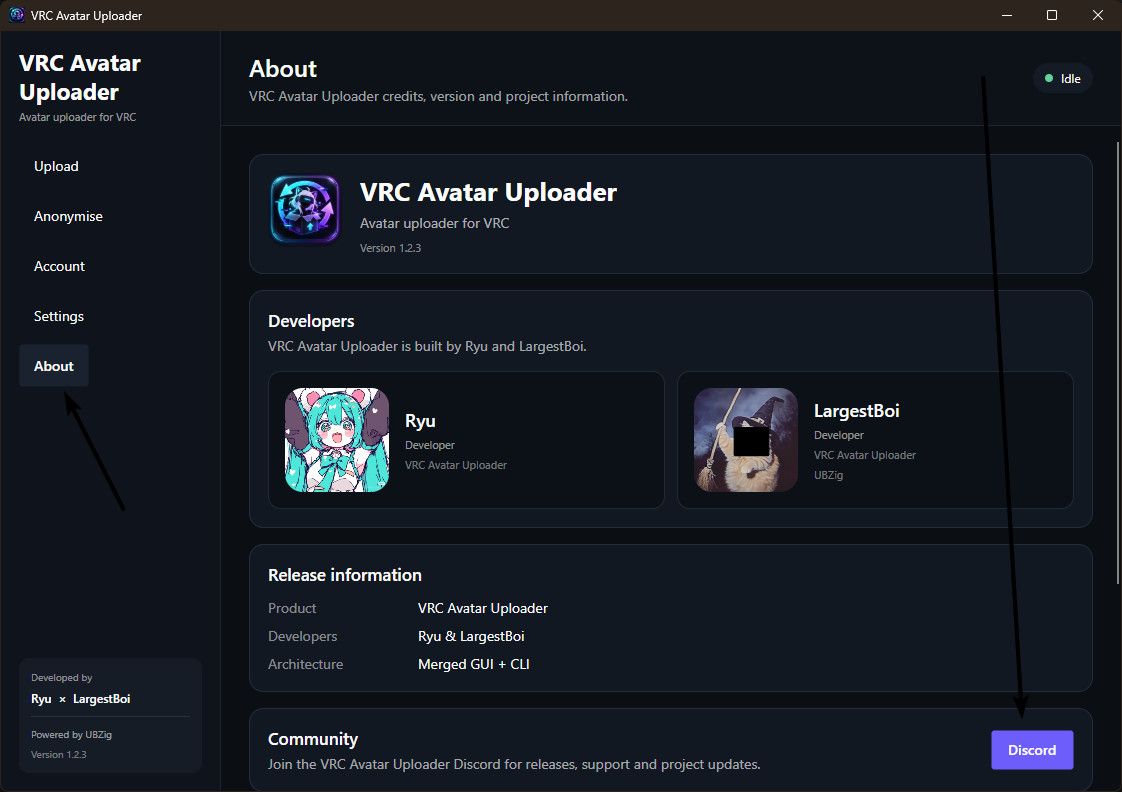
              image.jpeg

              1 Reply Last reply
              0
              • Rabidbean3713R
                Rabidbean3713R
                Rabidbean3713
                wrote last edited by
                #49

                alot of the time when avis are ripped they are broken in some things like gogo or radial toggles does this fix it when uploading?

                LargestBoiL 1 Reply Last reply
                -1
                • Rabidbean3713R Rabidbean3713

                  alot of the time when avis are ripped they are broken in some things like gogo or radial toggles does this fix it when uploading?

                  LargestBoiL
                  LargestBoiL
                  LargestBoi
                  wrote last edited by
                  #50

                  @Rabidbean3713
                  The uploader tool doesn't "Rip" the avatar, it simply alters the existing avatar content and repacks it for upload. Long as the avatar is supported (SDK3 and unity 2019 or 2022) then it'll upload just fine. Its current ability to 'edit' the avatar ends at being able to bypass majority of password systems.

                  1 Reply Last reply
                  0
                  • L
                    L
                    LordNesstor3
                    wrote last edited by
                    #51

                    @largestboi
                    Will the upload function for Quest be added in the future? It would be very convenient, as some avatars can’t be properly taken and uploaded for Quest.

                    LargestBoiL 1 Reply Last reply
                    0
                    • L LordNesstor3

                      @largestboi
                      Will the upload function for Quest be added in the future? It would be very convenient, as some avatars can’t be properly taken and uploaded for Quest.

                      LargestBoiL
                      LargestBoiL
                      LargestBoi
                      wrote last edited by
                      #52

                      @LordNesstor3
                      Unlikely at this point as the average user can't easily obtain corresponding quest VRCAs for uploading.

                      1 Reply Last reply
                      0

                      Hello! It looks like you're interested in this conversation, but you don't have an account yet.

                      Getting fed up of having to scroll through the same posts each visit? When you register for an account, you'll always come back to exactly where you were before, and choose to be notified of new replies (either via email, or push notification). You'll also be able to save bookmarks and upvote posts to show your appreciation to other community members.

                      With your input, this post could be even better πŸ’—

                      Register Login
                      Reply
                      • Reply as topic
                      Log in to reply
                      • Oldest to Newest
                      • Newest to Oldest
                      • Most Votes


                      • Login

                      • Login or register to search.
                      • First post
                        Last post
                      0
                      • Categories
                      • Recent
                      • Tags
                      • Popular