Skip to content
  • Categories
  • Recent
  • Tags
  • Popular
Skins
  • Light
  • Brite
  • Cerulean
  • Cosmo
  • Flatly
  • Journal
  • Litera
  • Lumen
  • Lux
  • Materia
  • Minty
  • Morph
  • Pulse
  • Sandstone
  • Simplex
  • Sketchy
  • Spacelab
  • United
  • Yeti
  • Zephyr
  • Dark
  • Cyborg
  • Darkly
  • Quartz
  • Slate
  • Solar
  • Superhero
  • Vapor

  • Default (Zephyr)
  • No Skin
Collapse
RipperStore Logo
  1. Home
  2. Guides
  3. New User Help
  4. how do i put outfit to my rindo ?

how do i put outfit to my rindo ?

Scheduled Pinned Locked Moved New User Help
8 Posts 7 Posters 2.5k Views 5 Watching
  • Oldest to Newest
  • Newest to Oldest
  • Most Votes
Reply
  • Reply as topic
Log in to reply
This topic has been deleted. Only users with topic management privileges can see it.
  • AstolfokunA
    AstolfokunA
    Astolfokun
    wrote on last edited by
    #1

    hello so i got the rindo base and some outfit but i want to know how to make the outfit move with the arm etc
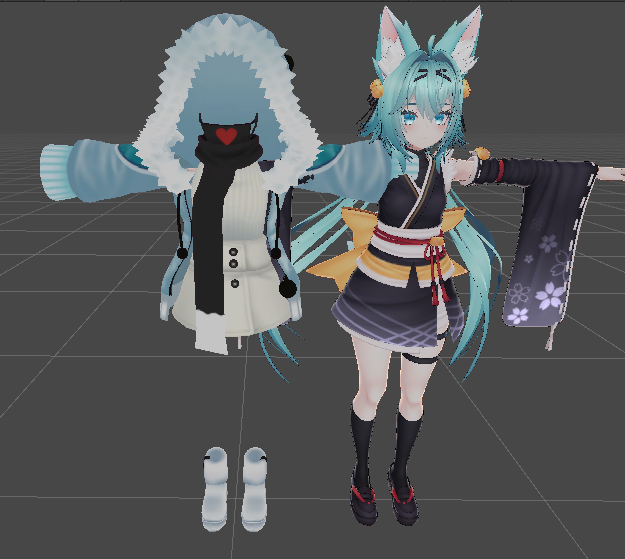
    15dfc02d-ef23-4fb4-965c-9d04a23c6adf-image.png
    here for exemple a outfit i have
    thanks in advance

    1 Reply Last reply
    1
    • dealer45D
      dealer45D
      dealer45
      wrote on last edited by dealer45
      #2

      This is the bare minimum, which is add your new clothes without any toggles:

      1. Turn off Rindo's original clothes
      2. https://booth.pm/en/items/3639300 download and import dressing tools
      3. https://www.youtube.com/watch?v=9nt2dDpnDA0 Follow this tutorial (Go to tools> chocopoi > dressing tools to open the window)
        If you want to learn more about how to make toggles, so that you can turn off certain parts of the clothes, I recommend watching Sippbox's tutorials: https://www.youtube.com/@Sippbox

      Good luck!

      https://drive.google.com/drive/folders/1Vdj4Z7cGdKmhSV3ugTKzMBBhdyGRzKbi?usp=sharing My Trade List!

      AstolfokunA J 2 Replies Last reply
      3
      • dealer45D dealer45

        This is the bare minimum, which is add your new clothes without any toggles:

        1. Turn off Rindo's original clothes
        2. https://booth.pm/en/items/3639300 download and import dressing tools
        3. https://www.youtube.com/watch?v=9nt2dDpnDA0 Follow this tutorial (Go to tools> chocopoi > dressing tools to open the window)
          If you want to learn more about how to make toggles, so that you can turn off certain parts of the clothes, I recommend watching Sippbox's tutorials: https://www.youtube.com/@Sippbox

        Good luck!

        AstolfokunA
        AstolfokunA
        Astolfokun
        wrote on last edited by
        #3

        @dealer45 thanks you so much ❤

        1 Reply Last reply
        0
        • koko_koalaK
          koko_koalaK
          koko_koala
          wrote on last edited by
          #4

          You can also just manually do it by unpacking prefab once it's on the avatar and then take armature and match it with same name armature on Rindo's body. Basically if it says "Hips" on the clothing armature then you must add this to the "Hips" on Rindo's avatar armature

          1 Reply Last reply
          0
          • G
            G
            Getz_yt
            wrote on last edited by
            #5

            (BLENDER) Align them together and Shift click on the regular Rindo Armature, then Shift click on the outfits, then CTRL J. open Cats and click fix Model.

            1 Reply Last reply
            0
            • dealer45D dealer45

              This is the bare minimum, which is add your new clothes without any toggles:

              1. Turn off Rindo's original clothes
              2. https://booth.pm/en/items/3639300 download and import dressing tools
              3. https://www.youtube.com/watch?v=9nt2dDpnDA0 Follow this tutorial (Go to tools> chocopoi > dressing tools to open the window)
                If you want to learn more about how to make toggles, so that you can turn off certain parts of the clothes, I recommend watching Sippbox's tutorials: https://www.youtube.com/@Sippbox

              Good luck!

              J
              J
              johnks
              wrote on last edited by
              #6

              @dealer45 Can you help me? I turned off the clothes for the avatar, but when I switch back to the original outfit using the dressing tools, the avatar becomes naked

              1 Reply Last reply
              0
              • K
                K
                kikyoLove
                wrote on last edited by
                #7
                This post is deleted!
                1 Reply Last reply
                0
                • D
                  D
                  dfddfsaGGSDFgdR
                  wrote on last edited by
                  #8

                  what outfit is this?

                  1 Reply Last reply
                  0

                  Hello! It looks like you're interested in this conversation, but you don't have an account yet.

                  Getting fed up of having to scroll through the same posts each visit? When you register for an account, you'll always come back to exactly where you were before, and choose to be notified of new replies (either via email, or push notification). You'll also be able to save bookmarks and upvote posts to show your appreciation to other community members.

                  With your input, this post could be even better 💗

                  Register Login
                  Reply
                  • Reply as topic
                  Log in to reply
                  • Oldest to Newest
                  • Newest to Oldest
                  • Most Votes


                  • Login

                  • Login or register to search.
                  • First post
                    Last post
                  0
                  • Categories
                  • Recent
                  • Tags
                  • Popular