
✔ (FOUND by pinapplefried) Zaphina by Scarecrow / ElectricCherry
-
-
Bump!
-
-
-
Bump
-
Bump
-
Bump
-
-
bumpp pls
-
-
i bought itt its gonna be a sec till i can get the link for yall cuz my internet has been shit the entire day
-
i bought itt its gonna be a sec till i can get the link for yall cuz my internet has been shit the entire day
@pinapplefried YAAY
-
-
here yall go. there isnt a unity package, just create an existing project
-
-
diff link for users who cant use mega
-
 A avicollector moved this topic from Gumroad/Payhip Avatars on
-
-
@Xi0Xin1 nope its a pc only avi, so someone would have to optimize it
-
-
does anyone know to upload it with working gogo
@bloodyboobies I haven't messed with this avatar yet, so I'm going to give generic advice on how to do it rather than specific to that avatar.
If it already has GoGo that's just showing red or not working, add GoGo to your VCC project, as pictured below.

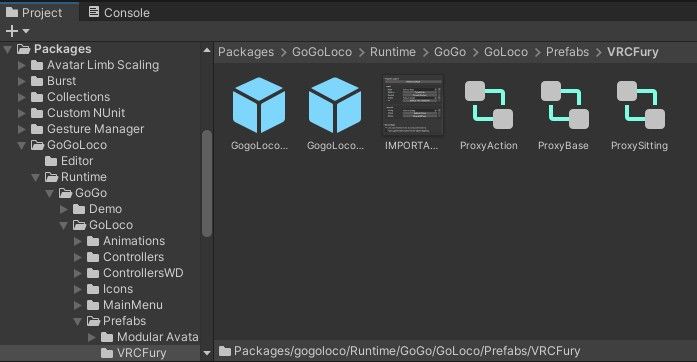
If it's not already on there, still add GoGo to your VCC project, then under Packages, you're going to open GoGoLoco > Runtime > GoGo > GoGoLoco > Prefabs > VRCFury. Select one of those two GoGoLoco prefabs (the left one is All, the right one is Beyond), and drag that up and drop it onto the avatar hierarchy. Then you should be good to go. Hope that helps!









Hello! It looks like you're interested in this conversation, but you don't have an account yet.
Getting fed up of having to scroll through the same posts each visit? When you register for an account, you'll always come back to exactly where you were before, and choose to be notified of new replies (either via email, or push notification). You'll also be able to save bookmarks and upvote posts to show your appreciation to other community members.
With your input, this post could be even better 💗
Register Login