
Poiyomi Shaders DUMP (35 GB) ✔
-
and the file is clean on virus total
-
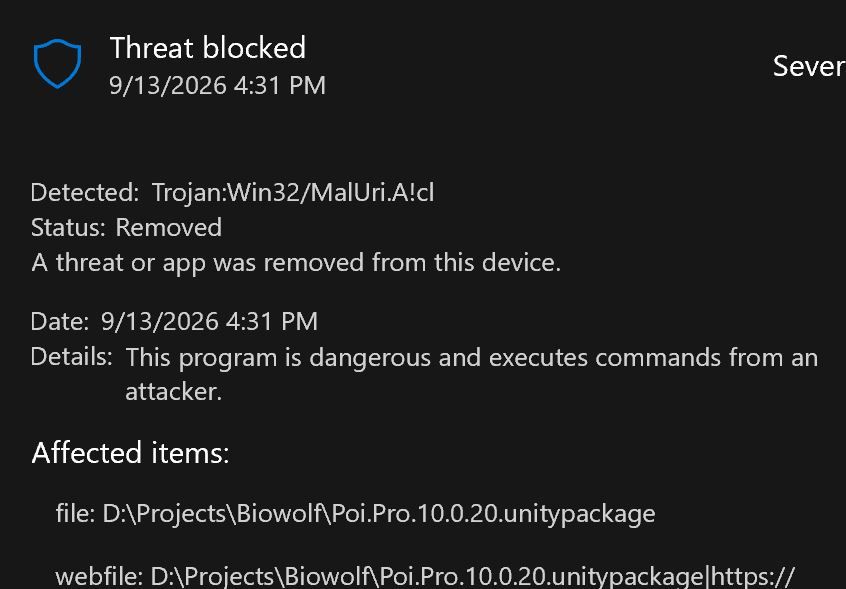
@ShadowxDark87 Yeah, Trojan:Win32/MalUri.A!cl
previous version did not have any flags from windows.i know workupload links have been giving me false flags recently
-
-
@ShadowxDark87 Yeah, Trojan:Win32/MalUri.A!cl
previous version did not have any flags from windows. -
Don't rely on Windows Defender, it can throw false positives. https://forum.ripper.store/topic/36743/false-positives-and-malware?_=1789335754675
-
-
-
-
bump
-
-
bump
-
-
-
-
-
-
Anyone found change logs related to Pro 11.0.x?
Blog Changelog list stops at 10.0.20. https://www.poiyomi.com/changelog
@Striker10
Pro 11.0.0
New Material Editor- A refreshed interface with cleaner controls and clearer sections.
- Find settings faster with improved search. Filter for settings you've changed, animated properties, or textures.
- Edit multiple materials together and easily see where their settings differ.
- Larger, interactive texture previews.
- Easier access to presets, gradients, and texture tools.
- Improved light and dark themes, with optional alternating row colors.
New Shader Features
- PBR lighting: A new lighting option for more realistic materials, with metallic, smoothness, and clear-coat controls.
- Triple Outline: Create layered outlines with up to three outlines on one material.
- More outline control: Use texture masks to control different parts of your outlines, including their size, color, and glow.
- Outline edge fade: Soften the edges of your outlines.
- Screen-space UV scaling: Adjust the size of textures mapped to the screen.
Pro 11.0.1
-
Texture Studio
Pan around Texture Studio with the middle mouse button, and use Reset view to return to the starting view.
Reopen saved texture packs from the Previous packs button.
Corrected the texture windows to be square instead of rectangular to fit a more compact horizontal layout -
Texture fields show estimated VRAM usage, while expanded previews show the source file size.
-
Fixed a bug that cropped up last second making sub section headers have big gaps between them
-
@Striker10
Pro 11.0.0
New Material Editor- A refreshed interface with cleaner controls and clearer sections.
- Find settings faster with improved search. Filter for settings you've changed, animated properties, or textures.
- Edit multiple materials together and easily see where their settings differ.
- Larger, interactive texture previews.
- Easier access to presets, gradients, and texture tools.
- Improved light and dark themes, with optional alternating row colors.
New Shader Features
- PBR lighting: A new lighting option for more realistic materials, with metallic, smoothness, and clear-coat controls.
- Triple Outline: Create layered outlines with up to three outlines on one material.
- More outline control: Use texture masks to control different parts of your outlines, including their size, color, and glow.
- Outline edge fade: Soften the edges of your outlines.
- Screen-space UV scaling: Adjust the size of textures mapped to the screen.
Pro 11.0.1
-
Texture Studio
Pan around Texture Studio with the middle mouse button, and use Reset view to return to the starting view.
Reopen saved texture packs from the Previous packs button.
Corrected the texture windows to be square instead of rectangular to fit a more compact horizontal layout -
Texture fields show estimated VRAM usage, while expanded previews show the source file size.
-
Fixed a bug that cropped up last second making sub section headers have big gaps between them
-
@Striker10
11.0.2
Faster material editing, especially when adjusting sliders or editing several materials together.
Individual on/off switches and stencil controls for each Triple Outline layer.
Custom shaders can now have more or fewer outline layers through the shader generator.
Improved outline compatibility with skyboxes and effects that use camera depth in the built-in render pipeline. -









Hello! It looks like you're interested in this conversation, but you don't have an account yet.
Getting fed up of having to scroll through the same posts each visit? When you register for an account, you'll always come back to exactly where you were before, and choose to be notified of new replies (either via email, or push notification). You'll also be able to save bookmarks and upvote posts to show your appreciation to other community members.
With your input, this post could be even better 💗
Register Login