Skip to content
  • Categories
  • Recent
  • Tags
  • Popular
Skins
  • Light
  • Brite
  • Cerulean
  • Cosmo
  • Flatly
  • Journal
  • Litera
  • Lumen
  • Lux
  • Materia
  • Minty
  • Morph
  • Pulse
  • Sandstone
  • Simplex
  • Sketchy
  • Spacelab
  • United
  • Yeti
  • Zephyr
  • Dark
  • Cyborg
  • Darkly
  • Quartz
  • Slate
  • Solar
  • Superhero
  • Vapor

  • Default (Zephyr)
  • No Skin
Collapse
RipperStore Logo
  1. Home
  2. Assets
  3. Gifts / Downloads
  4. [GIFT] Projekt Kisu (Updated with more outfits)

[GIFT] Projekt Kisu (Updated with more outfits)

Scheduled Pinned Locked Moved Gifts / Downloads
gifttwittertwitchstreamernsfwpersonalpersonalscreatorvtubergumroad
61 Posts 22 Posters 3.7k Views 31 Watching
  • Oldest to Newest
  • Newest to Oldest
  • Most Votes
Reply
  • Reply as topic
Log in to reply
This topic has been deleted. Only users with topic management privileges can see it.
  • DarkerSpyroD
    DarkerSpyroD
    DarkerSpyro
    wrote last edited by
    #22

    after a bit of searching it's missing parameters

    1 Reply Last reply
    0
    • fsiaomF
      fsiaomF
      fsiaom
      wrote last edited by
      #23

      when you remove the missing parameters for marshmallow pb, it breaks the lazy top and causes it to clip like crazy - only tested it in play mode

      1 Reply Last reply
      0
      • YuiZenkouY
        YuiZenkouY
        YuiZenkou
        wrote last edited by YuiZenkou
        #24

        Alright I got to test it out in VR and I guess the ripped avatar has strange viewpoint issues but I've updated the files again.
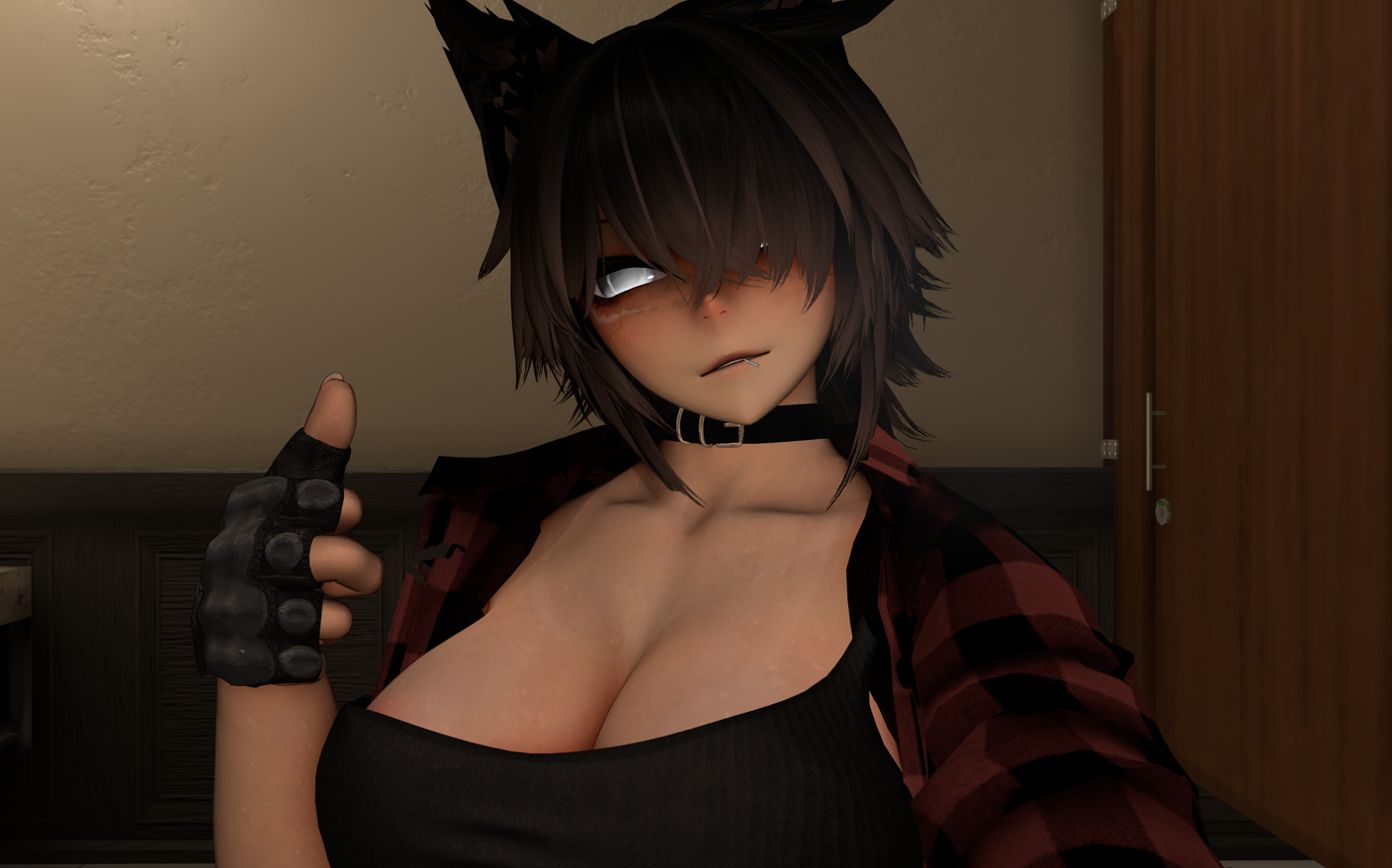
        Photos_CHrOj8fN9e.png

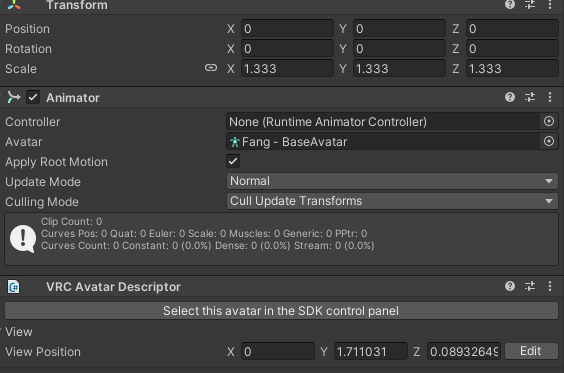
        1. [Viewpoint]
          The best I got it was changing the viewpoint at the Y axis between 1.28 to 1.3. Adjust as needed.
          Alternatively you can try the avatar scale and viewpoint from Arxon's base which was originally 1.333
          Unity_Ajhq2zSp24.png

        2. [Parameter]
          As for parameter I imported the package into a new unity to check and I guess it didn't export.
          You can create a new VRC Parameter and chuck that into the expressions section of the descriptor.

        3. [Floor Adjuster]
          Maybe not needed so it can be removed or adjusted. The avatar has some placement problems that doesn't make sense to me.

        4. [Marshmallow PB]
          All I can think of left is the marshmallow PB has a button for "Parameter Intialization" that might need to be clicked?

        1 Reply Last reply
        0
        • YuiZenkouY
          YuiZenkouY
          YuiZenkou
          wrote last edited by
          #25

          I just got home so I can try to fix any leftover problems if there is any. Sorry for the trouble and lmk if things are working >~<

          1 Reply Last reply
          0
          • EM1AE
            EM1AE
            EM1A
            wrote last edited by
            #26

            have you thought about adding ft?

            YuiZenkouY 1 Reply Last reply
            0
            • EM1AE EM1A

              have you thought about adding ft?

              YuiZenkouY
              YuiZenkouY
              YuiZenkou
              wrote last edited by
              #27

              @EM1A It should have FT installed but I don't have the right headset to test it

              EM1AE 1 Reply Last reply
              0
              • YuiZenkouY YuiZenkou

                @EM1A It should have FT installed but I don't have the right headset to test it

                EM1AE
                EM1AE
                EM1A
                wrote last edited by
                #28

                @YuiZenkou alrighty, if i can get it uploaded i can test it for you

                1 Reply Last reply
                0
                • YuiZenkouY
                  YuiZenkouY
                  YuiZenkou
                  wrote last edited by
                  #29

                  I went and checked importing the avatar from scratch and I guess scripts and other things break depending on how you do it. I'm new to this so I'm sorry and I've attached a step by step that got everything working for me >~<

                  [INSTALLATION]

                  1. IMPORT THESE FIRST
                  • Modular Avatar
                  • VRCFury
                  • VRCFT - Jerry's Templates
                  • Wholesome SPS
                  • GoGoLoco
                  • Poiyomi Pro 10.0.12
                  • Marshmallow PB
                  • CakePB

                  2) IMPORT THE PACKAGE

                  3) DRAG THE "PROJEKT KISU" PREFAB INTO YOUR SCENE

                  Please let me know if this works

                  E EM1AE 2 Replies Last reply
                  2
                  • YuiZenkouY YuiZenkou

                    I went and checked importing the avatar from scratch and I guess scripts and other things break depending on how you do it. I'm new to this so I'm sorry and I've attached a step by step that got everything working for me >~<

                    [INSTALLATION]

                    1. IMPORT THESE FIRST
                    • Modular Avatar
                    • VRCFury
                    • VRCFT - Jerry's Templates
                    • Wholesome SPS
                    • GoGoLoco
                    • Poiyomi Pro 10.0.12
                    • Marshmallow PB
                    • CakePB

                    2) IMPORT THE PACKAGE

                    3) DRAG THE "PROJEKT KISU" PREFAB INTO YOUR SCENE

                    Please let me know if this works

                    E
                    E
                    EmberBlossom
                    wrote last edited by
                    #30

                    @YuiZenkou
                    I got it working thank u
                    time to see if I can get more clothes for it

                    E 1 Reply Last reply
                    0
                    • E EmberBlossom

                      @YuiZenkou
                      I got it working thank u
                      time to see if I can get more clothes for it

                      E
                      E
                      EmasYAlgoMas
                      wrote last edited by
                      #31

                      @WanderingTulip pls if you find any can you post them here pls

                      E 1 Reply Last reply
                      0
                      • YuiZenkouY YuiZenkou

                        I went and checked importing the avatar from scratch and I guess scripts and other things break depending on how you do it. I'm new to this so I'm sorry and I've attached a step by step that got everything working for me >~<

                        [INSTALLATION]

                        1. IMPORT THESE FIRST
                        • Modular Avatar
                        • VRCFury
                        • VRCFT - Jerry's Templates
                        • Wholesome SPS
                        • GoGoLoco
                        • Poiyomi Pro 10.0.12
                        • Marshmallow PB
                        • CakePB

                        2) IMPORT THE PACKAGE

                        3) DRAG THE "PROJEKT KISU" PREFAB INTO YOUR SCENE

                        Please let me know if this works

                        EM1AE
                        EM1AE
                        EM1A
                        wrote last edited by
                        #32

                        @YuiZenkou sadly i dont have that version of poiyomi

                        YuiZenkouY 1 Reply Last reply
                        0
                        • EM1AE EM1A

                          @YuiZenkou sadly i dont have that version of poiyomi

                          YuiZenkouY
                          YuiZenkouY
                          YuiZenkou
                          wrote last edited by YuiZenkou
                          #33

                          @EM1A Anything newer should work as long as it's Poi Pro (I put the version I used in case something breaks)

                          EM1AE 1 Reply Last reply
                          1
                          • E EmasYAlgoMas

                            @WanderingTulip pls if you find any can you post them here pls

                            E
                            E
                            EmberBlossom
                            wrote last edited by
                            #34

                            @EmasYAlgoMas no promises but if i can get anything working i’ll definitely share

                            1 Reply Last reply
                            0
                            • K
                              K
                              Kristin_
                              wrote last edited by
                              #35

                              i sadly dont have the Poiyomi pro that is needed for the avatar

                              lovenightskyL 1 Reply Last reply
                              0
                              • K Kristin_

                                i sadly dont have the Poiyomi pro that is needed for the avatar

                                lovenightskyL
                                lovenightskyL
                                lovenightsky
                                wrote last edited by
                                #36

                                @Kristin_ https://forum.ripper.store/post/153836 here is where all the poiyomis get dumped

                                1 Reply Last reply
                                0
                                • CinderPaizuriC CinderPaizuri referenced this topic
                                • CinderPaizuriC
                                  CinderPaizuriC
                                  CinderPaizuri
                                  wrote last edited by
                                  #37

                                  It works! Thank youuuu 😭

                                  1 Reply Last reply
                                  0
                                  • YuiZenkouY YuiZenkou

                                    @EM1A Anything newer should work as long as it's Poi Pro (I put the version I used in case something breaks)

                                    EM1AE
                                    EM1AE
                                    EM1A
                                    wrote last edited by
                                    #38

                                    @YuiZenkou alright thank you! im getting on within the next hour so i can finally let you know if the face tracking works lol

                                    YuiZenkouY 1 Reply Last reply
                                    0
                                    • EM1AE EM1A

                                      @YuiZenkou alright thank you! im getting on within the next hour so i can finally let you know if the face tracking works lol

                                      YuiZenkouY
                                      YuiZenkouY
                                      YuiZenkou
                                      wrote last edited by
                                      #39

                                      @EM1A Thanks! I'm inexperienced with some things so as long as the avatar is working if anyone wants to fix it further if FT doesn't work then it'd be much appreciated ^~^

                                      1 Reply Last reply
                                      0
                                      • D
                                        D
                                        darkkiro
                                        wrote last edited by
                                        #40

                                        thx u

                                        1 Reply Last reply
                                        0
                                        • CinderPaizuriC
                                          CinderPaizuriC
                                          CinderPaizuri
                                          wrote last edited by
                                          #41

                                          Hahh
                                          IMG_5986.jpeg IMG_5987.jpeg

                                          YuiZenkouY 1 Reply Last reply
                                          😂
                                          -1

                                          Hello! It looks like you're interested in this conversation, but you don't have an account yet.

                                          Getting fed up of having to scroll through the same posts each visit? When you register for an account, you'll always come back to exactly where you were before, and choose to be notified of new replies (either via email, or push notification). You'll also be able to save bookmarks and upvote posts to show your appreciation to other community members.

                                          With your input, this post could be even better 💗

                                          Register Login
                                          Reply
                                          • Reply as topic
                                          Log in to reply
                                          • Oldest to Newest
                                          • Newest to Oldest
                                          • Most Votes


                                          • Login

                                          • Login or register to search.
                                          • First post
                                            Last post
                                          0
                                          • Categories
                                          • Recent
                                          • Tags
                                          • Popular