Skip to content
  • Categories
  • Recent
  • Tags
  • Popular
Skins
  • Light
  • Brite
  • Cerulean
  • Cosmo
  • Flatly
  • Journal
  • Litera
  • Lumen
  • Lux
  • Materia
  • Minty
  • Morph
  • Pulse
  • Sandstone
  • Simplex
  • Sketchy
  • Spacelab
  • United
  • Yeti
  • Zephyr
  • Dark
  • Cyborg
  • Darkly
  • Quartz
  • Slate
  • Solar
  • Superhero
  • Vapor

  • Default (Zephyr)
  • No Skin
Collapse
RipperStore Logo
  1. Home
  2. Assets
  3. Gifts / Downloads
  4. Rikkorchi Clothing "dirty" re-pack "Thread"

Rikkorchi Clothing "dirty" re-pack "Thread"

Scheduled Pinned Locked Moved Gifts / Downloads
giftclothingrikkorchirikkor
5 Posts 4 Posters 588 Views 4 Watching
  • Oldest to Newest
  • Newest to Oldest
  • Most Votes
Reply
  • Reply as topic
Log in to reply
This topic has been deleted. Only users with topic management privileges can see it.
  • AtilaA
    AtilaA
    Atila
    wrote on last edited by Atila
    #1

    I noticed there wasnt much clothing at all for the rikkorchi. I found some meshes and put it together, so its basically a "dirty" clothing repack but it should work.
    Comes with socks, a baggy hoodie, shorts and pants.

    Clothing pack w/Hoodie,Shorts,Pants:
    [register or login to view this hidden content]

    "Buggy" onesei:
    [register or login to view this hidden content]

    Note* For the onesei you have to drop it in first then drop ur avatar in it then pull the avi out and re-drag the onesei back in, once you see the armature link script provide a log/results then it worked. Not sure why that is but likely a unity/armature script bug.


    Also they dont come with mats since they are custom meshes that were not intended for sale. If you have any questions im willing to help, my first time taking a shot at these dirty repacks so they are "quite" raw for now.
    Also ill keep adding more dirty re-packs as I acquire meshes and keep updating to make em as easy to use as possible. Consider this a moving thread

    1 Reply Last reply
    0
    • AtilaA
      AtilaA
      Atila
      wrote on last edited by Atila
      #2

      Also in order to remove the chest hair you have to shrink "Chest_hair_base" with a toggle. Make a vrcfury toggle, add "scale". Make sure you place a minus so it shrinks. You can link this to the same toggle as the hoodie if you make one.
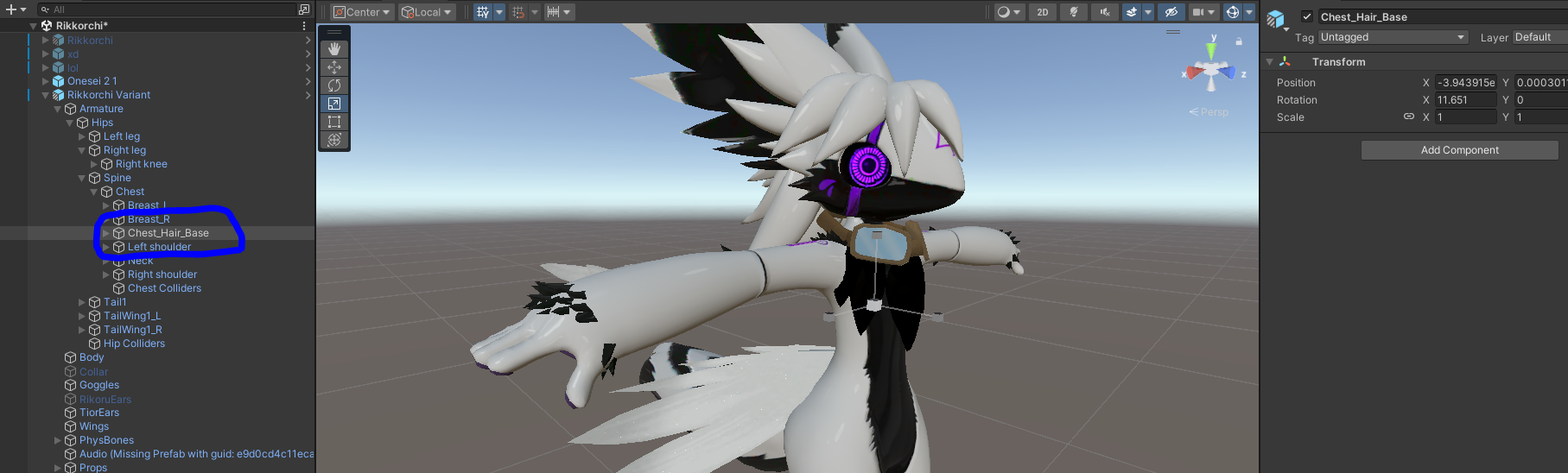
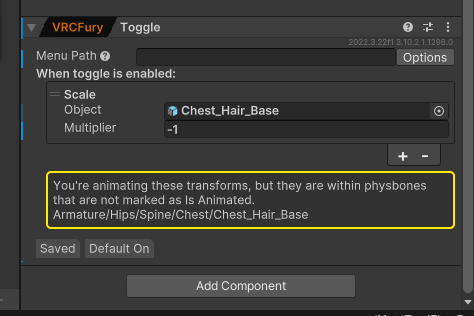
      Capture.PNGCapture.PNG

      1 Reply Last reply
      0
      • A
        A
        amor_rus
        wrote on last edited by
        #3

        Thank you

        1 Reply Last reply
        0
        • astgshuA
          astgshuA
          astgshu
          wrote last edited by
          #4

          Bump for avi

          1 Reply Last reply
          0
          • EliMCGamerGuyE
            EliMCGamerGuyE
            EliMCGamerGuy
            wrote last edited by
            #5

            bump, links are dead

            1 Reply Last reply
            0

            Hello! It looks like you're interested in this conversation, but you don't have an account yet.

            Getting fed up of having to scroll through the same posts each visit? When you register for an account, you'll always come back to exactly where you were before, and choose to be notified of new replies (either via email, or push notification). You'll also be able to save bookmarks and upvote posts to show your appreciation to other community members.

            With your input, this post could be even better 💗

            Register Login
            Reply
            • Reply as topic
            Log in to reply
            • Oldest to Newest
            • Newest to Oldest
            • Most Votes


            • Login

            • Login or register to search.
            • First post
              Last post
            0
            • Categories
            • Recent
            • Tags
            • Popular