Skip to content
  • Categories
  • Recent
  • Tags
  • Popular
Skins
  • Light
  • Brite
  • Cerulean
  • Cosmo
  • Flatly
  • Journal
  • Litera
  • Lumen
  • Lux
  • Materia
  • Minty
  • Morph
  • Pulse
  • Sandstone
  • Simplex
  • Sketchy
  • Spacelab
  • United
  • Yeti
  • Zephyr
  • Dark
  • Cyborg
  • Darkly
  • Quartz
  • Slate
  • Solar
  • Superhero
  • Vapor

  • Default (Zephyr)
  • No Skin
Collapse
RipperStore Logo
  1. Home
  2. Assets
  3. Looking for...
  4. Uncategorized
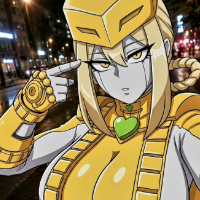
  5. LF: Zentreya Android Avatar

LF: Zentreya Android Avatar

Scheduled Pinned Locked Moved Uncategorized
animevtubercyborgfemalelooking for
75 Posts 26 Posters 17.0k Views 57 Watching
  • Oldest to Newest
  • Newest to Oldest
  • Most Votes
Reply
  • Reply as topic
Log in to reply
This topic has been deleted. Only users with topic management privileges can see it.
  • JorlerJ Jorler

    Hi, I downloaded the model and want to export it to Blender, but I can't figure out how to do it. Does anyone know how the heck you do that? And yes, I've looked through the files, and NO, I can't find the FBX file.

    BRUHGB
    BRUHGB
    BRUHG
    wrote on last edited by
    #66

    @Jorler i think its ripped from the game if theres no fbx, but there is a unity addon to turn prefabs into fbx you'll just have to look that up on youtube or use ai to help you find it

    1 Reply Last reply
    0
    • VRCavi21xV VRCavi21x referenced this topic on
    • BRUHGB
      BRUHGB
      BRUHG
      wrote on last edited by
      #67

      bump

      1 Reply Last reply
      0
      • VRCavi21xV VRCavi21x referenced this topic on
      • VRCavi21xV
        VRCavi21xV
        VRCavi21x
        wrote on last edited by
        #68

        Thanks the Skills of @lotus-okami they have Fixed up the V2 Model and it Uploaded pretty Well just have to add Gogo Loco yourself (Which is pretty easy)

        Main Download - [register or login to view this hidden content]

        Alt. Download for those who can't do Mega - [register or login to view this hidden content]

        Nova1337N 1 Reply Last reply
        4
        • VRCavi21xV VRCavi21x

          Thanks the Skills of @lotus-okami they have Fixed up the V2 Model and it Uploaded pretty Well just have to add Gogo Loco yourself (Which is pretty easy)

          Main Download - [register or login to view this hidden content]

          Alt. Download for those who can't do Mega - [register or login to view this hidden content]

          Nova1337N
          Nova1337N
          Nova1337
          wrote on last edited by
          #69

          @VRCavi21x TYSM

          1 Reply Last reply
          1
          • VRCavi21xV VRCavi21x referenced this topic on
          • KatsumiChanK
            KatsumiChanK
            KatsumiChan
            wrote on last edited by
            #70
            This post is deleted!
            1 Reply Last reply
            0
            • KatsumiChanK
              KatsumiChanK
              KatsumiChan
              wrote on last edited by
              #71

              i have a question whats the difference between the V1 and V2

              1 Reply Last reply
              0
              • VolttekkaV Volttekka

                @AtaraxiaDias Okay, the solution is to just drag ONLY the Asset folder and the .unity file into the project, and then delete the _PoiyomiShaders folder because the console doesn't like that

                KatsumiChanK
                KatsumiChanK
                KatsumiChan
                wrote on last edited by
                #72

                @Volttekka What about the other folders on the zip? i dont add them to the project? sorry im new on this.

                VolttekkaV 1 Reply Last reply
                0
                • KatsumiChanK KatsumiChan

                  @Volttekka What about the other folders on the zip? i dont add them to the project? sorry im new on this.

                  VolttekkaV
                  VolttekkaV
                  Volttekka
                  wrote on last edited by
                  #73

                  @KatsumiChan The other folders are garbage, do not put them in your project since it will confuse the hell out of Unity and make it throw up a bunch of error messages

                  1 Reply Last reply
                  0
                  • R rust referenced this topic on
                  • K
                    K
                    Krystal_Loona
                    wrote last edited by
                    #74

                    Quick question is the gogo already set up or no because I have no idea on how to add it

                    1 Reply Last reply
                    0
                    • K
                      K
                      Krystal_Loona
                      wrote last edited by
                      #75

                      Belay can someone help me out with the avatar please the legs are not connected to the thighs of the avatar


                      1 Reply Last reply
                      0

                      Hello! It looks like you're interested in this conversation, but you don't have an account yet.

                      Getting fed up of having to scroll through the same posts each visit? When you register for an account, you'll always come back to exactly where you were before, and choose to be notified of new replies (either via email, or push notification). You'll also be able to save bookmarks and upvote posts to show your appreciation to other community members.

                      With your input, this post could be even better 💗

                      Register Login
                      Reply
                      • Reply as topic
                      Log in to reply
                      • Oldest to Newest
                      • Newest to Oldest
                      • Most Votes


                      • Login

                      • Login or register to search.
                      • First post
                        Last post
                      0
                      • Categories
                      • Recent
                      • Tags
                      • Popular