
FOUND Marisol by Peekabowo
-
Oh my apologies, some text was cut off for me and I didn't see the other errors regarding the Blueprint ID and Skinned Meshes! Make sure your blueprint ID section is cleared! Sometimes Unity also likes to freak out about this so a restart and a fresh project doesn't hurt to see! For the skinned meshes, I could have sworn VRCFury normally handles this stuff but if you have to check manually, try changing the blendshapes to Normal or Legacy! If you need help with that I can try my best!
-
@EA i'll try making a new project but id like to learn to to switch the blend shapes if you could share how
@Vimbutu
Go to the Project window at the bottom of Unity and find the avatar's .fbx or .prefab you dragged/opened in the scene! (If you are looking through the prefab, double click the box that says "Variant Parent" and it will take you to the FBX) (An Example; Not of Marisol's project)
Click on the 3D model asset to view its settings in the Inspector window on the right. At the top of the inspector, click on the model tab. Scroll down until you see the Geometry section. Check the box next to Legacy Blend Shape Normals. Scroll down to the very bottom of the Inspector and click apply!
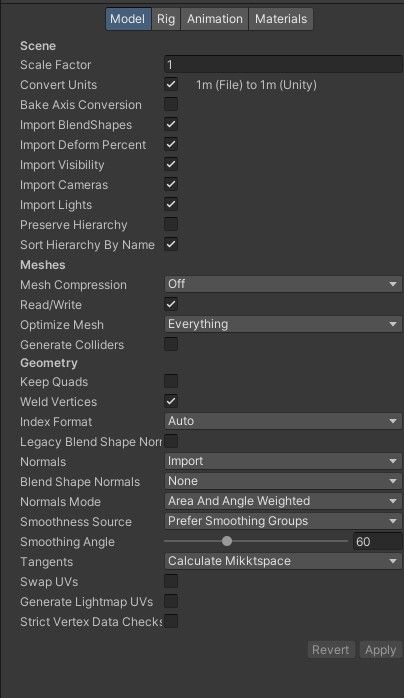

Alternatively; You can change the Blend Shape Normals (NOT Legacy) to none!

I really hope this helps!


PS/Edit: Once you hit Apply, Unity will re-import the model. After it finishes loading, try uploading your avatar again through the VRChat SDK panel! Let me know if it throws a different error after applying the fix!
ㅤㅤㅤㅤ ㅤㅤㅤㅤㅤㅤㅤㅤ ㅤㅤㅤㅤㅤ ㅤㅤㅤㅤㅤㅤㅤ⋆⭒˚。✧˖°¸¸♬·¯·♪·¯·♫¸¸⋆⭒˚。✧˖°
ㅤㅤㅤㅤㅤㅤ ㅤㅤㅤㅤㅤ𝒜𝓁𝓌𝒶𝓎𝓈 𝑜𝓃 𝓉𝒽𝑒 𝓁𝑜𝑜𝓀𝑜𝓊𝓉 𝒻𝑜𝓇 𝒫𝑒𝒶𝓀𝒶𝒷𝑜𝓌𝑜 𝒶𝓋𝒾𝓈 + 𝒶𝓈𝓈𝑒𝓉𝓈 𝒶𝓃𝒹 𝒦𝓊𝓇𝑜𝓀𝒾 𝒜𝓈𝓈𝑒𝓉𝓈!
ㅤㅤㅤㅤㅤㅤㅤㅤ ㅤㅤㅤㅤㅤ ㅤㅤㅤㅤㅤㅤㅤㅤ ㅤㅤㅤㅤㅤ#𝓈𝓉𝑜𝓅𝓊𝓈𝒾𝓃𝑔𝑔𝑜𝓃𝓈𝑜
ㅤㅤㅤㅤㅤㅤㅤㅤㅤㅤㅤ ㅤㅤㅤㅤㅤㅤㅤㅤ ㅤㅤㅤㅤㅤ⋆⭒˚。✧˖°¸¸♫·¯·♪¸♩·¯·♬¸¸⋆⭒˚。✧˖°
ㅤㅤㅤㅤ ㅤㅤㅤㅤㅤㅤㅤㅤ ㅤㅤㅤ
-
@Vimbutu
Go to the Project window at the bottom of Unity and find the avatar's .fbx or .prefab you dragged/opened in the scene! (If you are looking through the prefab, double click the box that says "Variant Parent" and it will take you to the FBX) (An Example; Not of Marisol's project)
Click on the 3D model asset to view its settings in the Inspector window on the right. At the top of the inspector, click on the model tab. Scroll down until you see the Geometry section. Check the box next to Legacy Blend Shape Normals. Scroll down to the very bottom of the Inspector and click apply!
Alternatively; You can change the Blend Shape Normals (NOT Legacy) to none!
I really hope this helps!
PS/Edit: Once you hit Apply, Unity will re-import the model. After it finishes loading, try uploading your avatar again through the VRChat SDK panel! Let me know if it throws a different error after applying the fix!
-
@Vimbutu Awesome! I'm glad things worked out!
ㅤㅤㅤㅤ ㅤㅤㅤㅤㅤㅤㅤㅤ ㅤㅤㅤㅤㅤ ㅤㅤㅤㅤㅤㅤㅤ⋆⭒˚。✧˖°¸¸♬·¯·♪·¯·♫¸¸⋆⭒˚。✧˖°
ㅤㅤㅤㅤㅤㅤ ㅤㅤㅤㅤㅤ𝒜𝓁𝓌𝒶𝓎𝓈 𝑜𝓃 𝓉𝒽𝑒 𝓁𝑜𝑜𝓀𝑜𝓊𝓉 𝒻𝑜𝓇 𝒫𝑒𝒶𝓀𝒶𝒷𝑜𝓌𝑜 𝒶𝓋𝒾𝓈 + 𝒶𝓈𝓈𝑒𝓉𝓈 𝒶𝓃𝒹 𝒦𝓊𝓇𝑜𝓀𝒾 𝒜𝓈𝓈𝑒𝓉𝓈!
ㅤㅤㅤㅤㅤㅤㅤㅤ ㅤㅤㅤㅤㅤ ㅤㅤㅤㅤㅤㅤㅤㅤ ㅤㅤㅤㅤㅤ#𝓈𝓉𝑜𝓅𝓊𝓈𝒾𝓃𝑔𝑔𝑜𝓃𝓈𝑜
ㅤㅤㅤㅤㅤㅤㅤㅤㅤㅤㅤ ㅤㅤㅤㅤㅤㅤㅤㅤ ㅤㅤㅤㅤㅤ⋆⭒˚。✧˖°¸¸♫·¯·♪¸♩·¯·♬¸¸⋆⭒˚。✧˖°
ㅤㅤㅤㅤ ㅤㅤㅤㅤㅤㅤㅤㅤ ㅤㅤㅤ -
anybody have any DLC's I could nab for Marisol?
ᴡʜᴇɴ ᴛʜᴇ ᴅᴀʏꜱ ꜰᴇᴇʟ ʟᴏɴɢ ᴀɴᴅ ᴛʜᴇ ɴɪɢʜᴛꜱ ɢᴇᴛꜱ ʟᴏɴᴇʟʏ.
ᴡʜᴇɴ ʏᴏᴜʀ ꜱᴋʏ ɢᴇᴛꜱ ᴅᴀʀᴋ ᴀɴᴅ ᴛʜᴇ ʀᴀɪɴ ꜱᴛᴀʀᴛꜱ ᴘᴏᴜʀɪɴɢ, ʏᴇᴀʜ
ᴡʜᴇɴ ᴛʜᴇ ᴡᴀʟʟꜱ ᴄᴀᴠᴇ ɪɴ ᴀɴᴅ ʏᴏᴜ ɴᴇᴇᴅ ꜱᴏᴍᴇʙᴏᴅʏ.
ɪ ɢᴏᴛ ʏᴏᴜ.
ɪ ᴡᴏᴜʟᴅ ᴛᴀᴋᴇ ᴀ ʙᴜʟʟᴇᴛ, ɢɪᴠᴇ ᴍʏ ʟɪꜰᴇ ɪɴ ᴀ ꜱᴇᴄᴏɴᴅ ɪꜰ ɪᴛ ᴄᴀᴍᴇ ᴅᴏᴡɴ ᴛᴏ ɪᴛ.
ꜱᴀᴄʀɪꜰɪᴄᴇ ᴀɴʏᴛʜɪɴɢ ᴛᴏ ꜱᴇᴇ ᴛʜᴇ ʟɪɢʜᴛ ɪɴ ʏᴏᴜʀ ᴇʏᴇꜱ, ɪ ꜱᴡᴇᴀʀ ɪ'ᴅ ᴅᴏ ɪᴛ. -
anybody have any DLC's I could nab for Marisol?
@LighterNightling There's a post for all of Marisol's found (and not found) DLC's! https://forum.ripper.store/topic/123787/list-of-all-marisol-dlcs-4-12-found?_=1788530184227
ㅤㅤㅤㅤ ㅤㅤㅤㅤㅤㅤㅤㅤ ㅤㅤㅤㅤㅤ ㅤㅤㅤㅤㅤㅤㅤ⋆⭒˚。✧˖°¸¸♬·¯·♪·¯·♫¸¸⋆⭒˚。✧˖°
ㅤㅤㅤㅤㅤㅤ ㅤㅤㅤㅤㅤ𝒜𝓁𝓌𝒶𝓎𝓈 𝑜𝓃 𝓉𝒽𝑒 𝓁𝑜𝑜𝓀𝑜𝓊𝓉 𝒻𝑜𝓇 𝒫𝑒𝒶𝓀𝒶𝒷𝑜𝓌𝑜 𝒶𝓋𝒾𝓈 + 𝒶𝓈𝓈𝑒𝓉𝓈 𝒶𝓃𝒹 𝒦𝓊𝓇𝑜𝓀𝒾 𝒜𝓈𝓈𝑒𝓉𝓈!
ㅤㅤㅤㅤㅤㅤㅤㅤ ㅤㅤㅤㅤㅤ ㅤㅤㅤㅤㅤㅤㅤㅤ ㅤㅤㅤㅤㅤ#𝓈𝓉𝑜𝓅𝓊𝓈𝒾𝓃𝑔𝑔𝑜𝓃𝓈𝑜
ㅤㅤㅤㅤㅤㅤㅤㅤㅤㅤㅤ ㅤㅤㅤㅤㅤㅤㅤㅤ ㅤㅤㅤㅤㅤ⋆⭒˚。✧˖°¸¸♫·¯·♪¸♩·¯·♬¸¸⋆⭒˚。✧˖°
ㅤㅤㅤㅤ ㅤㅤㅤㅤㅤㅤㅤㅤ ㅤㅤㅤ -
@LighterNightling There's a post for all of Marisol's found (and not found) DLC's! https://forum.ripper.store/topic/123787/list-of-all-marisol-dlcs-4-12-found?_=1788530184227
@EA thankiess!!
ᴡʜᴇɴ ᴛʜᴇ ᴅᴀʏꜱ ꜰᴇᴇʟ ʟᴏɴɢ ᴀɴᴅ ᴛʜᴇ ɴɪɢʜᴛꜱ ɢᴇᴛꜱ ʟᴏɴᴇʟʏ.
ᴡʜᴇɴ ʏᴏᴜʀ ꜱᴋʏ ɢᴇᴛꜱ ᴅᴀʀᴋ ᴀɴᴅ ᴛʜᴇ ʀᴀɪɴ ꜱᴛᴀʀᴛꜱ ᴘᴏᴜʀɪɴɢ, ʏᴇᴀʜ
ᴡʜᴇɴ ᴛʜᴇ ᴡᴀʟʟꜱ ᴄᴀᴠᴇ ɪɴ ᴀɴᴅ ʏᴏᴜ ɴᴇᴇᴅ ꜱᴏᴍᴇʙᴏᴅʏ.
ɪ ɢᴏᴛ ʏᴏᴜ.
ɪ ᴡᴏᴜʟᴅ ᴛᴀᴋᴇ ᴀ ʙᴜʟʟᴇᴛ, ɢɪᴠᴇ ᴍʏ ʟɪꜰᴇ ɪɴ ᴀ ꜱᴇᴄᴏɴᴅ ɪꜰ ɪᴛ ᴄᴀᴍᴇ ᴅᴏᴡɴ ᴛᴏ ɪᴛ.
ꜱᴀᴄʀɪꜰɪᴄᴇ ᴀɴʏᴛʜɪɴɢ ᴛᴏ ꜱᴇᴇ ᴛʜᴇ ʟɪɢʜᴛ ɪɴ ʏᴏᴜʀ ᴇʏᴇꜱ, ɪ ꜱᴡᴇᴀʀ ɪ'ᴅ ᴅᴏ ɪᴛ. -
@EA thankiess!!
@LighterNightling Of Course!
ㅤㅤㅤㅤ ㅤㅤㅤㅤㅤㅤㅤㅤ ㅤㅤㅤㅤㅤ ㅤㅤㅤㅤㅤㅤㅤ⋆⭒˚。✧˖°¸¸♬·¯·♪·¯·♫¸¸⋆⭒˚。✧˖°
ㅤㅤㅤㅤㅤㅤ ㅤㅤㅤㅤㅤ𝒜𝓁𝓌𝒶𝓎𝓈 𝑜𝓃 𝓉𝒽𝑒 𝓁𝑜𝑜𝓀𝑜𝓊𝓉 𝒻𝑜𝓇 𝒫𝑒𝒶𝓀𝒶𝒷𝑜𝓌𝑜 𝒶𝓋𝒾𝓈 + 𝒶𝓈𝓈𝑒𝓉𝓈 𝒶𝓃𝒹 𝒦𝓊𝓇𝑜𝓀𝒾 𝒜𝓈𝓈𝑒𝓉𝓈!
ㅤㅤㅤㅤㅤㅤㅤㅤ ㅤㅤㅤㅤㅤ ㅤㅤㅤㅤㅤㅤㅤㅤ ㅤㅤㅤㅤㅤ#𝓈𝓉𝑜𝓅𝓊𝓈𝒾𝓃𝑔𝑔𝑜𝓃𝓈𝑜
ㅤㅤㅤㅤㅤㅤㅤㅤㅤㅤㅤ ㅤㅤㅤㅤㅤㅤㅤㅤ ㅤㅤㅤㅤㅤ⋆⭒˚。✧˖°¸¸♫·¯·♪¸♩·¯·♬¸¸⋆⭒˚。✧˖°
ㅤㅤㅤㅤ ㅤㅤㅤㅤㅤㅤㅤㅤ ㅤㅤㅤ -
I had a good feeling that she would be DMCAing anything that comes in here so. I am currently waiting for the DM for the purple texture. This is just the normal version.
DL | PASS: vrchat
-
V2.8 Update: Pass: Maris Note: The purple texture is there just go onto material and disable HueShift as well as NSFW texture might be slightly Different + DLC but anyways Enjoy
-
anyone got this: https://jinxxy.com/NuclearFox/rainbow-frenzy-marisol
-
V2.8 Update: Pass: Maris Note: The purple texture is there just go onto material and disable HueShift as well as NSFW texture might be slightly Different + DLC but anyways Enjoy
@SerenaLove Awesome! Thank you! I would also highly suggest a BL just in case!
ㅤㅤㅤㅤ ㅤㅤㅤㅤㅤㅤㅤㅤ ㅤㅤㅤㅤㅤ ㅤㅤㅤㅤㅤㅤㅤ⋆⭒˚。✧˖°¸¸♬·¯·♪·¯·♫¸¸⋆⭒˚。✧˖°
ㅤㅤㅤㅤㅤㅤ ㅤㅤㅤㅤㅤ𝒜𝓁𝓌𝒶𝓎𝓈 𝑜𝓃 𝓉𝒽𝑒 𝓁𝑜𝑜𝓀𝑜𝓊𝓉 𝒻𝑜𝓇 𝒫𝑒𝒶𝓀𝒶𝒷𝑜𝓌𝑜 𝒶𝓋𝒾𝓈 + 𝒶𝓈𝓈𝑒𝓉𝓈 𝒶𝓃𝒹 𝒦𝓊𝓇𝑜𝓀𝒾 𝒜𝓈𝓈𝑒𝓉𝓈!
ㅤㅤㅤㅤㅤㅤㅤㅤ ㅤㅤㅤㅤㅤ ㅤㅤㅤㅤㅤㅤㅤㅤ ㅤㅤㅤㅤㅤ#𝓈𝓉𝑜𝓅𝓊𝓈𝒾𝓃𝑔𝑔𝑜𝓃𝓈𝑜
ㅤㅤㅤㅤㅤㅤㅤㅤㅤㅤㅤ ㅤㅤㅤㅤㅤㅤㅤㅤ ㅤㅤㅤㅤㅤ⋆⭒˚。✧˖°¸¸♫·¯·♪¸♩·¯·♬¸¸⋆⭒˚。✧˖°
ㅤㅤㅤㅤ ㅤㅤㅤㅤㅤㅤㅤㅤ ㅤㅤㅤ -
V2.8 Update: Pass: Maris Note: The purple texture is there just go onto material and disable HueShift as well as NSFW texture might be slightly Different + DLC but anyways Enjoy
@SerenaLove Omg thank you its about time
-
 D doll.zip has marked this topic as solved on
-
V2.8 Update: Pass: Maris Note: The purple texture is there just go onto material and disable HueShift as well as NSFW texture might be slightly Different + DLC but anyways Enjoy
Maris Note
what is the password for the link?
-
Maris Note
what is the password for the link?
-
-
@batbutt Poi Toon should work fine but it may look slightly different from what the avatar was meant to look like! (If you're experiencing any purple materials on the avatar, look for the materials list and select the purple mats, then change the shader to Poi Toon!) However, I will drop you the latest Poi Pro!
Pass: PastelDreams
ㅤㅤㅤㅤ ㅤㅤㅤㅤㅤㅤㅤㅤ ㅤㅤㅤㅤㅤ ㅤㅤㅤㅤㅤㅤㅤ⋆⭒˚。✧˖°¸¸♬·¯·♪·¯·♫¸¸⋆⭒˚。✧˖°
ㅤㅤㅤㅤㅤㅤ ㅤㅤㅤㅤㅤ𝒜𝓁𝓌𝒶𝓎𝓈 𝑜𝓃 𝓉𝒽𝑒 𝓁𝑜𝑜𝓀𝑜𝓊𝓉 𝒻𝑜𝓇 𝒫𝑒𝒶𝓀𝒶𝒷𝑜𝓌𝑜 𝒶𝓋𝒾𝓈 + 𝒶𝓈𝓈𝑒𝓉𝓈 𝒶𝓃𝒹 𝒦𝓊𝓇𝑜𝓀𝒾 𝒜𝓈𝓈𝑒𝓉𝓈!
ㅤㅤㅤㅤㅤㅤㅤㅤ ㅤㅤㅤㅤㅤ ㅤㅤㅤㅤㅤㅤㅤㅤ ㅤㅤㅤㅤㅤ#𝓈𝓉𝑜𝓅𝓊𝓈𝒾𝓃𝑔𝑔𝑜𝓃𝓈𝑜
ㅤㅤㅤㅤㅤㅤㅤㅤㅤㅤㅤ ㅤㅤㅤㅤㅤㅤㅤㅤ ㅤㅤㅤㅤㅤ⋆⭒˚。✧˖°¸¸♫·¯·♪¸♩·¯·♬¸¸⋆⭒˚。✧˖°
ㅤㅤㅤㅤ ㅤㅤㅤㅤㅤㅤㅤㅤ ㅤㅤㅤ -
@batbutt Poi Toon should work fine but it may look slightly different from what the avatar was meant to look like! (If you're experiencing any purple materials on the avatar, look for the materials list and select the purple mats, then change the shader to Poi Toon!) However, I will drop you the latest Poi Pro!
Pass: PastelDreams -
@batbutt Thank you, and you're so very welcome! Enjoy!

ㅤㅤㅤㅤ ㅤㅤㅤㅤㅤㅤㅤㅤ ㅤㅤㅤㅤㅤ ㅤㅤㅤㅤㅤㅤㅤ⋆⭒˚。✧˖°¸¸♬·¯·♪·¯·♫¸¸⋆⭒˚。✧˖°
ㅤㅤㅤㅤㅤㅤ ㅤㅤㅤㅤㅤ𝒜𝓁𝓌𝒶𝓎𝓈 𝑜𝓃 𝓉𝒽𝑒 𝓁𝑜𝑜𝓀𝑜𝓊𝓉 𝒻𝑜𝓇 𝒫𝑒𝒶𝓀𝒶𝒷𝑜𝓌𝑜 𝒶𝓋𝒾𝓈 + 𝒶𝓈𝓈𝑒𝓉𝓈 𝒶𝓃𝒹 𝒦𝓊𝓇𝑜𝓀𝒾 𝒜𝓈𝓈𝑒𝓉𝓈!
ㅤㅤㅤㅤㅤㅤㅤㅤ ㅤㅤㅤㅤㅤ ㅤㅤㅤㅤㅤㅤㅤㅤ ㅤㅤㅤㅤㅤ#𝓈𝓉𝑜𝓅𝓊𝓈𝒾𝓃𝑔𝑔𝑜𝓃𝓈𝑜
ㅤㅤㅤㅤㅤㅤㅤㅤㅤㅤㅤ ㅤㅤㅤㅤㅤㅤㅤㅤ ㅤㅤㅤㅤㅤ⋆⭒˚。✧˖°¸¸♫·¯·♪¸♩·¯·♬¸¸⋆⭒˚。✧˖°
ㅤㅤㅤㅤ ㅤㅤㅤㅤㅤㅤㅤㅤ ㅤㅤㅤ -
having trouble looking thru but anyone?? have the preorder outfit? or is that staying in the same hell pocket as genowo's preorder outfit just because again
I am an avatar connoisseur, I love everything weird and strange, and world drops. Give me something to customize and my soul is yours!
Wishlist: https://drive.google.com/drive/folders/1GZ5wx6Bc2DAxX9vmd5TaVRZgFFnTnBEx?usp=sharing (UPDATED 3/18/2026)
If you know where to get any of them, @ me or send me a DM!











Hello! It looks like you're interested in this conversation, but you don't have an account yet.
Getting fed up of having to scroll through the same posts each visit? When you register for an account, you'll always come back to exactly where you were before, and choose to be notified of new replies (either via email, or push notification). You'll also be able to save bookmarks and upvote posts to show your appreciation to other community members.
With your input, this post could be even better 💗
Register Login