
help with a avatars gogoloco
-
so ive abbadoned a avatar bc i count figure out what i was doing wrong i have the latest gogo in the project but the avatar contuines to do this weird pose and i REALLY like this avi T_T
like what am i doing wrong the person who provided the files only told me i needed certain things and it still refuses to work

-
You only need one thing for Gogo Loco and that's VRCFury. That pose you see is just the default pose for Unity's
'Play' state many avatars have.If you have Gesture Manager in your project as well, if you go to it while it's on Play mode, the pose will be neutral again.
-
im gonna try this out and hopefully it works
-
OMG SHE WORKED TYSM
-
@Artie ah real quick when trying on the avi i uhh,,, cant acsess gogo it wont let me click on it t_t
@_dollysbitch Make sure that you install either Gogo Loco prefab (either Beyond or All) directly on your avatar.
After that, put Unity in play mode and use Gesture Manager. Gogo Loco should be there. It's possible there's a "next" button on the radial menu.
-
like put gogo into vcc?
-
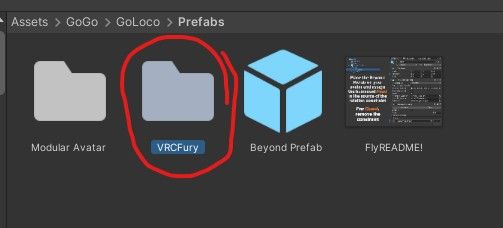
No, go into the GoGo LoCo folder, find the Prefab folder. You might have to dig around a little bit.
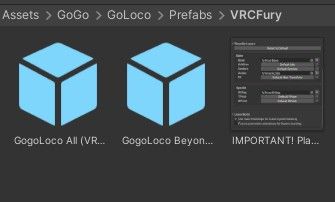
When you find it, you'll find prefabs named Gogo Loco All and Gogo Loco Beyond. Beyond is the lighter, smaller version.
Just drag whichever prefab of the two directly on your avatar in the hierarchy.
After that, you should be good to go. -
okie trying that rn to see if it works
-
it went into the unity pose and plus it still doesnt work T_T im soo sorry to be troubling u with this
⠀⠀꒰⠀jst looking for avis ෆ upvoting helps !! <3
⠀ ⠀ྀི.
︶⊹︶︶୨୧︶︶⊹︶ -
it went into the unity pose and plus it still doesnt work T_T im soo sorry to be troubling u with this
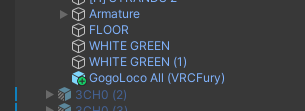
@_dollysbitch Do you have the prefab directly inside the avatar hierarchy?
-
yeah i dragged it into the avi
-
-
it was outside ,, should it ahve been inside the avi?
⠀⠀꒰⠀jst looking for avis ෆ upvoting helps !! <3
⠀ ⠀ྀི.
︶⊹︶︶୨୧︶︶⊹︶ -
it was outside ,, should it ahve been inside the avi?
@_dollysbitch No, the Gesture Manager stays outside.
When you hit Play, click on the Gesture Manager and it'll show you the radial menu. (Make sure you're on Inspector mode)
You can then use the radial menu on the right. When you click Expressions, you should see GoGo LoCo.



Hello! It looks like you're interested in this conversation, but you don't have an account yet.
Getting fed up of having to scroll through the same posts each visit? When you register for an account, you'll always come back to exactly where you were before, and choose to be notified of new replies (either via email, or push notification). You'll also be able to save bookmarks and upvote posts to show your appreciation to other community members.
With your input, this post could be even better 💗
Register Login