Skip to content
  • Categories
  • Recent
  • Tags
  • Popular
Skins
  • Light
  • Brite
  • Cerulean
  • Cosmo
  • Flatly
  • Journal
  • Litera
  • Lumen
  • Lux
  • Materia
  • Minty
  • Morph
  • Pulse
  • Sandstone
  • Simplex
  • Sketchy
  • Spacelab
  • United
  • Yeti
  • Zephyr
  • Dark
  • Cyborg
  • Darkly
  • Quartz
  • Slate
  • Solar
  • Superhero
  • Vapor

  • Default (Zephyr)
  • No Skin
Collapse
RipperStore Logo
  1. Home
  2. Assets
  3. Gifts / Downloads
  4. Gift ~~ 【リリース記念セール】Ronroneo‐ ロンロネオ ‐【オリジナル3Ⅾモデル】

Gift ~~ 【リリース記念セール】Ronroneo‐ ロンロネオ ‐【オリジナル3Ⅾモデル】

Scheduled Pinned Locked Moved Gifts / Downloads
malemale avatarboothbooth avatarronroneo
24 Posts 10 Posters 2.8k Views 8 Watching
  • Oldest to Newest
  • Newest to Oldest
  • Most Votes
Reply
  • Reply as topic
Log in to reply
This topic has been deleted. Only users with topic management privileges can see it.
  • beebaboobaB
    beebaboobaB
    beebabooba
    wrote on last edited by
    #5

    so cuuuute! Cheshire cat vibes : 3 thank you so much for your generous gift!

    1 Reply Last reply
    0
    • eironE
      eironE
      eiron
      wrote on last edited by
      #6

      @flunitrazepam

      Store page says
      "Base body: Uses the common base body of Legacy System Works' "+Head".
      https://lsw.booth.pm/items/5153266
      [Order number: 9475728] *The overall scale of the avatar is 1.07, so the height is different from other +Head avatars, but you can make +Head clothing fit perfectly by placing it directly below the avatar without putting it in the Hierarchy"

      so you can use the +head outfits, but might have to adjust the scale/height

      +Head thread
      https://forum.ripper.store/topic/20053/huge-updating-lf-head-plus-head-outfits-12-143

      FlunitrazepamF 1 Reply Last reply
      1
      • eironE eiron

        @flunitrazepam

        Store page says
        "Base body: Uses the common base body of Legacy System Works' "+Head".
        https://lsw.booth.pm/items/5153266
        [Order number: 9475728] *The overall scale of the avatar is 1.07, so the height is different from other +Head avatars, but you can make +Head clothing fit perfectly by placing it directly below the avatar without putting it in the Hierarchy"

        so you can use the +head outfits, but might have to adjust the scale/height

        +Head thread
        https://forum.ripper.store/topic/20053/huge-updating-lf-head-plus-head-outfits-12-143

        FlunitrazepamF
        FlunitrazepamF
        Flunitrazepam
        wrote on last edited by
        #7

        @eiron omg tysmmm ❤ i'll have a little look later and test it! i may start buying more +head compatible items and fullsets then~!

        1 Reply Last reply
        0
        • G
          G
          gensArchon
          wrote on last edited by
          #8

          thanks!!

          1 Reply Last reply
          0
          • 0
            0
            0021
            wrote on last edited by
            #9

            bump2.1

            1 Reply Last reply
            0
            • wololo420W
              wololo420W
              wololo420
              wrote on last edited by
              #10

              bump for 2.1

              1 Reply Last reply
              0
              • wololo420W
                wololo420W
                wololo420
                wrote on last edited by
                #11

                bump

                1 Reply Last reply
                0
                • FlunitrazepamF
                  FlunitrazepamF
                  Flunitrazepam
                  wrote on last edited by
                  #12

                  adding 2.1 to the DL link! revisit the dl link at the top for it and let me know if there's any issues!! ❤
                  @wololo420 @0021

                  wololo420W 1 Reply Last reply
                  1
                  • FlunitrazepamF Flunitrazepam

                    adding 2.1 to the DL link! revisit the dl link at the top for it and let me know if there's any issues!! ❤
                    @wololo420 @0021

                    wololo420W
                    wololo420W
                    wololo420
                    wrote on last edited by
                    #13

                    @Flunitrazepam dude if i could i would give u a blow

                    FlunitrazepamF 1 Reply Last reply
                    0
                    • wololo420W
                      wololo420W
                      wololo420
                      wrote on last edited by
                      #14

                      @flunitrazepam look, i found this FaceEmo option but it is not activated in the expression wheel, I tried to implement it manually but I didn't understand anything, how can I activate it? it was pretty hidden by the way
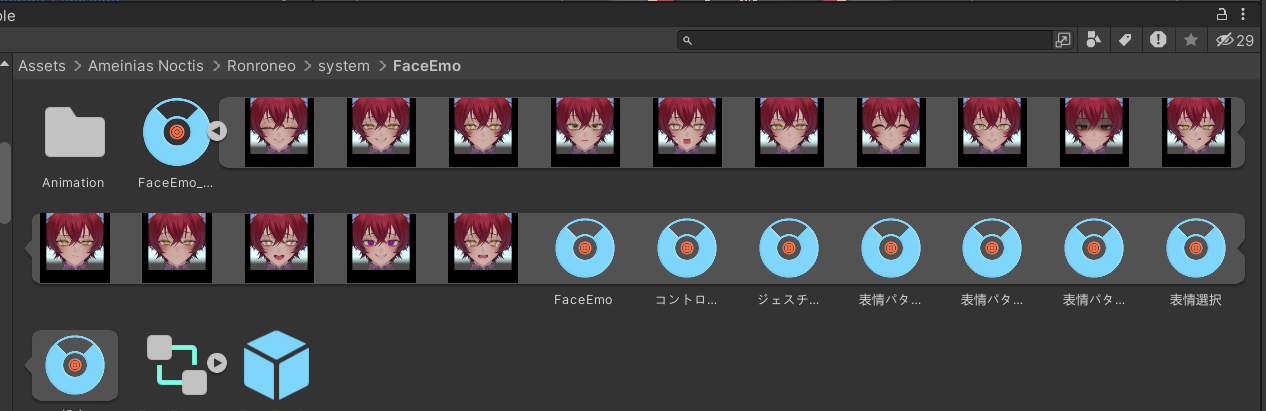
                      FaceEmo1.png

                      FlunitrazepamF 1 Reply Last reply
                      0
                      • wololo420W
                        wololo420W
                        wololo420
                        wrote on last edited by
                        #15

                        its all in japanese btw,if someone could translate it it would be really helpful, plus the flickering doesn't work

                        1 Reply Last reply
                        0
                        • wololo420W wololo420

                          @Flunitrazepam dude if i could i would give u a blow

                          FlunitrazepamF
                          FlunitrazepamF
                          Flunitrazepam
                          wrote on last edited by
                          #16

                          @wololo420 oh! um! no thank you!

                          Regarding your other messages, I will look into it! I will also see about translating all of the menu's. Please be patient as I haven't looked at the latest version of the model yet!

                          1 Reply Last reply
                          0
                          • wololo420W wololo420

                            @flunitrazepam look, i found this FaceEmo option but it is not activated in the expression wheel, I tried to implement it manually but I didn't understand anything, how can I activate it? it was pretty hidden by the way
                            FaceEmo1.png

                            FlunitrazepamF
                            FlunitrazepamF
                            Flunitrazepam
                            wrote on last edited by
                            #17

                            @wololo420 I have your solution sorted! Please make sure to look in the Prefab menu for the FaceEmo prefabs, as they already have the scripts added to them for easy use (Kisekae included in subfolder)!
                            Directory will look similar to "Ameinias Noctis\Ronroneo\prefab\FaceEmo" (+ \FEkisekae).

                            Important! Ensure you have installed the necessary scripts available for free here!!
                            [無料] FaceEmo(表情作成・設定ツール)
                            Failure to install this will result in several emotes to not work, please be diligent and remember!

                            I am confused on what you mean by "flickering" not working! Please help me understand so I can look out for it.

                            I will prepare a unity package shortly once I have finished making a translated menu version, I hope that it will help you.

                            wololo420W 1 Reply Last reply
                            0
                            • FlunitrazepamF Flunitrazepam

                              @wololo420 I have your solution sorted! Please make sure to look in the Prefab menu for the FaceEmo prefabs, as they already have the scripts added to them for easy use (Kisekae included in subfolder)!
                              Directory will look similar to "Ameinias Noctis\Ronroneo\prefab\FaceEmo" (+ \FEkisekae).

                              Important! Ensure you have installed the necessary scripts available for free here!!
                              [無料] FaceEmo(表情作成・設定ツール)
                              Failure to install this will result in several emotes to not work, please be diligent and remember!

                              I am confused on what you mean by "flickering" not working! Please help me understand so I can look out for it.

                              I will prepare a unity package shortly once I have finished making a translated menu version, I hope that it will help you.

                              wololo420W
                              wololo420W
                              wololo420
                              wrote on last edited by
                              #18

                              @Flunitrazepam I meant that the blink doesn't work

                              1 Reply Last reply
                              0
                              • wololo420W
                                wololo420W
                                wololo420
                                wrote on last edited by
                                #19

                                I thank you in advance if you make the unity package with translation and everything, I love this avatar and I was really looking forward to 2.10

                                FlunitrazepamF 1 Reply Last reply
                                0
                                • wololo420W wololo420

                                  I thank you in advance if you make the unity package with translation and everything, I love this avatar and I was really looking forward to 2.10

                                  FlunitrazepamF
                                  FlunitrazepamF
                                  Flunitrazepam
                                  wrote on last edited by
                                  #20

                                  @wololo420 I already added a fan-translation to the DL link, please be sure to check it and tell me if there are any issues! I am going to be uploading each of the prefabs without any edits and testing them soon.

                                  1 Reply Last reply
                                  0
                                  • IxxysI
                                    IxxysI
                                    Ixxys
                                    wrote on last edited by
                                    #21

                                    Oh my god, he's so cute!
                                    Thanks so much for sharing! 🐈

                                    FlunitrazepamF 1 Reply Last reply
                                    0
                                    • IxxysI Ixxys

                                      Oh my god, he's so cute!
                                      Thanks so much for sharing! 🐈

                                      FlunitrazepamF
                                      FlunitrazepamF
                                      Flunitrazepam
                                      wrote on last edited by
                                      #22

                                      @Ixxys Right?? Please enjoy the avatar! If there are any issues with the model, please comment and I will help if I can.

                                      IxxysI 1 Reply Last reply
                                      0
                                      • FlunitrazepamF Flunitrazepam

                                        @Ixxys Right?? Please enjoy the avatar! If there are any issues with the model, please comment and I will help if I can.

                                        IxxysI
                                        IxxysI
                                        Ixxys
                                        wrote on last edited by
                                        #23

                                        @Flunitrazepam It's just the idle animation lacking a blink if anything. Seems like there's a plugin that comes with the avatar for that, so it shouldn't take too long to figure out.
                                        A small workaround is using FaceEmo with these settings. Not quite a blink, but the eye movement is sufficient
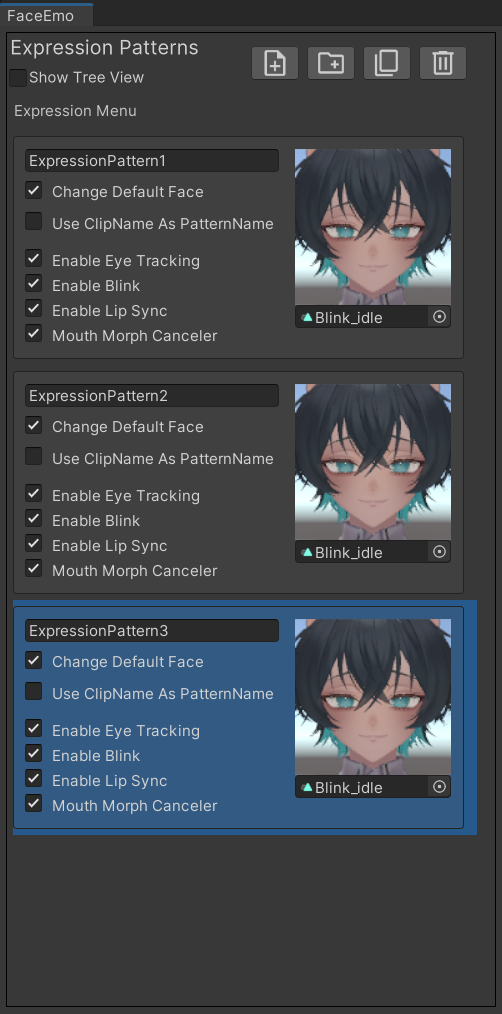
                                        Unity_cYCJTll63K.png
                                        Past that, I can't wait to use him

                                        1 Reply Last reply
                                        0
                                        • IxxysI
                                          IxxysI
                                          Ixxys
                                          wrote on last edited by
                                          #24

                                          Ok, turns out there's a prefab just called "Blink" that comes with the avatar.
                                          Drag, drop and problem solved

                                          1 Reply Last reply
                                          0

                                          Hello! It looks like you're interested in this conversation, but you don't have an account yet.

                                          Getting fed up of having to scroll through the same posts each visit? When you register for an account, you'll always come back to exactly where you were before, and choose to be notified of new replies (either via email, or push notification). You'll also be able to save bookmarks and upvote posts to show your appreciation to other community members.

                                          With your input, this post could be even better 💗

                                          Register Login
                                          Reply
                                          • Reply as topic
                                          Log in to reply
                                          • Oldest to Newest
                                          • Newest to Oldest
                                          • Most Votes


                                          • Login

                                          • Login or register to search.
                                          • First post
                                            Last post
                                          0
                                          • Categories
                                          • Recent
                                          • Tags
                                          • Popular