
LF Nikki
-
bump
-
-
-
-
Bump for fix, because the upload seems to float.
-
-
Select the Nikki_Bundle_1 FBX avatar
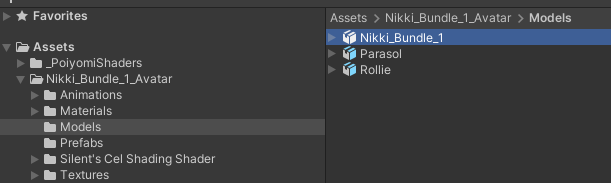
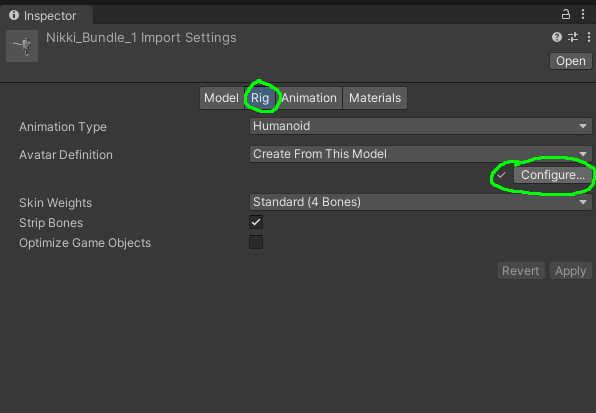
Then go to the right side of the Inspector, select "Rig," and then click "Configure"
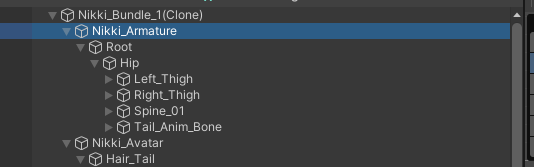
On the left side, where the bones are, first select "Nikki Armature"
Then, in the bottom right section, set the x, y, and z positions to 0
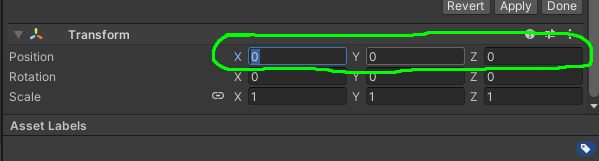
Now select the "Hip" bone and, likewise, set the x, y, and z positions to 0
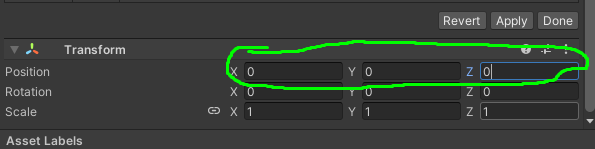
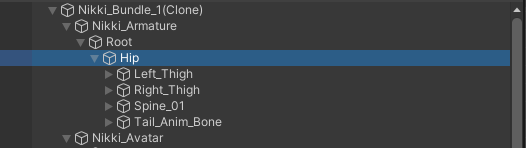
Just hit "Apply" and "Done." The avatar shouldn't be floating anymore. That's the fix.
-
Select the Nikki_Bundle_1 FBX avatar
Then go to the right side of the Inspector, select "Rig," and then click "Configure"
On the left side, where the bones are, first select "Nikki Armature"
Then, in the bottom right section, set the x, y, and z positions to 0
Now select the "Hip" bone and, likewise, set the x, y, and z positions to 0
Just hit "Apply" and "Done." The avatar shouldn't be floating anymore. That's the fix.
-
-
bump for a nsfw edit
-
I'm Interested into making an edit, likely a headswap with a bom39 base, or if I can edit the original base well enough on my own. It'll likely take a week for me to get a good draft settled down I could release.
NSFW CONTENT WARNING: -
-
anyone know what shaders I need?
-
-
If anyone can post the files here, That'd be great. VRModels got hacked.
-
Here, Hehe boy






Hello! It looks like you're interested in this conversation, but you don't have an account yet.
Getting fed up of having to scroll through the same posts each visit? When you register for an account, you'll always come back to exactly where you were before, and choose to be notified of new replies (either via email, or push notification). You'll also be able to save bookmarks and upvote posts to show your appreciation to other community members.
With your input, this post could be even better 💗
Register Login