
✔ (FOUND by windbreaka) Ricci by Sxlviia / SuiSui
-
-
@expiredgf add d4rks optimizer in vcc and in the tool in unity click on optimize on upload.
edit: works fine for me everything was already in there as it should be i clicked upload and everything was fine. -
-
update if you do what i just did you have to fix some of the materials bc some are broken
-
im still trying to fix it
-
-
-
-
-
-
the version i have is her updated version she dropped on sunday via her payhip im sorry i wish i could be of more help

-
@ᴍɪɴᴀᴢᴜᴋɪ i fixed it just now when you open the project this comes up and then these are all the things you need checked on
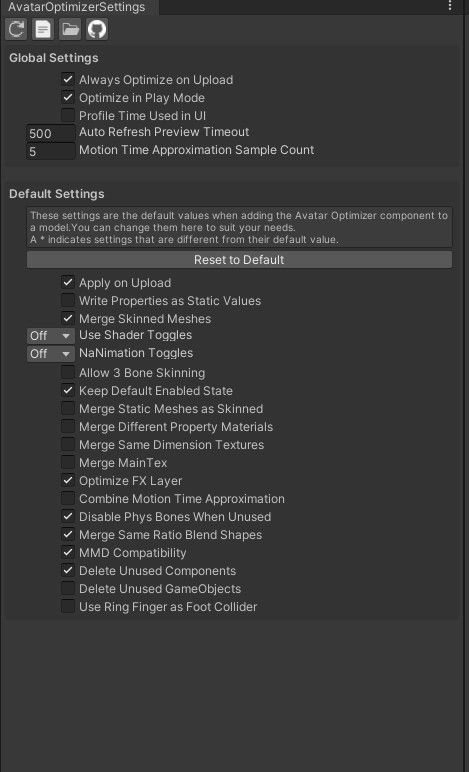
@Bikerbabe_vr how u fix it cause it still says is 600 mb
-
@windbreaka u have the link
@babygirllola i dident fix it yet half the materials are pink for me
-
-
-
pls stop dming, this version i have uploaded on my google drive is her most recent fix, if there is another i will update it.
i also cannot help you upload or fix the avi as i myself did not upload it to my account, not trying to be rude but the mass dms im getting is a lil extra -
my issue is i got her to upload but a lot of her items dont work and when i try to redo everything in unity the one thing i come across a lot is the d4arkoptimizer just wont load half the time and i have to keep taking it out and putting it back in. idrk what im doing wrong
-
@Kaoi could you also help me with that? i got her uploaded but a lot of the items broke and i cant deselect them.
-
OK I FIGURED IT OUT GUYS! so onc eyou make the project in VCC add all these add ons
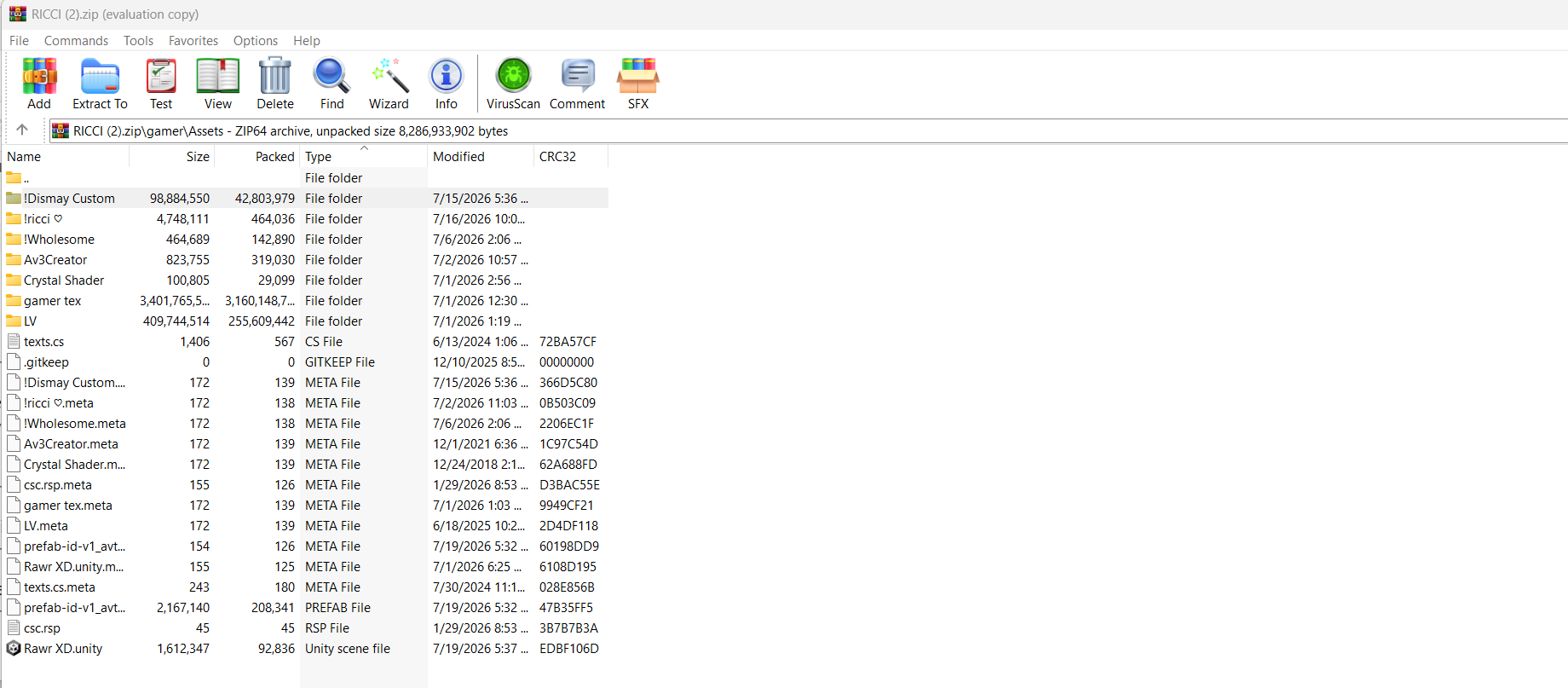
after that when you go to the Ricci.ZIP open it and open gamer-> assets and copy and paste everything in that folder and only that folder
once you have her all opened up in unity go into tools int he left uper bar in unity and go to the d4arkoptimizer setting thing lol and then open it and make sure you have optimize on upload on and from there upload her like normal fixing anything that says auto fix and she should upload after sometime.
reply to me if something goes wrong but this should be how to do it

-
OK I FIGURED IT OUT GUYS! so onc eyou make the project in VCC add all these add ons
after that when you go to the Ricci.ZIP open it and open gamer-> assets and copy and paste everything in that folder and only that folder
once you have her all opened up in unity go into tools int he left uper bar in unity and go to the d4arkoptimizer setting thing lol and then open it and make sure you have optimize on upload on and from there upload her like normal fixing anything that says auto fix and she should upload after sometime.
reply to me if something goes wrong but this should be how to do it
DONT FORGET TO ADD GOLOCO!! i did lol

 her !!





Hello! It looks like you're interested in this conversation, but you don't have an account yet.
Getting fed up of having to scroll through the same posts each visit? When you register for an account, you'll always come back to exactly where you were before, and choose to be notified of new replies (either via email, or push notification). You'll also be able to save bookmarks and upvote posts to show your appreciation to other community members.
With your input, this post could be even better 💗
Register Login