Skip to content
  • Categories
  • Recent
  • Tags
  • Popular
Skins
  • Light
  • Brite
  • Cerulean
  • Cosmo
  • Flatly
  • Journal
  • Litera
  • Lumen
  • Lux
  • Materia
  • Minty
  • Morph
  • Pulse
  • Sandstone
  • Simplex
  • Sketchy
  • Spacelab
  • United
  • Yeti
  • Zephyr
  • Dark
  • Cyborg
  • Darkly
  • Quartz
  • Slate
  • Solar
  • Superhero
  • Vapor

  • Default (Zephyr)
  • No Skin
Collapse
RipperStore Logo
  1. Home
  2. Assets
  3. Looking for...
  4. Furry Avatars
  5. Mawyu - Mayu Edit blender file

Mawyu - Mayu Edit blender file

Scheduled Pinned Locked Moved Solved Furry Avatars
avatarmayublender
20 Posts 5 Posters 715 Views
  • Oldest to Newest
  • Newest to Oldest
  • Most Votes
Reply
  • Reply as topic
Log in to reply
This topic has been deleted. Only users with topic management privileges can see it.
  • F
    F
    fun
    wrote on last edited by
    #1

    Does anyone have these blender files https://hazzcatt.gumroad.com/l/xvnsk

    1 Reply Last reply
    1
    • VerdanṫFennecV
      VerdanṫFennecV
      VerdanṫFennec
      wrote on last edited by
      #7

      [register or login to view this hidden content] heres the tora mayu maw as a blendfile

      1 Reply Last reply
      0
      • ShmebulockS
        ShmebulockS
        Shmebulock
        wrote on last edited by
        #2

        bump

        1 Reply Last reply
        0
        • F
          F
          fun
          wrote on last edited by
          #3

          bump

          1 Reply Last reply
          1
          • AkyrA
            AkyrA
            Akyr
            wrote on last edited by
            #4

            NEW VERSION MAWYU 1.6 FOR ADULT MAYU & MAYU

            • LINK : [register or login to view this hidden content]
            L 1 Reply Last reply
            0
            • AkyrA Akyr

              NEW VERSION MAWYU 1.6 FOR ADULT MAYU & MAYU

              • LINK : [register or login to view this hidden content]
              L
              L
              lerb_games
              wrote on last edited by lerb_games
              #5

              @yzen123 How do I use it? Whenever I try to patch I get the error "The patcher failed to patch the FBX" "Make sure the FBX you're patching is the original, unedited FBX and is not a newer or older version than is supported!" even though I KNOW that it's the right version
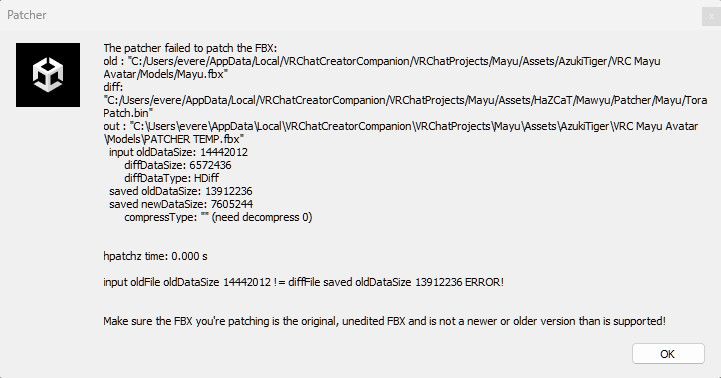
              c8bcaf32-760f-421b-8346-374d8d40d7b3-image.jpeg

              AkyrA 1 Reply Last reply
              0
              • VerdanṫFennecV
                VerdanṫFennecV
                VerdanṫFennec
                wrote on last edited by
                #6

                give me a minute ill make a blender file for you

                F 2 Replies Last reply
                0
                • VerdanṫFennecV
                  VerdanṫFennecV
                  VerdanṫFennec
                  wrote on last edited by
                  #7

                  [register or login to view this hidden content] heres the tora mayu maw as a blendfile

                  1 Reply Last reply
                  0
                  • L lerb_games

                    @yzen123 How do I use it? Whenever I try to patch I get the error "The patcher failed to patch the FBX" "Make sure the FBX you're patching is the original, unedited FBX and is not a newer or older version than is supported!" even though I KNOW that it's the right version
                    c8bcaf32-760f-421b-8346-374d8d40d7b3-image.jpeg

                    AkyrA
                    AkyrA
                    Akyr
                    wrote on last edited by
                    #8

                    @lerb_games Hi! What version of mayu are you trying to patch it on? (Adult? Torah? Pawlygon?)

                    L 1 Reply Last reply
                    0
                    • AkyrA Akyr

                      @lerb_games Hi! What version of mayu are you trying to patch it on? (Adult? Torah? Pawlygon?)

                      L
                      L
                      lerb_games
                      wrote on last edited by
                      #9

                      @yzen123 I ended up fixing it! It turned out that the mayu I got was an incorrect version, even though it said it was the right one 😛

                      1 Reply Last reply
                      0
                      • VerdanṫFennecV VerdanṫFennec

                        give me a minute ill make a blender file for you

                        F
                        F
                        fun
                        wrote on last edited by
                        #10

                        @Verdanṫ thx

                        1 Reply Last reply
                        1
                        • F fun has marked this topic as solved on
                        • VerdanṫFennecV VerdanṫFennec

                          give me a minute ill make a blender file for you

                          F
                          F
                          fun
                          wrote on last edited by
                          #11

                          @Verdanṫ Do you know how to export textures from unity straight to blender?

                          VerdanṫFennecV 1 Reply Last reply
                          1
                          • F fun

                            @Verdanṫ Do you know how to export textures from unity straight to blender?

                            VerdanṫFennecV
                            VerdanṫFennecV
                            VerdanṫFennec
                            wrote on last edited by
                            #12

                            @fun lemme reinstall blender rq

                            F 1 Reply Last reply
                            0
                            • VerdanṫFennecV VerdanṫFennec

                              @fun lemme reinstall blender rq

                              F
                              F
                              fun
                              wrote on last edited by
                              #13

                              @Verdanṫ okay

                              1 Reply Last reply
                              1
                              • VerdanṫFennecV
                                VerdanṫFennecV
                                VerdanṫFennec
                                wrote on last edited by
                                #14

                                [register or login to view this hidden content] i have a quick video for an example of one way to do it for some reason the proper way to do it was crashing my blender

                                F 1 Reply Last reply
                                0
                                • VerdanṫFennecV VerdanṫFennec

                                  [register or login to view this hidden content] i have a quick video for an example of one way to do it for some reason the proper way to do it was crashing my blender

                                  F
                                  F
                                  fun
                                  wrote on last edited by
                                  #15

                                  @Verdanṫ okay but the eyes and mouth don't have their textures

                                  VerdanṫFennecV 1 Reply Last reply
                                  0
                                  • F fun

                                    @Verdanṫ okay but the eyes and mouth don't have their textures

                                    VerdanṫFennecV
                                    VerdanṫFennecV
                                    VerdanṫFennec
                                    wrote on last edited by
                                    #16

                                    @fun they do but the eyes have a layer overthem thats transparent ingame its the lens material and you have to drag the maw textures in from the Haza-cat folder

                                    F 1 Reply Last reply
                                    0
                                    • VerdanṫFennecV
                                      VerdanṫFennecV
                                      VerdanṫFennec
                                      wrote on last edited by
                                      #17

                                      if you plan to make a render make the lens material a transparent one in the options

                                      1 Reply Last reply
                                      0
                                      • VerdanṫFennecV VerdanṫFennec

                                        @fun they do but the eyes have a layer overthem thats transparent ingame its the lens material and you have to drag the maw textures in from the Haza-cat folder

                                        F
                                        F
                                        fun
                                        wrote on last edited by
                                        #18

                                        @Verdanṫ how to change this layer to eyes?

                                        VerdanṫFennecV 1 Reply Last reply
                                        0
                                        • F fun

                                          @Verdanṫ how to change this layer to eyes?

                                          VerdanṫFennecV
                                          VerdanṫFennecV
                                          VerdanṫFennec
                                          wrote on last edited by
                                          #19

                                          @fun same place as textures but instead of doing the color do the shader to be transparent

                                          F 1 Reply Last reply
                                          0
                                          • VerdanṫFennecV VerdanṫFennec

                                            @fun same place as textures but instead of doing the color do the shader to be transparent

                                            F
                                            F
                                            fun
                                            wrote on last edited by
                                            #20

                                            @Verdanṫ now is transparent but in cycles mode eye is black

                                            1 Reply Last reply
                                            0

                                            Hello! It looks like you're interested in this conversation, but you don't have an account yet.

                                            Getting fed up of having to scroll through the same posts each visit? When you register for an account, you'll always come back to exactly where you were before, and choose to be notified of new replies (either via email, or push notification). You'll also be able to save bookmarks and upvote posts to show your appreciation to other community members.

                                            With your input, this post could be even better 💗

                                            Register Login
                                            Reply
                                            • Reply as topic
                                            Log in to reply
                                            • Oldest to Newest
                                            • Newest to Oldest
                                            • Most Votes


                                            • Login

                                            • Login or register to search.
                                            • First post
                                              Last post
                                            0
                                            • Categories
                                            • Recent
                                            • Tags
                                            • Popular