
LF; Sinner May by salemaiku
-
-
-
-
-
bump
-
-
-
-
-
Upvote me:
@StarsuneX3X3 Thank you for sharing! Do you happen to have the eye shaders? And do you know what might need to be added for the Test Animations thing that's red?
Upvotes always appreciated! <3
-
@StarsuneX3X3 Thank you for sharing! Do you happen to have the eye shaders? And do you know what might need to be added for the Test Animations thing that's red?
-
@SweetSangria nope that's all she came with
@StarsuneX3X3 I figured out the eyes, the shaders were being weird, but they were there. I just had to go back through and re-assign them properly.
-
Upvote me:
@StarsuneX3X3 Huuuuuge!!!! I believed T . T
-
@StarsuneX3X3 I figured out the eyes, the shaders were being weird, but they were there. I just had to go back through and re-assign them properly.
@SweetSangria Did you figure out the test animations prefab? I have no clue what that is

-
Anytime I try to upload the avatar it just crashes and this happens EVERY TIME I TRY TO UPLOAD A SALEM AIKU AVATAR. And its so annoying because I spent an hour editing it but if its gonna keep freezing my pc its just not worth it.
-
These are what I used in VCC for her. I just deleted the Test Animations prefab from the hierarchy because based on the name I figured it was more for testing in Unity and if I didn't know what it was, I probably wasn't going to miss it in this case. She uploaded fine for me with these. I hope it helps everyone else. (You can also add your Poiyomi here, but I sometimes prefer to add mine manually in the project.)

-
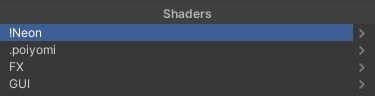
If your eyes load pink like there's a shader issue, just do the drop down shader menu for the eyes and click on the Neon here. Click Neon > Eye Shaders > Astral and the eyes should be fixed and display properly.
-
New link:
-
These are what I used in VCC for her. I just deleted the Test Animations prefab from the hierarchy because based on the name I figured it was more for testing in Unity and if I didn't know what it was, I probably wasn't going to miss it in this case. She uploaded fine for me with these. I hope it helps everyone else. (You can also add your Poiyomi here, but I sometimes prefer to add mine manually in the project.)
@SweetSangria Its so weird because all of that is exactly what I have in unity and yet she keeps freezing my pc and crashing via unity
I always have this issue with just her avis -
If your eyes load pink like there's a shader issue, just do the drop down shader menu for the eyes and click on the Neon here. Click Neon > Eye Shaders > Astral and the eyes should be fixed and display properly.
@SweetSangria It was the test animations!! Thank you so much








Hello! It looks like you're interested in this conversation, but you don't have an account yet.
Getting fed up of having to scroll through the same posts each visit? When you register for an account, you'll always come back to exactly where you were before, and choose to be notified of new replies (either via email, or push notification). You'll also be able to save bookmarks and upvote posts to show your appreciation to other community members.
With your input, this post could be even better 💗
Register Login