Skip to content
  • Categories
  • Recent
  • Tags
  • Popular
Skins
  • Light
  • Brite
  • Cerulean
  • Cosmo
  • Flatly
  • Journal
  • Litera
  • Lumen
  • Lux
  • Materia
  • Minty
  • Morph
  • Pulse
  • Sandstone
  • Simplex
  • Sketchy
  • Spacelab
  • United
  • Yeti
  • Zephyr
  • Dark
  • Cyborg
  • Darkly
  • Quartz
  • Slate
  • Solar
  • Superhero
  • Vapor

  • Default (Zephyr)
  • No Skin
Collapse
RipperStore Logo
  1. Home
  2. Assets
  3. Gifts / Downloads
  4. Improved Meru Base

Improved Meru Base

Scheduled Pinned Locked Moved Gifts / Downloads
milltinaavatarmeru
12 Posts 5 Posters 1.8k Views 12 Watching
  • Oldest to Newest
  • Newest to Oldest
  • Most Votes
Reply
  • Reply as topic
Log in to reply
This topic has been deleted. Only users with topic management privileges can see it.
  • MemololoM
    MemololoM
    Memololo
    wrote on last edited by Memololo
    #3

    That's strange. What are you adding? Clothes were drag and....oh, I know the problem!

    Try scaling them to 1.2!

    1 Reply Last reply
    0
    • TacoTrashT TacoTrash

      Yo could you give a list of assets that are compatible? I'm trying to add some Clothes for the body and they're just straight up not working. It's all Milltina too.

      MemololoM
      MemololoM
      Memololo
      wrote on last edited by
      #4

      @TacoTrash Did my advice help?

      1 Reply Last reply
      0
      • TacoTrashT
        TacoTrashT
        TacoTrash
        wrote on last edited by
        #5

        Haven't tried it yet. I'll let you know.

        1 Reply Last reply
        0
        • TacoTrashT
          TacoTrashT
          TacoTrash
          wrote on last edited by
          #6

          I can't seem to figure out how to adjust it to her chest size

          MemololoM 1 Reply Last reply
          0
          • TacoTrashT TacoTrash

            I can't seem to figure out how to adjust it to her chest size

            MemololoM
            MemololoM
            Memololo
            wrote on last edited by
            #7

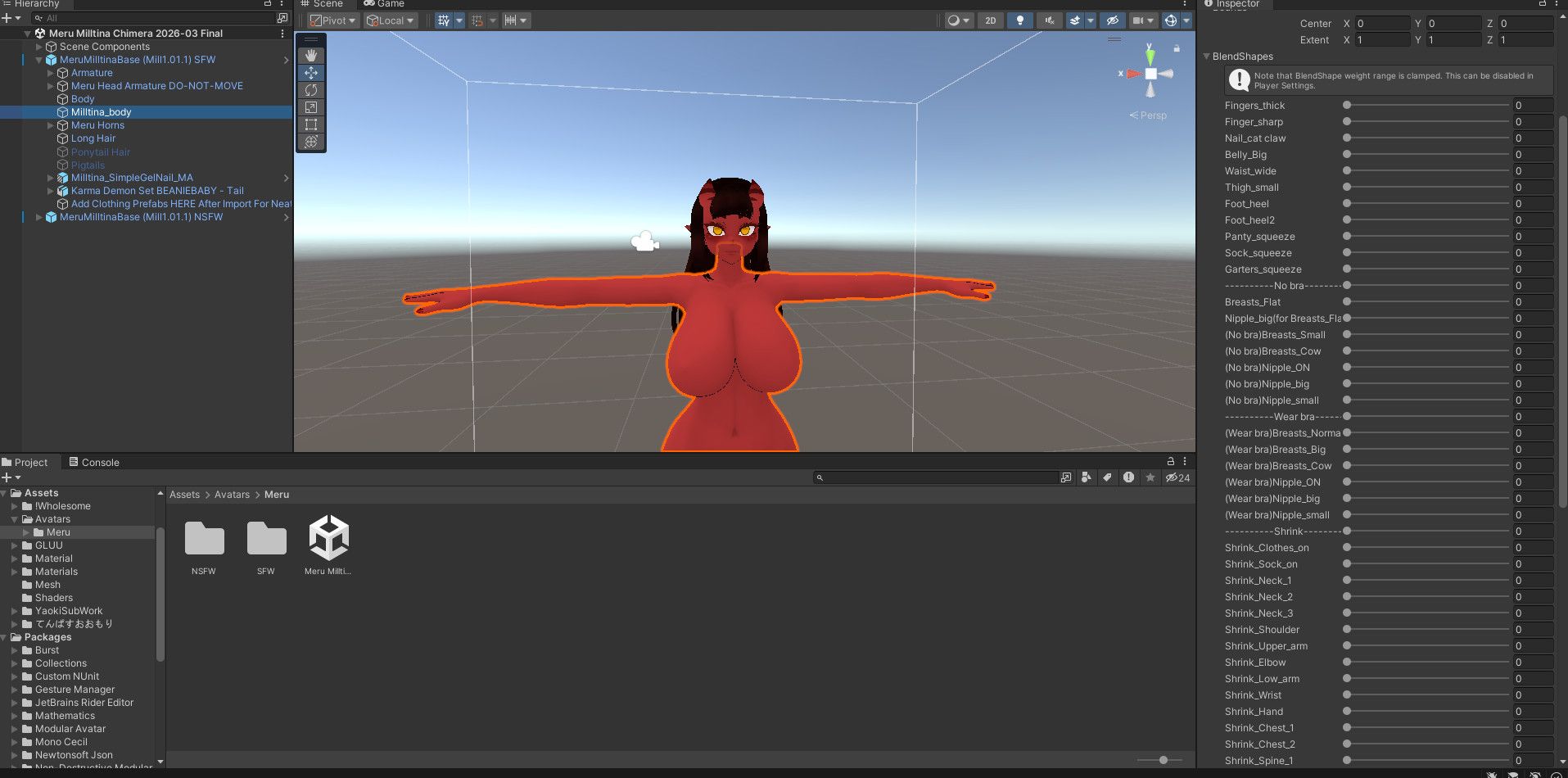
            @TacoTrash How so? You just need to make a toggle that changes the blendshapes of Milltina_body or move the blendshape manually in the inspector if you just want it changed one way and never changed back.

            Not all of the clothes you will find for Milltina will use all of her chest blendshapes.

            As for linking them, you need to link with either VRCfury (not optimal) or MA (optimal).
            e698958c-746f-4419-92fc-c677b9047c8f-image.jpeg

            1 Reply Last reply
            0
            • Y
              Y
              yokai22111
              wrote on last edited by
              #8

              can you add the normal meru clothes like you had on your past meru

              koronechudK 1 Reply Last reply
              0
              • MemololoM Memololo referenced this topic on
              • Y yokai22111

                can you add the normal meru clothes like you had on your past meru

                koronechudK
                koronechudK
                koronechud
                wrote on last edited by
                #9

                @yokai22111 dude yess i need thiss

                1 Reply Last reply
                0
                • DonutD
                  DonutD
                  Donut
                  wrote on last edited by
                  #10

                  Hi !! I really appreciate the hard work it is really well done ! But i wonder if you could just put an update with blendshapes for eyes up, eyes down, eyes left eyes right ? In order to put a custom face tracking ? Would be epic

                  I just said Bump

                  MemololoM 1 Reply Last reply
                  0
                  • DonutD Donut

                    Hi !! I really appreciate the hard work it is really well done ! But i wonder if you could just put an update with blendshapes for eyes up, eyes down, eyes left eyes right ? In order to put a custom face tracking ? Would be epic

                    MemololoM
                    MemololoM
                    Memololo
                    wrote on last edited by Memololo
                    #11

                    @Donut

                    It seems I misread your comment.

                    You see, what you are asking for...well, I now realize I did the wrong thing. I found a way to re-engage the MMD blendshapes and someone said that should help with facetracking. But, the eyes would need an overhaul to work for FT, I think.

                    https://imgur.com/jKAWW6t.mp4 - video of it in action

                    Unless this does work for you.

                    Regardless, when cleaned up, I will give everyone this new version with MMD compatibility.

                    1 Reply Last reply
                    1
                    • MemololoM
                      MemololoM
                      Memololo
                      wrote on last edited by Memololo
                      #12

                      @donut @koronechud @yokai22111

                      Sample video with the fixed hair and face (also, why is it so hard to find a place for anonymous video uploading? Had to make a burner account on a site no one uses): removed

                      I didn't finish it, but I'll put this up for now those waiting. It has the fixed head and some outfits. Maybe it fixes the issue with the FT?

                      Might do an update later when I add more. Like putting on the canon Meru outfits, but I haven't used those in a while tbh. Ended up just using her as a dress-up doll since she was the first model I really made custom and bling. More use it out of that sentimentality.

                      There are more outfits in the file, if you want to put them on yourselves.

                      Base is still Milltina and it uses the "adultified" prefab so outfits not using MA need to be set to 1.2 to fit. Also, if you increase her breast size you'll need to manually redo her marshmellow PB (just move the phone so the tip sits on her nipple and it will work).

                      Also, I didn't bother taking off my blueprint so you'll need to remove that to upload.

                      [register or login to view this hidden content]

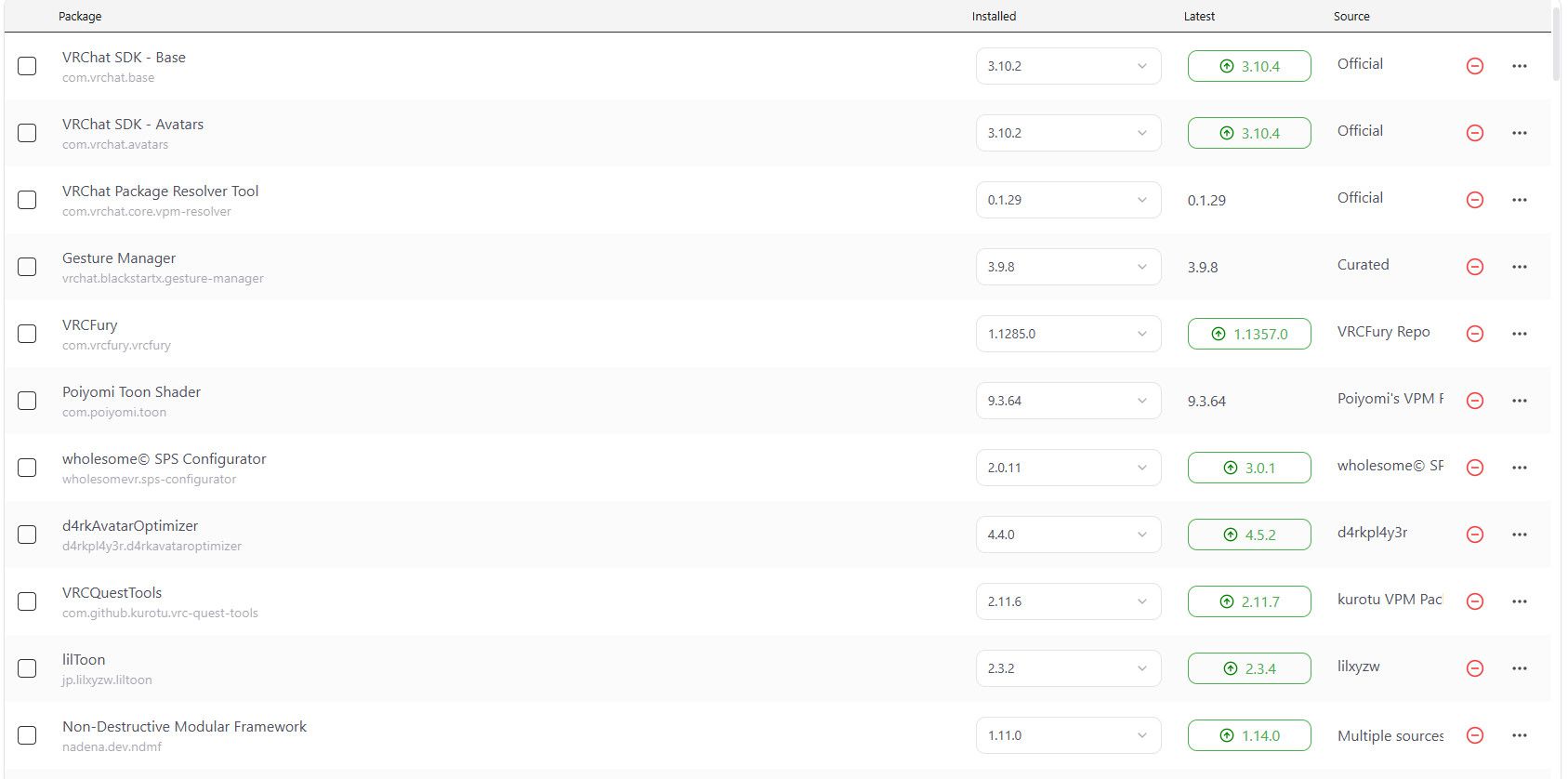
                      These are the dependencies.

                      3a8014fb-8883-4106-af66-d9f0d8545261-image.jpeg
                      8967a8bb-030f-4f69-8eab-f795f0274496-image.jpeg

                      Save files for the two sample outfits are here. The folder next to it (MMD Tests) in the subfolder (successful) have the prefabs for your to dress up on.

                      053b80fd-42c0-4512-86b6-e0a7872bbc6c-image.jpeg

                      1 Reply Last reply
                      1
                      • MemololoM Memololo referenced this topic on

                      Hello! It looks like you're interested in this conversation, but you don't have an account yet.

                      Getting fed up of having to scroll through the same posts each visit? When you register for an account, you'll always come back to exactly where you were before, and choose to be notified of new replies (either via email, or push notification). You'll also be able to save bookmarks and upvote posts to show your appreciation to other community members.

                      With your input, this post could be even better 💗

                      Register Login
                      Reply
                      • Reply as topic
                      Log in to reply
                      • Oldest to Newest
                      • Newest to Oldest
                      • Most Votes


                      • Login

                      • Login or register to search.
                      • First post
                        Last post
                      0
                      • Categories
                      • Recent
                      • Tags
                      • Popular