Skip to content
  • Categories
  • Recent
  • Tags
  • Popular
Skins
  • Light
  • Brite
  • Cerulean
  • Cosmo
  • Flatly
  • Journal
  • Litera
  • Lumen
  • Lux
  • Materia
  • Minty
  • Morph
  • Pulse
  • Sandstone
  • Simplex
  • Sketchy
  • Spacelab
  • United
  • Yeti
  • Zephyr
  • Dark
  • Cyborg
  • Darkly
  • Quartz
  • Slate
  • Solar
  • Superhero
  • Vapor

  • Default (Zephyr)
  • No Skin
Collapse
RipperStore Logo
  1. Home
  2. Assets
  3. Looking for...
  4. Clothes
  5. Question: Which material setting is this effect?

Question: Which material setting is this effect?

Scheduled Pinned Locked Moved Unsolved Clothes
material preset
6 Posts 2 Posters 172 Views 3 Watching
  • Oldest to Newest
  • Newest to Oldest
  • Most Votes
Reply
  • Reply as topic
Log in to reply
This topic has been deleted. Only users with topic management privileges can see it.
  • M
    M
    Meiru
    wrote on last edited by Meiru
    #1

    Been working on material setting and stumble accross this typa setting sometimes. Does anyone know which tools or asset they cast into the material to cook out this layering and thick feel?
    2010b381-261d-40ac-b3bc-3b5089ab8ab7-image.jpeg
    a87f8608-5d49-44c4-aa24-1e2ed7803d3c-image.jpeg

    1 Reply Last reply
    0
    • M
      M
      Meiru
      wrote on last edited by
      #2

      bump

      1 Reply Last reply
      0
      • FloraliasF
        FloraliasF
        Floralias
        wrote on last edited by
        #3

        I'd recommend playing around with "Rimshade" in the material settings if you havent already! thats typically what I like to do. 🙂

        M 1 Reply Last reply
        0
        • FloraliasF Floralias

          I'd recommend playing around with "Rimshade" in the material settings if you havent already! thats typically what I like to do. 🙂

          M
          M
          Meiru
          wrote on last edited by
          #4

          @Floralias said:

          I'd recommend playing around with "Rimshade" in the material settings if you havent already! thats typically what I like to do. 🙂

          im actually toying with rimshade all along but idk why it dont bring me the effect in the picture, perharp rimlight should also engage?
          So far i just achieve this
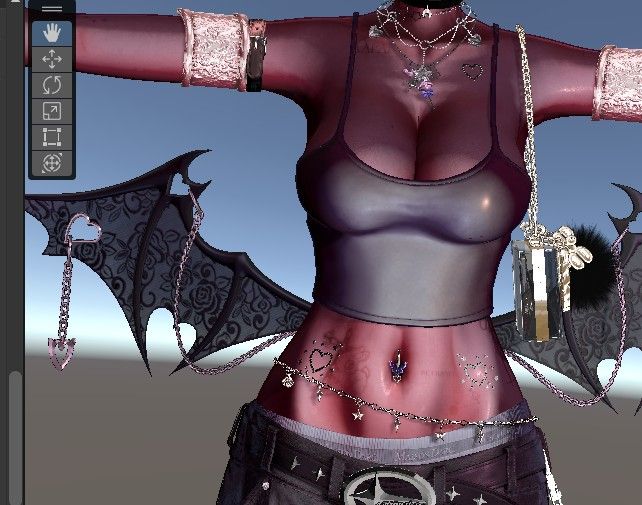
          480fd2ba-7e92-4498-a6bd-86afcfc67b3f-image.jpeg

          1 Reply Last reply
          1
          • M
            M
            Meiru
            wrote on last edited by
            #5

            bump

            1 Reply Last reply
            0
            • M
              M
              Meiru
              wrote on last edited by
              #6

              bump

              1 Reply Last reply
              0

              Hello! It looks like you're interested in this conversation, but you don't have an account yet.

              Getting fed up of having to scroll through the same posts each visit? When you register for an account, you'll always come back to exactly where you were before, and choose to be notified of new replies (either via email, or push notification). You'll also be able to save bookmarks and upvote posts to show your appreciation to other community members.

              With your input, this post could be even better 💗

              Register Login
              Reply
              • Reply as topic
              Log in to reply
              • Oldest to Newest
              • Newest to Oldest
              • Most Votes


              • Login

              • Login or register to search.
              • First post
                Last post
              0
              • Categories
              • Recent
              • Tags
              • Popular