Skip to content
  • Categories
  • Recent
  • Tags
  • Popular
Skins
  • Light
  • Brite
  • Cerulean
  • Cosmo
  • Flatly
  • Journal
  • Litera
  • Lumen
  • Lux
  • Materia
  • Minty
  • Morph
  • Pulse
  • Sandstone
  • Simplex
  • Sketchy
  • Spacelab
  • United
  • Yeti
  • Zephyr
  • Dark
  • Cyborg
  • Darkly
  • Quartz
  • Slate
  • Solar
  • Superhero
  • Vapor

  • Default (Zephyr)
  • No Skin
Collapse
RipperStore Logo
  1. Home
  2. Assets
  3. Gifts / Downloads
  4. (GIFT) Ephemeral by Purrinia

(GIFT) Ephemeral by Purrinia

Scheduled Pinned Locked Moved Gifts / Downloads
cuteegirlpurrinialeapordcat
25 Posts 16 Posters 3.4k Views 9 Watching
  • Oldest to Newest
  • Newest to Oldest
  • Most Votes
Reply
  • Reply as topic
Log in to reply
This topic has been deleted. Only users with topic management privileges can see it.
  • smoriezcookies94S smoriezcookies94

    DL: 🔗 Download Link (workupload.com)
    Pass: ephe

    NeoltsN
    NeoltsN
    Neolts
    wrote on last edited by
    #10

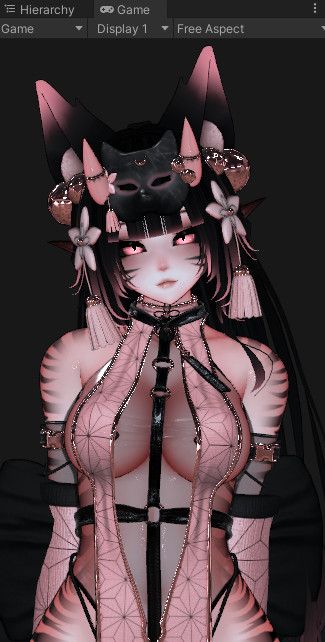
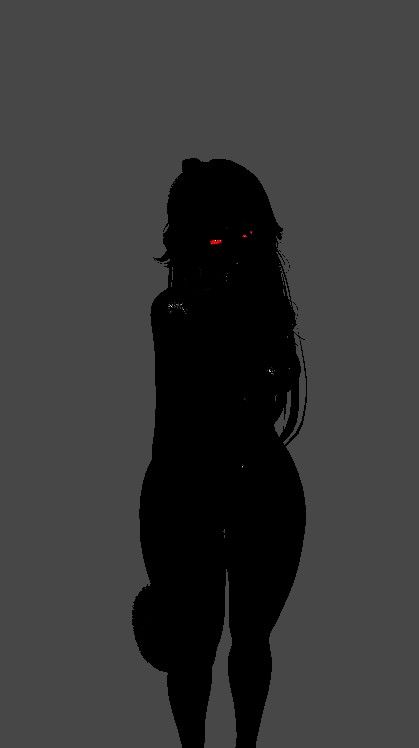
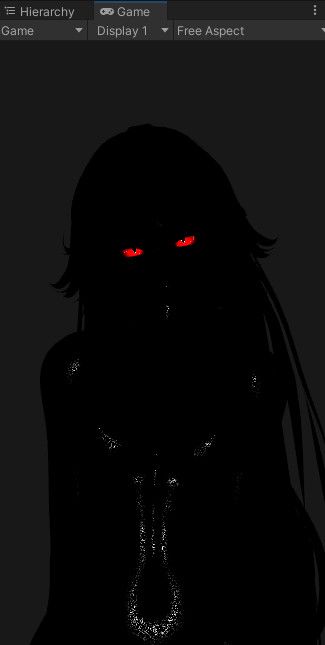
    @smoriezcookies94 Can you share what your vcc is for the avi? For some reason she looks all dark when I use gesture manager and ingame 😞

    smoriezcookies94S 1 Reply Last reply
    0
    • NeoltsN Neolts

      @smoriezcookies94 Can you share what your vcc is for the avi? For some reason she looks all dark when I use gesture manager and ingame 😞

      smoriezcookies94S
      smoriezcookies94S
      smoriezcookies94
      wrote on last edited by
      #11

      @Neolts i created a new project for her cause i had the same issue so many times
      f8d3454f-dc56-4a0b-892d-380348653d68-image.jpeg

      NeoltsN 1 Reply Last reply
      0
      • smoriezcookies94S smoriezcookies94

        @Neolts i created a new project for her cause i had the same issue so many times
        f8d3454f-dc56-4a0b-892d-380348653d68-image.jpeg

        NeoltsN
        NeoltsN
        Neolts
        wrote on last edited by
        #12

        @smoriezcookies94 Got it, tyvm for the help

        1 Reply Last reply
        1
        • NeoltsN
          NeoltsN
          Neolts
          wrote on last edited by Neolts
          #13

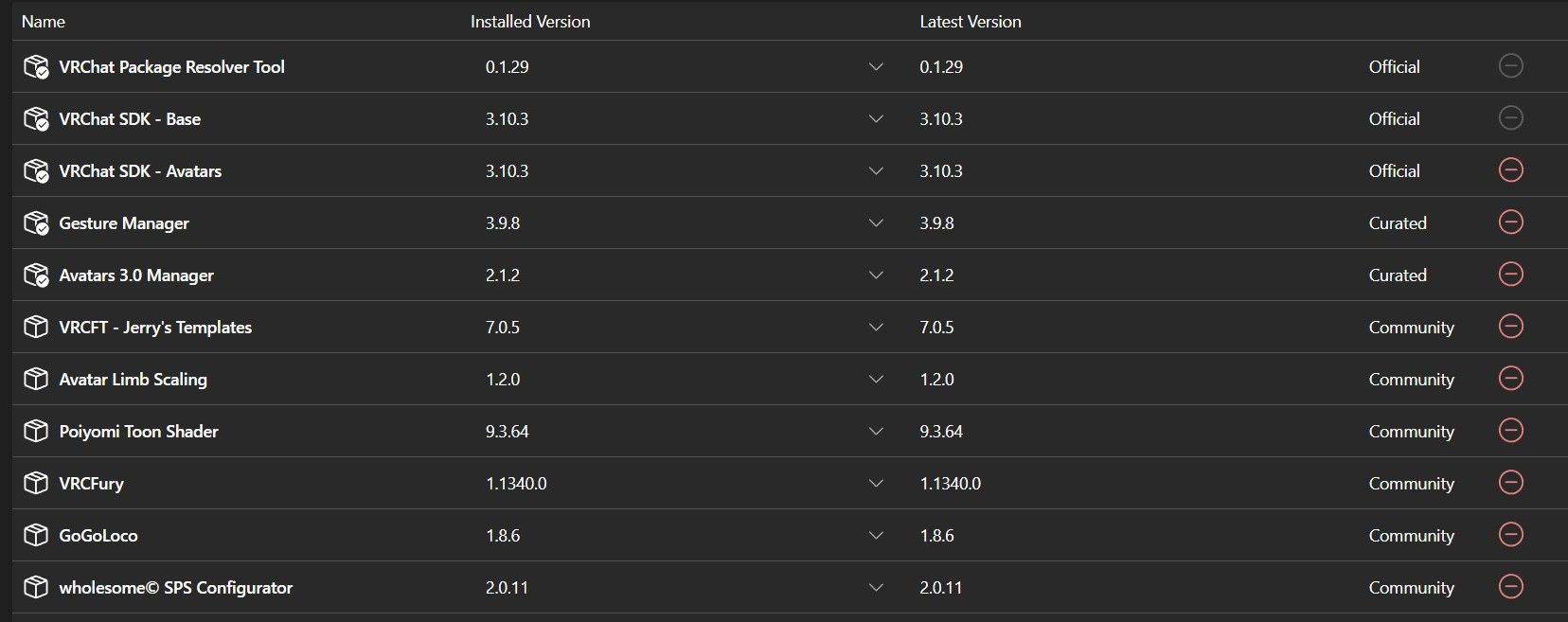
          Uuuugh I already have the same vcc but the problem still persists, any cause for this to keep happening?
          adb081de-e58f-4c8a-9d85-4f9ef846b4ab-image.jpeg
          bac25064-f5c1-4174-aad0-c020eb25e30f-image.jpeg

          smoriezcookies94S Special WeekS honeyloveH 3 Replies Last reply
          0
          • NeoltsN Neolts

            Uuuugh I already have the same vcc but the problem still persists, any cause for this to keep happening?
            adb081de-e58f-4c8a-9d85-4f9ef846b4ab-image.jpeg
            bac25064-f5c1-4174-aad0-c020eb25e30f-image.jpeg

            smoriezcookies94S
            smoriezcookies94S
            smoriezcookies94
            wrote on last edited by
            #14

            @Neolts huh weird, im not very sure. i use the same VCC folder for uploading every other avi i have, but it fixed it when i made a new VCC folder with everything i put in the photo
            maybe if you could, you could have another friend try to upload it? i had my friend try to upload it from scratch to his account and he got it pretty much first try

            1 Reply Last reply
            0
            • NeoltsN Neolts

              Uuuugh I already have the same vcc but the problem still persists, any cause for this to keep happening?
              adb081de-e58f-4c8a-9d85-4f9ef846b4ab-image.jpeg
              bac25064-f5c1-4174-aad0-c020eb25e30f-image.jpeg

              Special WeekS
              Special WeekS
              Special Week
              wrote on last edited by
              #15

              @Neolts

              Are you double clicking the unity package or are you dragging it into your unity project?

              Yes, this actually does matter in some cases as when you double click some files do not go properly, but when you drag it into your project the files goes as normal. I can't explain the actual logic behind it given how sometimes unityprojects can be total annomalies; however, give that a try in a brand new project.

              NeoltsN 1 Reply Last reply
              0
              • Special WeekS Special Week

                @Neolts

                Are you double clicking the unity package or are you dragging it into your unity project?

                Yes, this actually does matter in some cases as when you double click some files do not go properly, but when you drag it into your project the files goes as normal. I can't explain the actual logic behind it given how sometimes unityprojects can be total annomalies; however, give that a try in a brand new project.

                NeoltsN
                NeoltsN
                Neolts
                wrote on last edited by
                #16

                @Special-Week I always drag and tried into my existing project and making a new one for it. Honestly, I already gave up on it

                1 Reply Last reply
                0
                • pain_killerP pain_killer referenced this topic on
                • T
                  T
                  theduck
                  wrote on last edited by
                  #17

                  got it working with no problems

                  1 Reply Last reply
                  0
                  • T
                    T
                    tell_you_hwat
                    wrote on last edited by
                    #18

                    i had the same issue at first, but i think it got fixed once i pressed yes when i was asked if i want to fix possible lighting issues

                    1 Reply Last reply
                    0
                    • NeoltsN Neolts

                      Uuuugh I already have the same vcc but the problem still persists, any cause for this to keep happening?
                      adb081de-e58f-4c8a-9d85-4f9ef846b4ab-image.jpeg
                      bac25064-f5c1-4174-aad0-c020eb25e30f-image.jpeg

                      honeyloveH
                      honeyloveH
                      honeylove
                      wrote on last edited by
                      #19

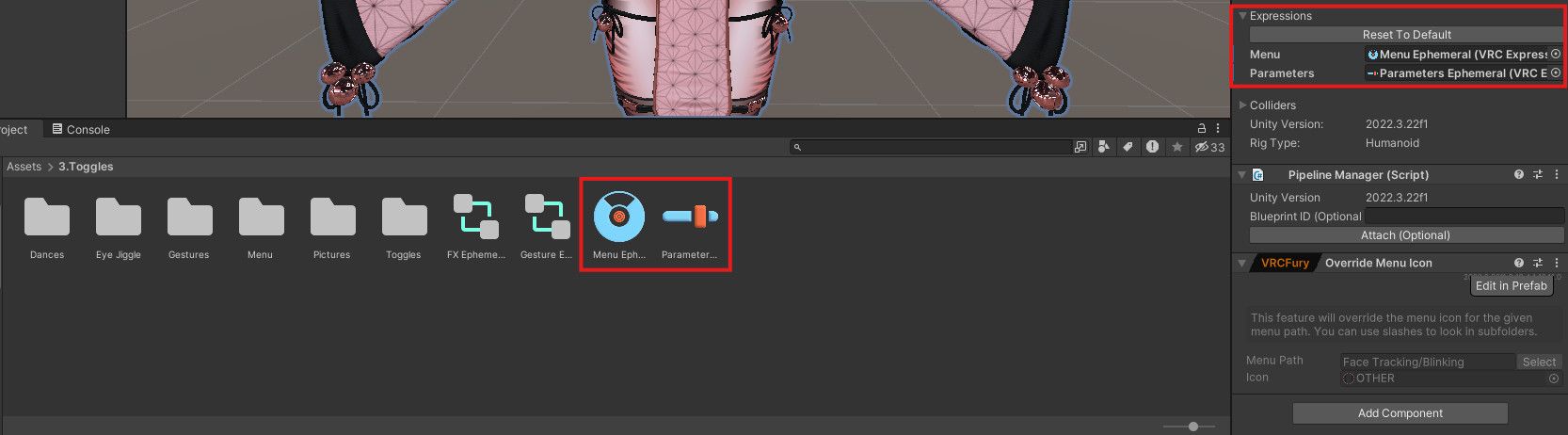
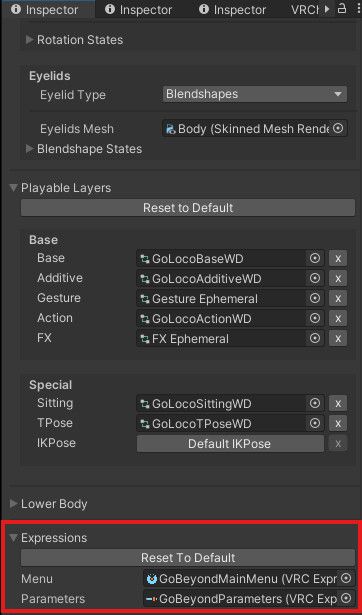
                      @Neolts Sorry I'm a bit late, but the reason it's doing this is because the avatar defaults to using the GoBeyond expressions menu and GoBeyond parameters instead of using the ones made for the avatar. Just switch them to the avatar's menu and parameters and it should work!

                      Before:
                      612dfd59-fbbe-40b3-928c-4f85b7a8fc94-image.jpeg
                      1bef9583-0322-4de8-91c2-9d7c145f430d-image.jpeg

                      After:
                      f13c999c-c32d-4d7a-825a-eaff2759ec49-image.jpeg
                      b2c940fe-5cf7-4239-a6fa-5ab52b21d2ae-image.jpeg

                      NeoltsN hehecutieeH YuraaY 4 Replies Last reply
                      5
                      • honeyloveH honeylove

                        @Neolts Sorry I'm a bit late, but the reason it's doing this is because the avatar defaults to using the GoBeyond expressions menu and GoBeyond parameters instead of using the ones made for the avatar. Just switch them to the avatar's menu and parameters and it should work!

                        Before:
                        612dfd59-fbbe-40b3-928c-4f85b7a8fc94-image.jpeg
                        1bef9583-0322-4de8-91c2-9d7c145f430d-image.jpeg

                        After:
                        f13c999c-c32d-4d7a-825a-eaff2759ec49-image.jpeg
                        b2c940fe-5cf7-4239-a6fa-5ab52b21d2ae-image.jpeg

                        NeoltsN
                        NeoltsN
                        Neolts
                        wrote on last edited by Neolts
                        #20

                        @honeylove Alrighty, I'll give it another shot

                        1 Reply Last reply
                        1
                        • honeyloveH honeylove

                          @Neolts Sorry I'm a bit late, but the reason it's doing this is because the avatar defaults to using the GoBeyond expressions menu and GoBeyond parameters instead of using the ones made for the avatar. Just switch them to the avatar's menu and parameters and it should work!

                          Before:
                          612dfd59-fbbe-40b3-928c-4f85b7a8fc94-image.jpeg
                          1bef9583-0322-4de8-91c2-9d7c145f430d-image.jpeg

                          After:
                          f13c999c-c32d-4d7a-825a-eaff2759ec49-image.jpeg
                          b2c940fe-5cf7-4239-a6fa-5ab52b21d2ae-image.jpeg

                          NeoltsN
                          NeoltsN
                          Neolts
                          wrote on last edited by
                          #21

                          @honeylove Tyvm, that fixed her

                          1 Reply Last reply
                          1
                          • honeyloveH honeylove

                            @Neolts Sorry I'm a bit late, but the reason it's doing this is because the avatar defaults to using the GoBeyond expressions menu and GoBeyond parameters instead of using the ones made for the avatar. Just switch them to the avatar's menu and parameters and it should work!

                            Before:
                            612dfd59-fbbe-40b3-928c-4f85b7a8fc94-image.jpeg
                            1bef9583-0322-4de8-91c2-9d7c145f430d-image.jpeg

                            After:
                            f13c999c-c32d-4d7a-825a-eaff2759ec49-image.jpeg
                            b2c940fe-5cf7-4239-a6fa-5ab52b21d2ae-image.jpeg

                            hehecutieeH
                            hehecutieeH
                            hehecutiee
                            wrote on last edited by
                            #22

                            @honeylove tysm for this omg âĪ

                            1 Reply Last reply
                            1
                            • honeyloveH honeylove

                              @Neolts Sorry I'm a bit late, but the reason it's doing this is because the avatar defaults to using the GoBeyond expressions menu and GoBeyond parameters instead of using the ones made for the avatar. Just switch them to the avatar's menu and parameters and it should work!

                              Before:
                              612dfd59-fbbe-40b3-928c-4f85b7a8fc94-image.jpeg
                              1bef9583-0322-4de8-91c2-9d7c145f430d-image.jpeg

                              After:
                              f13c999c-c32d-4d7a-825a-eaff2759ec49-image.jpeg
                              b2c940fe-5cf7-4239-a6fa-5ab52b21d2ae-image.jpeg

                              YuraaY
                              YuraaY
                              Yuraa
                              wrote on last edited by
                              #23

                              @honeylove Tysm for doing this, this happened with me as well<3

                              Mrowww.. Meow meow ! āļ…₍^â€ĒâЊ â€ĒマâģŠ

                              1 Reply Last reply
                              1
                              • UnknownGU
                                UnknownGU
                                UnknownG
                                wrote on last edited by
                                #24

                                When I move forward the front of the dress likes to get stuck in the tummy. Does anyone know if there's something to do to prevent this? I've been fiddling with it but I'm really not sure

                                1 Reply Last reply
                                0
                                • yalllahY
                                  yalllahY
                                  yalllah
                                  wrote last edited by
                                  #25

                                  reup

                                  ya

                                  1 Reply Last reply
                                  0

                                  Hello! It looks like you're interested in this conversation, but you don't have an account yet.

                                  Getting fed up of having to scroll through the same posts each visit? When you register for an account, you'll always come back to exactly where you were before, and choose to be notified of new replies (either via email, or push notification). You'll also be able to save bookmarks and upvote posts to show your appreciation to other community members.

                                  With your input, this post could be even better 💗

                                  Register Login
                                  Reply
                                  • Reply as topic
                                  Log in to reply
                                  • Oldest to Newest
                                  • Newest to Oldest
                                  • Most Votes


                                  • Login

                                  • Login or register to search.
                                  • First post
                                    Last post
                                  0
                                  • Categories
                                  • Recent
                                  • Tags
                                  • Popular