Skip to content
  • Categories
  • Recent
  • Tags
  • Popular
Skins
  • Light
  • Brite
  • Cerulean
  • Cosmo
  • Flatly
  • Journal
  • Litera
  • Lumen
  • Lux
  • Materia
  • Minty
  • Morph
  • Pulse
  • Sandstone
  • Simplex
  • Sketchy
  • Spacelab
  • United
  • Yeti
  • Zephyr
  • Dark
  • Cyborg
  • Darkly
  • Quartz
  • Slate
  • Solar
  • Superhero
  • Vapor

  • Default (Zephyr)
  • No Skin
Collapse
RipperStore Logo
  1. Home
  2. Guides
  3. New User Help
  4. LF: Help with Assetripper/Ripped AVIS

LF: Help with Assetripper/Ripped AVIS

Scheduled Pinned Locked Moved New User Help
ripping avatar
16 Posts 5 Posters 943 Views 1 Watching
  • Oldest to Newest
  • Newest to Oldest
  • Most Votes
Reply
  • Reply as topic
Log in to reply
This topic has been deleted. Only users with topic management privileges can see it.
  • BanderB
    BanderB
    Bander
    wrote on last edited by
    #3

    @reym coudl you maybe offer some help ?

    1 Reply Last reply
    0
    • BanderB Bander

      @m1zuki could you maybe help? ive seen you fix vrca's, id like some help if you can offer it

      M1zukiM
      M1zukiM
      M1zuki
      wrote on last edited by
      #4

      @ffffffafafa Id recommend using ARC instead of asset ripper. ARC is way easier to use and much cleaner

      BanderB 2 Replies Last reply
      0
      • M1zukiM M1zuki

        @ffffffafafa Id recommend using ARC instead of asset ripper. ARC is way easier to use and much cleaner

        BanderB
        BanderB
        Bander
        wrote on last edited by
        #5

        @M1zuki could you send me a link? i cant seem to find it anywhere

        1 Reply Last reply
        0
        • BanderB
          BanderB
          Bander
          wrote on last edited by
          #6

          EDIT: Ive foudn out how to, my only problem now is, is there any way to recover the params and menus?

          1 Reply Last reply
          0
          • HELIOS_H
            HELIOS_H
            HELIOS_
            wrote on last edited by
            #7

            params?

            BanderB 1 Reply Last reply
            0
            • HELIOS_H HELIOS_

              params?

              BanderB
              BanderB
              Bander
              wrote on last edited by
              #8

              @HELIOS_ parameters

              1 Reply Last reply
              0
              • M1zukiM M1zuki

                @ffffffafafa Id recommend using ARC instead of asset ripper. ARC is way easier to use and much cleaner

                BanderB
                BanderB
                Bander
                wrote on last edited by
                #9

                @M1zuki how do i use ARC? ive got a hold of it but have no idea what to do

                M1zukiM 1 Reply Last reply
                0
                • BanderB Bander

                  @M1zuki how do i use ARC? ive got a hold of it but have no idea what to do

                  M1zukiM
                  M1zukiM
                  M1zuki
                  wrote on last edited by M1zuki
                  #10

                  @ffffffafafa you have to join their discord server for a key so you can actually use it, I’d recommend using a burner VRChat account. Once you join the discord there should be a channel where you can do /key generate or something like that. They’ll dm you a key, input that in the setting tabs after you press auth. Back to the vrchat account, it’s optional to put an account in but it’s mainly to look up avatars and take the VRCA which is supporter only. Once auth go to VRCA and there should be an input output system (Load VRCA / Extract VRCA). And it should fix it for you, you can also extract it to a unity package with a click of a box. Hopefully that makes sense

                  BanderB 1 Reply Last reply
                  1
                  • BanderB Bander

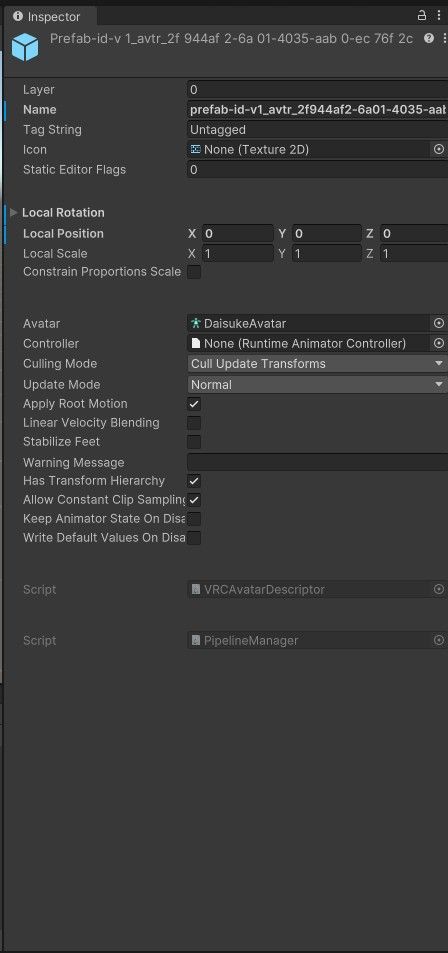
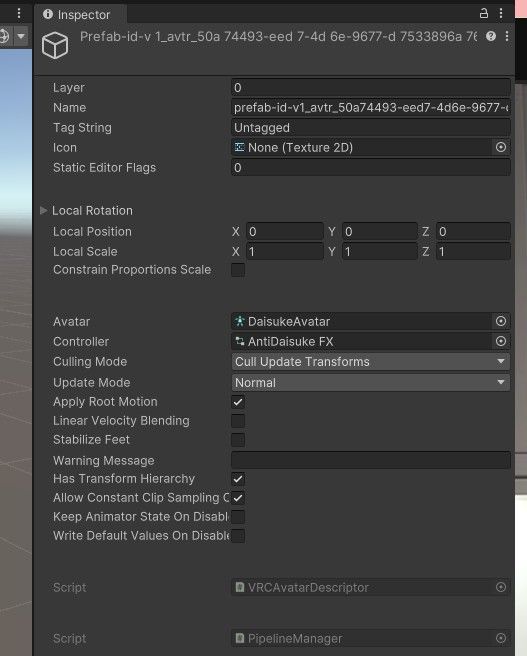
                    So i used asset ripper to turn a vrca into a unity project, and when i imported it, the avatar turned out like this 6b6a4fc0-724e-4a6e-88f3-6c576cc5d9f2-image.jpeg all the materials are messed up, and i cannot add any components onto the avatar, im really new to this so i would like some help. THANKS!!!!
                    VRCAmazingV
                    VRCAmazingV
                    VRCAmazing
                    wrote on last edited by
                    #11

                    @ffffffafafa if you plan on using AssetRipper, you need to, when exporting:
                    Export -> Export all files -> Export Unity Project
                    Then you need to open Exported -> Assets and rename shader and scripts to .shader and .scripts
                    Then put the Assets folder into your Unity project, after that just follow this (timestamp on purpose, don't go to the beginning).

                    Discord: VRCAmazing
                    Upvotes are appreciated!


                    ➡️ For the ripping thread: Please read the Q&A before posting! ⬅️

                    1 Reply Last reply
                    1
                    • M1zukiM M1zuki

                      @ffffffafafa you have to join their discord server for a key so you can actually use it, I’d recommend using a burner VRChat account. Once you join the discord there should be a channel where you can do /key generate or something like that. They’ll dm you a key, input that in the setting tabs after you press auth. Back to the vrchat account, it’s optional to put an account in but it’s mainly to look up avatars and take the VRCA which is supporter only. Once auth go to VRCA and there should be an input output system (Load VRCA / Extract VRCA). And it should fix it for you, you can also extract it to a unity package with a click of a box. Hopefully that makes sense

                      BanderB
                      BanderB
                      Bander
                      wrote on last edited by
                      #12

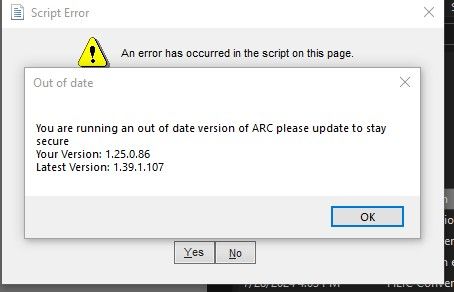
                      @M1zuki ive done that, but i am still not able to use anything on the ARC, i alos get this notification everytime i load up ARC 095b2270-cdc9-4c15-a8bc-5e59d8607ccf-image.jpeg
                      M1zukiM 1 Reply Last reply
                      0
                      • BanderB
                        BanderB
                        Bander
                        wrote on last edited by
                        #13

                        okay so ive managed to get it to work, but now it isnt letting me go into gesutre manager, its saying the following :
                        c7b07595-90c1-48f0-af1f-ec922f8c4be2-image.jpeg

                        1 Reply Last reply
                        0
                        • BanderB
                          BanderB
                          Bander
                          wrote on last edited by
                          #14

                          and once i restarted the project, the avatar ended up like this
                          dedde5e2-5341-47b7-8c75-8a0d88fdbf13-image.jpeg

                          1 Reply Last reply
                          0
                          • BanderB Bander

                            @M1zuki ive done that, but i am still not able to use anything on the ARC, i alos get this notification everytime i load up ARC 095b2270-cdc9-4c15-a8bc-5e59d8607ccf-image.jpeg

                            M1zukiM
                            M1zukiM
                            M1zuki
                            wrote on last edited by
                            #15

                            @ffffffafafa then you have to they the latest version, they usually send the most updated version in the discord once you verify just go to updates and releases

                            1 Reply Last reply
                            0
                            • BanderB Bander

                              So i used asset ripper to turn a vrca into a unity project, and when i imported it, the avatar turned out like this 6b6a4fc0-724e-4a6e-88f3-6c576cc5d9f2-image.jpeg all the materials are messed up, and i cannot add any components onto the avatar, im really new to this so i would like some help. THANKS!!!!

                              ReymR
                              ReymR
                              Reym
                              wrote on last edited by
                              #16

                              @ffffffafafa try using asset ripper
                              the step should be easy to do here
                              https://github.com/AssetRipper/AssetRipper
                              step by step

                              extract the zip file
                              run the program, the exe (AssetRipper.GUI.Free.exe)
                              a browser will open to the interface of assetripper
                              click file and click open file
                              locate where you put your vrca/vrcw file
                              select your vrca/vrcw and click open
                              click export and then click export all files and then click select folder
                              locate where you want to extract it (MAKE SURE THE DIRECTORY YOU CHOOSE IS AN EMPTY FOLDER OR ELSE IF YOU PICK THE FOLDER THAT HAS LOT OF FILES IT WILL BE DELETED)
                              once you select an empty folder click export unity project and wait, after a while the file will be exported to the folder you selected.
                              

                              next step is to download FACS Utilities
                              github.com/FACS01-01/FACS_Utilities
                              make a new project in VCC not in Unity Hub! make sure the Vrchat SDK is fully installed on the package list, start up the project, while its loading head over to the folder where you extracted the vrca/vrcw, change the folder called script to .script so that unity doesn't get angry at that... from experience, next move the folder containing the extracted vrca/vrcw to the unity project folder that you have created
                              example: C:\VRChatProjects(your project folder name)\Assets and paste the folder into the Assets folder, the folder name will not get conflicted so don't worry

                              after unity has fully loaded drag the .unitypackage of FACS Utilities into the unity, wait for it to load and then press Import, wait for it to finish copying and there should be a new tab on the top called FACS, click it and head over to a tab called Script, and then select fix script, drag the folder where it contain the extracted vrca/vrcw, and press Run Fix! Give it a few moment and when its done, head over to the animation tab, select Fix Animation, Put the avatar prefab in the Animation Roots object selector, the name should be (avatar id here).prefab and press Auto Detect, and then press Run! button, give it a few moment again and then drag the prefab into the Hierarchy, and done! the avatar is fixed, except the shader it will look very bad

                              if you want to learn more about the tools here is the wiki
                              https://github.com/FACS01-01/FACS_Utilities/wiki

                              if you are still confused, i will try to assist, just tag me and i will check it when i have time

                              I'm bad at understanding english word

                              I fix .vrca/.vrcw stuff for free and for fun! Depending on file, every outcome and vary might be different than the original avatar has due to the toggles and much more, send me a pm if you need an avi that need to fix or cracking a password locked avatar or send me .vrca file or through my pms and i will extract/fix them for you!

                              request is semi-open, only on unencrypted __data file aka .vrca or .vrcw

                              1 Reply Last reply
                              0

                              Hello! It looks like you're interested in this conversation, but you don't have an account yet.

                              Getting fed up of having to scroll through the same posts each visit? When you register for an account, you'll always come back to exactly where you were before, and choose to be notified of new replies (either via email, or push notification). You'll also be able to save bookmarks and upvote posts to show your appreciation to other community members.

                              With your input, this post could be even better đź’—

                              Register Login
                              Reply
                              • Reply as topic
                              Log in to reply
                              • Oldest to Newest
                              • Newest to Oldest
                              • Most Votes


                              • Login

                              • Login or register to search.
                              • First post
                                Last post
                              0
                              • Categories
                              • Recent
                              • Tags
                              • Popular