Skip to content
  • Categories
  • Recent
  • Tags
  • Popular
Skins
  • Light
  • Brite
  • Cerulean
  • Cosmo
  • Flatly
  • Journal
  • Litera
  • Lumen
  • Lux
  • Materia
  • Minty
  • Morph
  • Pulse
  • Sandstone
  • Simplex
  • Sketchy
  • Spacelab
  • United
  • Yeti
  • Zephyr
  • Dark
  • Cyborg
  • Darkly
  • Quartz
  • Slate
  • Solar
  • Superhero
  • Vapor

  • Default (Zephyr)
  • No Skin
Collapse
RipperStore Logo
  1. Home
  2. Assets
  3. Looking for...
  4. Scripts & Tools
  5. Ebony and Ivory

Ebony and Ivory

Scheduled Pinned Locked Moved Unsolved Scripts & Tools
scripts & toolshelp findsystem
7 Posts 4 Posters 381 Views 4 Watching
  • Oldest to Newest
  • Newest to Oldest
  • Most Votes
Reply
  • Reply as topic
Log in to reply
This topic has been deleted. Only users with topic management privileges can see it.
  • B
    B
    BLOODSTORM
    wrote on last edited by
    #1

    https://cinderstorm8.gumroad.com/l/EbonyandIvory

    1 Reply Last reply
    0
    • that one dudeT
      that one dudeT
      that one dude
      wrote on last edited by
      #2

      bump

      1 Reply Last reply
      0
      • alinzon36A
        alinzon36A
        alinzon36
        wrote on last edited by
        #3

        bump

        1 Reply Last reply
        0
        • alinzon36A
          alinzon36A
          alinzon36
          wrote on last edited by
          #4

          [register or login to view this hidden content]

          here ya go, enjoy! (=^.^=)

          B 1 Reply Last reply
          1
          • alinzon36A
            alinzon36A
            alinzon36
            wrote on last edited by
            #5

            HOW TO SET UP: instructions on how to do it

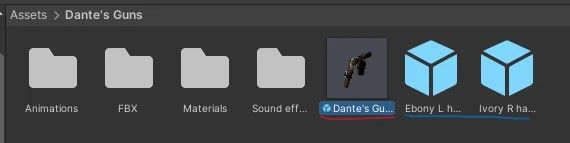
            1.) The first thing you wanna do is open up the folder after install called "Dante's Guns" From there you'll see 3 packages, the overall product with two empty gameobjects. They should look something like this:

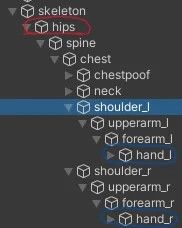
            2.) Once you do, go over in your avatar's hierarchy, from there open up your avatar's armature in the list and find your hips bone, along with both hands.

            3.) Once you do, simply drag the prefab "Dante's Guns" onto your hips bone. Under "Dante's Guns" in your hierarchy you can select both holsters and using the move and rotate tools to adjust them to your base.
            Do the same for the "Handhold" empty gameobjects for your hands. Put "Ebony L Handhold" in your left hand followed by putting "Ivory R Handhold" in your right hand

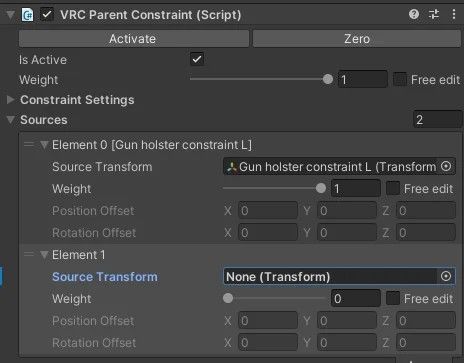
            4.) Once putting everything in place, click on one of the two guns in "Dante's Guns" and find the "VRC Parent Constraint" on the inspector tab of your screen. It will look like this:

            Under "Element 1" find the corresponding empty gameobject for the corresponding gun in your hierarchy that you just placed a moment ago. (e.g. "Ebony L hand hold" would go onto Ebony's parent constraint in "Element 1"). Do the same process with the other gun.

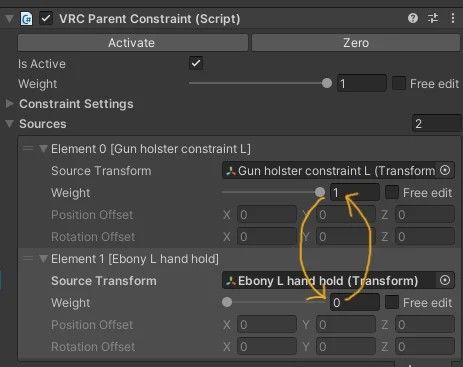
            5.) After doing that, it's time to adjust the "Hand Holds" in your hand bones to make sure that both Ebony and Ivory are properly in your hands as you see fit. You will want to change the values of both Ebony and Ivory's weights as shown here:

            Change Element 0's Weight to zero and Element 1's weight to one, This will snap the guns to the hands for us to adjust both of them. Use the move tool and the "Hand Hold" to move the guns in your hands till you are satisfied.

            6.) After adjusting both guns revert the values in the VRC Parent constraint to what they originally were, they both should be back in your holsters. Once that is done you should be all set to upload! Be sure to test your avatar in the gesture manager before uploading to ensure that everything works.
            23606db9-5392-4e5c-bdbb-59f2b034701c-image.jpeg

            272c77f4-eaa4-432d-9171-2c7c25fa058f-image.jpeg

            cbf2a5be-fe3e-470d-9c58-d45022e8a1b4-image.jpeg

            0fadb30b-b328-4625-acc9-5614be4a955d-image.jpeg

            1 Reply Last reply
            1
            • alinzon36A alinzon36

              [register or login to view this hidden content]

              here ya go, enjoy! (=^.^=)

              B
              B
              BLOODSTORM
              wrote on last edited by
              #6

              @alinzon36 THANK YOU OMG

              1 Reply Last reply
              😁
              0
              • P
                P
                phantomsecrets
                wrote on last edited by
                #7

                the final ik stuff is royally fucking me! I got the stub and the main Ik stuff installed and yet I'm still getting problems!
                1 Reply Last reply
                0

                Hello! It looks like you're interested in this conversation, but you don't have an account yet.

                Getting fed up of having to scroll through the same posts each visit? When you register for an account, you'll always come back to exactly where you were before, and choose to be notified of new replies (either via email, or push notification). You'll also be able to save bookmarks and upvote posts to show your appreciation to other community members.

                With your input, this post could be even better 💗

                Register Login
                Reply
                • Reply as topic
                Log in to reply
                • Oldest to Newest
                • Newest to Oldest
                • Most Votes


                • Login

                • Login or register to search.
                • First post
                  Last post
                0
                • Categories
                • Recent
                • Tags
                • Popular