
[TOOL] Booth Item Searcher – Tampermonkey Script
-
Tired of manually searching for Booth items? This userscript does it for you.
When you open any product page on booth.pm, a small panel pops up in the corner and automatically searches the forum using the item ID. Results show up right in the panel — just click to open the topic.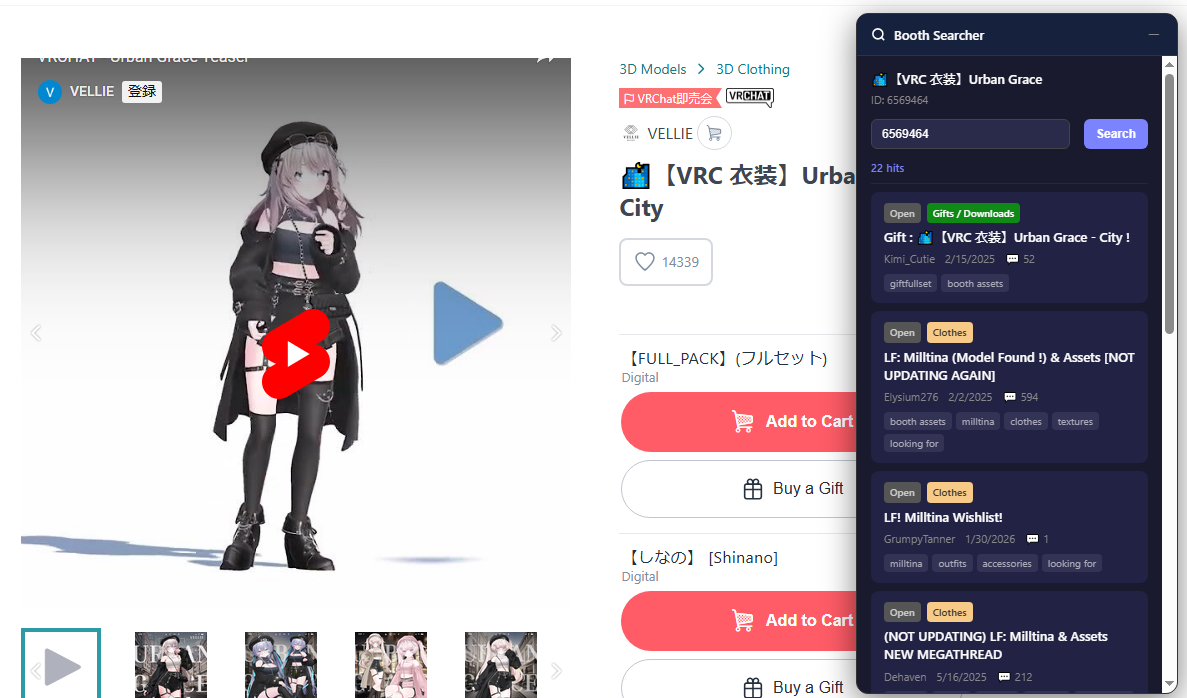
What it does:
Auto-searches by item ID on page load
Shows results with title, category, tags, and solved statusSupports Japanese, English, and Korean
Install v1.0.4: https://github.com/ripple007/Booth-Item-Searcher/raw/refs/heads/main/booth-item-searcher.user.js
Requires Tampermonkey. Click the link above and it'll install automatically. -
-
how do you install it?
nvm figured it out
- install tamper monkey
- enable dev mode on tamper monkey
- open tamper monkey window
- install .js file
-
-
-
-
-
-
-
Update v1.0.4
- Fixed authentication-related search failures (401 Unauthorized).
- Added automatic fallback to searching through a forum tab.
- Forum login is now required. Search is disabled when you are logged out or your login status cannot be verified.
- Added a login link and a “Check login again” button.
- Improved error handling and automatic retries for rate limits.
- Updated the loading message to “Searching...”.
After updating, reload your BOOTH tabs.






Hello! It looks like you're interested in this conversation, but you don't have an account yet.
Getting fed up of having to scroll through the same posts each visit? When you register for an account, you'll always come back to exactly where you were before, and choose to be notified of new replies (either via email, or push notification). You'll also be able to save bookmarks and upvote posts to show your appreciation to other community members.
With your input, this post could be even better 💗
Register Login