Skip to content
  • Categories
  • Recent
  • Tags
  • Popular
Skins
  • Light
  • Brite
  • Cerulean
  • Cosmo
  • Flatly
  • Journal
  • Litera
  • Lumen
  • Lux
  • Materia
  • Minty
  • Morph
  • Pulse
  • Sandstone
  • Simplex
  • Sketchy
  • Spacelab
  • United
  • Yeti
  • Zephyr
  • Dark
  • Cyborg
  • Darkly
  • Quartz
  • Slate
  • Solar
  • Superhero
  • Vapor

  • Default (Zephyr)
  • No Skin
Collapse
RipperStore Logo
  1. Home
  2. Assets
  3. Gifts / Downloads
  4. Avatar Collection Female Sonic (09/????)

Avatar Collection Female Sonic (09/????)

Scheduled Pinned Locked Moved Gifts / Downloads
avatarvrcagift
10 Posts 3 Posters 1.0k Views 4 Watching
  • Oldest to Newest
  • Newest to Oldest
  • Most Votes
Reply
  • Reply as topic
Log in to reply
This topic has been deleted. Only users with topic management privileges can see it.
  • Lotus OkamiL
    Lotus OkamiL
    Lotus Okami
    wrote on last edited by Lotus Okami
    #1

    The avatar collection will feature avatars of Fauna, as her store is no longer available for purchase.
    I'll go up to 40 avatars from this collection that were made available here on the site.

    VRChat_2026-05-26_20-16-28.895_1920x1080.png

    [register or login to view this hidden content]

    If you'd like to request an avatar, then click this link: https://forum.ripper.store/topic/96673/helping-milk-drinker-make-vrca-adjustments-for-unity/310?_=1779837445311

    1 Reply Last reply
    3
    • VRCavi21xV
      VRCavi21xV
      VRCavi21x
      wrote on last edited by
      #2

      I would love to Upload this but at least in unity the Beyond prefab built into the avatar doesn't show gogo loco, and when I do add it myself it bugs it and makes it permanently stuck like this
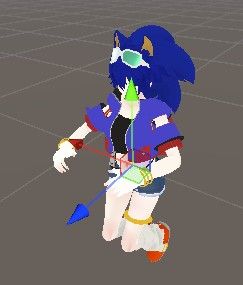
      286b7010-3f19-47cf-a8e5-225c6dedd34c-image.jpeg

      Y Lotus OkamiL 2 Replies Last reply
      0
      • VRCavi21xV VRCavi21x

        I would love to Upload this but at least in unity the Beyond prefab built into the avatar doesn't show gogo loco, and when I do add it myself it bugs it and makes it permanently stuck like this

        286b7010-3f19-47cf-a8e5-225c6dedd34c-image.jpeg

        Y
        Y
        yukisama2
        wrote on last edited by
        #3

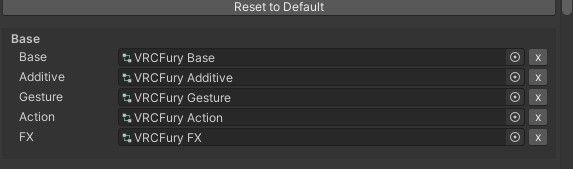
        @VRCavi21x remove the BASE layer
        0697c777-3cf6-4898-8851-17ba211d5933-image.jpeg all EXCEPT THE FX

        VRCavi21xV 1 Reply Last reply
        0
        • Y
          Y
          yukisama2
          wrote on last edited by
          #4

          thats what i do to fix that issue

          1 Reply Last reply
          0
          • VRCavi21xV VRCavi21x

            I would love to Upload this but at least in unity the Beyond prefab built into the avatar doesn't show gogo loco, and when I do add it myself it bugs it and makes it permanently stuck like this

            286b7010-3f19-47cf-a8e5-225c6dedd34c-image.jpeg

            Lotus OkamiL
            Lotus OkamiL
            Lotus Okami
            wrote on last edited by
            #5

            @VRCavi21x put the gogoloco all vrcfury

            1 Reply Last reply
            0
            • VRCavi21xV
              VRCavi21xV
              VRCavi21x
              wrote on last edited by
              #6

              I'll try these thank you!

              1 Reply Last reply
              0
              • Y yukisama2

                @VRCavi21x remove the BASE layer
                0697c777-3cf6-4898-8851-17ba211d5933-image.jpeg all EXCEPT THE FX

                VRCavi21xV
                VRCavi21xV
                VRCavi21x
                wrote on last edited by
                #7

                @yukisama2 And for this may I know how you got to that menu pop up in case?

                Y 1 Reply Last reply
                0
                • VRCavi21xV VRCavi21x

                  @yukisama2 And for this may I know how you got to that menu pop up in case?

                  Y
                  Y
                  yukisama2
                  wrote on last edited by
                  #8

                  @VRCavi21x u have to press the prefab inside the unity and the right playabe layers

                  VRCavi21xV 1 Reply Last reply
                  0
                  • Y yukisama2

                    @VRCavi21x u have to press the prefab inside the unity and the right playabe layers

                    VRCavi21xV
                    VRCavi21xV
                    VRCavi21x
                    wrote on last edited by
                    #9

                    @yukisama2 that isn't very clear sorry-

                    Y 1 Reply Last reply
                    0
                    • VRCavi21xV VRCavi21x

                      @yukisama2 that isn't very clear sorry-

                      Y
                      Y
                      yukisama2
                      wrote on last edited by
                      #10

                      @VRCavi21x gimme ur discord and i can show u

                      1 Reply Last reply
                      0

                      Hello! It looks like you're interested in this conversation, but you don't have an account yet.

                      Getting fed up of having to scroll through the same posts each visit? When you register for an account, you'll always come back to exactly where you were before, and choose to be notified of new replies (either via email, or push notification). You'll also be able to save bookmarks and upvote posts to show your appreciation to other community members.

                      With your input, this post could be even better 💗

                      Register Login
                      Reply
                      • Reply as topic
                      Log in to reply
                      • Oldest to Newest
                      • Newest to Oldest
                      • Most Votes


                      • Login

                      • Login or register to search.
                      • First post
                        Last post
                      0
                      • Categories
                      • Recent
                      • Tags
                      • Popular