
Lf this Walking, Jumping and Running animation
-
This is lady loco gogo walking
-
@DHNGUYEN3 umm you can manual edit the gogoloco to have the running animations of Shizuku. Like i did for proning and crouching it was a bit of a headache and smashing my head against the table but ended up working. I don't use gogoloco
@Pretend-Like It's not working for me, does gogoloco contradict it?
-
@Pretend-Like It's not working for me, does gogoloco contradict it?
@RealisticTopics In what aspects is it not working. Idk but for me i can't test my locomotion animation
-
@RealisticTopics In what aspects is it not working. Idk but for me i can't test my locomotion animation
@Pretend-Like when I upload it to game it literally is still the same basic animation.
-
@Pretend-Like when I upload it to game it literally is still the same basic animation.
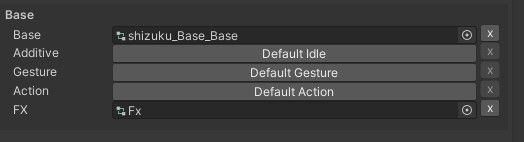
@RealisticTopics gogoloco will over lap "default base" you have on the avatar you need to edit gogoloco and switch the blend tree to shizuku's one. I was talking to someone else who was doing it.
Its much easier then what i had to do which was to change every single small animation
-
@RealisticTopics gogoloco will over lap "default base" you have on the avatar you need to edit gogoloco and switch the blend tree to shizuku's one. I was talking to someone else who was doing it.
Its much easier then what i had to do which was to change every single small animation
@Pretend-Like Thank's I'll test that out, I was assuming they were clashing and goco loco was blocking it out. Is there a quick tutorial you can send?
-
@Pretend-Like Thank's I'll test that out, I was assuming they were clashing and goco loco was blocking it out. Is there a quick tutorial you can send?
@RealisticTopics you have to find the blend trees that control the animations for standing crouching and proning of gogoloco and change them out from the default one in gogoloco to shizuku's by dragging and drop them into the blendtree of gogoloco i don't have a tutorial. If you really are struggling hit me up ill see if i can demonstrate it to you via a video or smthing
-
@RealisticTopics you have to find the blend trees that control the animations for standing crouching and proning of gogoloco and change them out from the default one in gogoloco to shizuku's by dragging and drop them into the blendtree of gogoloco i don't have a tutorial. If you really are struggling hit me up ill see if i can demonstrate it to you via a video or smthing
-
@Pretend-Like I couldn't figure it out
@RealisticTopics

this is the main area for motion for 3-4 point tracking this is the area you would most likely be -
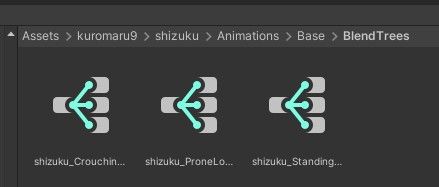
find these and keep them on stand by
https://youtu.be/Ez46-0Bt0N8 here is a vid of me editing the stand motion -
find these and keep them on stand by
https://youtu.be/Ez46-0Bt0N8 here is a vid of me editing the stand motion@Pretend-Like Thank you!

Hello! It looks like you're interested in this conversation, but you don't have an account yet.
Getting fed up of having to scroll through the same posts each visit? When you register for an account, you'll always come back to exactly where you were before, and choose to be notified of new replies (either via email, or push notification). You'll also be able to save bookmarks and upvote posts to show your appreciation to other community members.
With your input, this post could be even better 💗
Register Login