
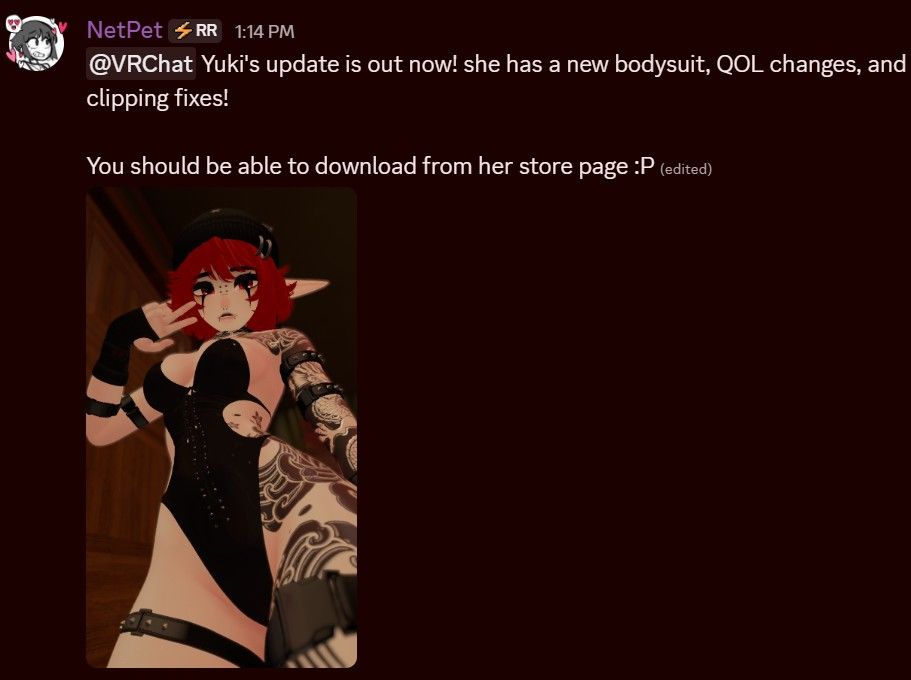
LF: Yuki By NetPet (RELEASED JUST NOW)
-
 Download Link (workupload.com)
pass: meowRequired Packages: VRCFury & Non Destructive Framework
Optional Packages: Gesture Manager, Avatar Limb Scaling, Jerry's FT TemplatesSupport original creator if you enjoy this avi!
@44 only 2 days
-
@Golshi That's weird, I tested all toggles with original defaults & even with VRCFury's auto fix. All toggles worked no problem which is why I kinda wrote them off initially. I'll mess around with it a bit more to see if there's anything specific that could cause it though
@NotQrof anything of note to share regarding fixes or requirements? also, in your original post you mentioned you need "non destructive framework". i looked it up and i couldnt find anything in terms of packages or VCC unity plugins, could you elaborate?
-
@NotQrof anything of note to share regarding fixes or requirements? also, in your original post you mentioned you need "non destructive framework". i looked it up and i couldnt find anything in terms of packages or VCC unity plugins, could you elaborate?
@Obscene-Complex No fixes of note that I could find. You can use VRCFury's autofix for write defaults or not. It hasn't caused me any issues on my end but Golshi mentioned setting all defaults to "off" fixed an issue they were having.
These are the packages I have. Green being the required ones as listed on the Jinxxy listing. Blue being the optional ones that have objects in the model but can be removed without affecting much in the final result. You'll just lose facetracking & limb scaling without their respective packages. Non-Destructive Modular Framework (NDMF) is included in Modular Avatar's & AAO's repo's. I suggest just adding Modular Avatar as a repository in VCC/ALCOM to get it.
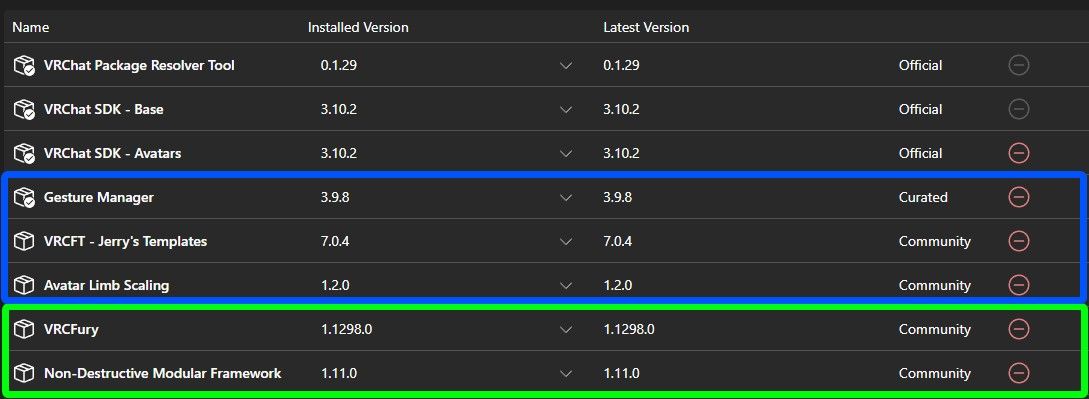
If you want me to send you the repo links for all of these let me know. It's not difficult to do so!
Willing to pricesplit on things that interest me.
-
@Obscene-Complex No fixes of note that I could find. You can use VRCFury's autofix for write defaults or not. It hasn't caused me any issues on my end but Golshi mentioned setting all defaults to "off" fixed an issue they were having.
These are the packages I have. Green being the required ones as listed on the Jinxxy listing. Blue being the optional ones that have objects in the model but can be removed without affecting much in the final result. You'll just lose facetracking & limb scaling without their respective packages. Non-Destructive Modular Framework (NDMF) is included in Modular Avatar's & AAO's repo's. I suggest just adding Modular Avatar as a repository in VCC/ALCOM to get it.
If you want me to send you the repo links for all of these let me know. It's not difficult to do so!
@NotQrof i forgot modular is labeled as "non destructive" lol, usually i just call it "modular avatar"
i do indeed have all these repo's so i will add them all and check it out, thank you!!!
-
for some odd reason Sps dont wanna show up it dont work on the toy or the peenar, theres no see through clothes like said on the nsfw showcase but everything else works fine but if somone know how to fix or if its just a me issue cus am going nuts trying to find help in there discord ik how to add sps but it wont make the mouth move like shown on the video ;-;
-
for some odd reason Sps dont wanna show up it dont work on the toy or the peenar, theres no see through clothes like said on the nsfw showcase but everything else works fine but if somone know how to fix or if its just a me issue cus am going nuts trying to find help in there discord ik how to add sps but it wont make the mouth move like shown on the video ;-;
@kiwisecretstash The sps is under the "NSFW" menu and you have to enable the toy & sps on whatever socket you're trying to use. I just tested sps in game and the cheek deformation also works as long as you aren't going straight back. Gotta have an angle from what I can tell. You MIGHT need VRCFT template for the cheek/mouth deformation but I'm unsure, don't quote me. It never hurts to try though and if it does work after that lmk so I can change it to a required package.
For the see through clothes look for the "sweat" slider at customize/edit avatar/edit body/sweat amount. Higher number = more see through. It depletes on it's own unless you use the freeze toggle in the same menu. I believe it goes up automatically when you use sps
All things tested with a clean upload without any personal modifications. You can always check and make sure sockets/plugs are toggling properly for you with gesture manager.
-
-
according to the maker, an update for it comes out around friday???? idk what but according to them its bugfixes and a patch for it, if someone wants to keep an eye out
i really like this creator, new one to the space. gonna go buy this today i think, even with it being here
-
according to the maker, an update for it comes out around friday???? idk what but according to them its bugfixes and a patch for it, if someone wants to keep an eye out
i really like this creator, new one to the space. gonna go buy this today i think, even with it being here
-
@BLACK0NYX thx gng the other one had a password limit
-
If anyone is paying attention to this thread when it updates just mention me and I'll look into doing it. Again, if you like this model and you can please support the original creator!
-
If anyone is paying attention to this thread when it updates just mention me and I'll look into doing it. Again, if you like this model and you can please support the original creator!
-
-
-
-
Update bump
-
-
BUMP
-
-
Bump







Hello! It looks like you're interested in this conversation, but you don't have an account yet.
Getting fed up of having to scroll through the same posts each visit? When you register for an account, you'll always come back to exactly where you were before, and choose to be notified of new replies (either via email, or push notification). You'll also be able to save bookmarks and upvote posts to show your appreciation to other community members.
With your input, this post could be even better 💗
Register Login